How-to · Notion · Meetings · Oct 5, 2026
Turn meeting notes into Notion tasks without inventing owners
Notion is useful for this job when notes and the task database already live there. AI should not invent owners to fill empty properties.
Who this is for
Ops leads whose system of record is Notion. If work lives in Asana, ClickUp, or Linear, use those reviews instead — Asana AI, ClickUp Brain, Linear — same ritual, different home.
How to do it
This page is a how-to. It is not a ranking of task tools. Product detail and dated pricing live on the reviews linked below.
1. Step 1 — Start from a short action list
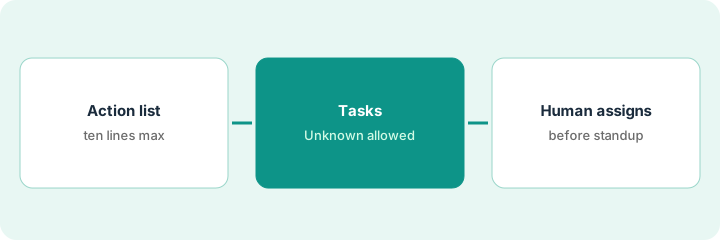
What it is: From your notetaker (Fireflies, Otter, Granola, etc.), produce Owner — task — date lines. Missing owner → Unknown.
The Tuesday ops sync becomes a Notion page titled with the date and eight lines. Two of them start with “Unknown” because nobody claimed the task on the call.
Paste at most ten action lines into a Notion page titled with the meeting date. No transcript dump.
2. Step 2 — Create tasks with Unknown allowed
What it is: Follow Notion AI for ops: meeting extract → database rows. Properties should allow blank/Unknown owners rather than forcing a fake name.
Six rows land with owners. Two land with Owner empty and the needs-owner tag — not assigned to whoever spoke last.
Prompt/pattern: “Create tasks from the list. If owner is Unknown, leave Owner empty and tag needs-owner. Do not guess names.”
3. Step 3 — Human assign before standup
What it is: Before the next standup, a human fills every needs-owner row or drops the task. AI drafts; humans assign.
Friday’s needs-owner filter shows three rows. Two get owners; one is dropped because nobody actually needed it done.
Filter the DB to needs-owner every Friday. Zero that filter before you make new meetings.
Pricing context (October 2026)
This how-to is not a price sheet. Public list prices for Notion AI for ops, Notion AI, Asana AI, ClickUp Brain, Linear, and ChatGPT tasks live on those reviews. Recheck each vendor’s site before you budget. Dated October 2026.
Uncertainty: AI add-ons, plan tiers, and per-seat AI pricing change. If an invoice and a review disagree, trust the invoice. Do not paste a marketing list price you did not pay. The only prices this site sells here are the optional $9 AI toolkit spreadsheet and $19 AI toolkit audit.
When this helps (honest take)
Useful when Notion already holds the task database people open.
Not useful when Notion is a graveyard wiki and Asana is where work moves — put tasks where the team already looks (Asana AI).
Related options (educational)
| Need | Where to look | Why |
|---|---|---|
| Notes and tasks already in Notion | Notion AI for ops | Meeting extract into database rows |
| Work moves in Asana | Asana AI | Same ritual, different home |
| Work moves in ClickUp | ClickUp Brain | Same ritual, different home |
| Work moves in Linear | Linear | Same ritual, different home |
| Personal reminders, not team tasks | ChatGPT tasks | A lighter job than a team database |
Related reviews: Notion AI for ops · Notion AI · ChatGPT tasks. Related how-to: Turn one messy call into owners and dates.
FAQ
Should AI fill in owners when the notes do not name one?
No. Leave Owner empty, tag the row needs-owner, and have a human assign it before standup.
How long should the action list be?
Ten lines at most, in Owner — task — date shape. No transcript dump.
What if our tasks live in Asana, ClickUp, or Linear?
Use the same ritual in that tool. Put tasks where the team already looks.
Where do dated prices live?
On the linked reviews and the vendor sites. This October 2026 how-to does not invent list prices.
Optional next step
Free reviews stay free. Neither offer is required to use this page. If several wiki or task AI seats overlap, optional help: $9 AI toolkit spreadsheet (seats, spend, owner, cancel-by, overlap) or $19 AI toolkit audit when you want a written memo.