How-to · Meetings & notes · Oct 4, 2026
Turn one messy call into owners and dates before you leave the room
The meeting was useful. The Slack paste was not. This how-to is the ten-minute exit routine: capture, rewrite, hand off.
Who this is for
Ops leads and project owners who run working sessions where decisions happen out loud and then vanish. If the meeting is pure broadcast and nobody expects follow-up, skip the ritual.
How to do it
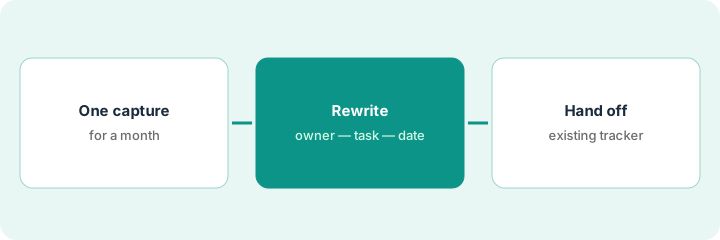
Run this on one meeting type for a month. Do not invent a second notes wiki for the same actions.

1. Before the call — one capture path
What it is: Pick one capture path for this meeting type and stick to it for a month:
- Bot OK → Fireflies or Otter
- Bot not OK → Granola
- Already on Zoom and Companion is enough → Zoom AI Companion
Tell people when a bot or recording is present if your policy requires it.
Next week’s recurring working session names the capture tool in the calendar description so guests are not surprised.
Put the capture tool name in the calendar description for next week’s recurring meeting so guests are not surprised.
2. During / right after — the owners-and-dates pass
What it is: Within ten minutes of hang-up:
- Open the auto notes.
- List decisions in one short bullet list (facts only).
- List actions as
Owner — task — date. No owner → markUnknown — task — needs ownerand assign before end of day. - Delete vibes, jokes, and status theater from the share version.
Twelve “we should” lines come out of the call. Seven get an owner and a date. The rest go to a tracked project instead of a longer Slack paste.
Cap the share list at seven action lines. If you have more, you had a backlog meeting — split the rest into a tracked project instead of a longer paste.
3. After — hand off without a second novel
What it is: Paste the short list into the system of record your team already opens (Asana, Notion, Linear, monday — whichever is true). Do not create a second “notes wiki” for the same actions.
If the missing piece is a written follow-up paragraph after owners exist, use Claude for ops with the short list as the only source — do not paste the full transcript unless you need a quote.
The action list is the only source. Claude for ops drafts six sentences. A human edits before send. Missing owners stay marked Unknown.
Prompt shape for a follow-up draft (after owners exist): “Using only the action list below, write a 6-sentence follow-up email. Do not invent owners or dates. Mark Unknown if something is missing.” Then edit like a human before send.
Pricing context (October 2026)
This how-to is not a price sheet. Public list prices for Fireflies, Otter, Fathom, Granola, tl;dv, and Zoom AI Companion live on those reviews. Recheck each vendor’s site before you budget. Dated October 2026.
Uncertainty: Free tiers, seat minimums, bot add-ons, and CRM connectors change. If an invoice and a review disagree, trust the invoice. Do not paste a marketing list price you did not pay. The only prices this site sells here are the optional $9 AI toolkit spreadsheet and $19 AI toolkit audit.
Claude plan prices are on Claude for ops and Claude, not restated here. Dated October 2026. Confirm on the vendor site.
When this helps (honest take)
Useful when the same recurring call keeps producing vague “we should…” lines.
Not useful when nobody will open a tracker afterward — the ritual needs a home for the tasks.
Related options (educational)
| Need | Where to look | Why |
|---|---|---|
| Bot is fine | Fireflies or Otter | One capture path for the month |
| Bot is a bad look | Granola | Notes without a bot joining |
| Follow-up paragraph after owners exist | Claude for ops | Short list only — do not invent owners |
| Tasks already live in Notion | Notion AI for ops | Hand off to the tracker people open |
Related: Fireflies · Granola · Notion AI for ops · Claude for ops · Three steps for meeting notes.
FAQ
How fast should the owners-and-dates pass happen?
Within ten minutes of hang-up, before the share turns into a novel.
What if an action has no owner?
Mark Unknown — task — needs owner, and assign it before the end of the day. Do not invent a name.
Can Claude write the follow-up from the full transcript?
Use the short action list as the only source unless you need a quote. Edit like a human before send.
What if nobody opens a tracker?
Skip the ritual. It needs a home for the tasks.
Optional next step
Optional: the $9 AI toolkit spreadsheet if you also need to list which notetaker owns this meeting type. The $19 audit is only useful when several seats already overlap. Neither is required to run the exit routine.