Feature how-to · ChatGPT · Ops follow-through
ChatGPT tasks how-to (Sep 2026): follow-through for ops to-dos
Feature how-to — tasks and follow-ups tied to chat work; what belongs in Asana or Linear instead. Distinct from ChatGPT scheduled tasks (recurring cadences). Companion to the ChatGPT deep-dive and ChatGPT for ops.
What ChatGPT follow-through tasks are
On this page, tasks means turning chat work — especially meeting notes — into a clear to-do list with owner blanks and due-date blanks, then marking which items must live in the company tracker instead of chat. ChatGPT can draft the list; a person still assigns owners and copies committed work into Asana, Linear, or your system of record. Full product context: ChatGPT review. Ops role guide: ChatGPT for ops.
Vs scheduled / recurring tasks (do not confuse)
ChatGPT scheduled tasks run a recurring prompt on a cadence (for example every Monday list open renewals). This page is about follow-through action items from a conversation — one meeting, one decision thread, one Slack dump. You may use both: scheduled for cadences; follow-through tasks for “what did we just commit to?” Use Memory for tone rules (Memory how-to), not as a substitute for a tracker.
How to extract ops to-dos from chat
Examples at a glance: each step has a concrete ops example plus a short Try this.
1. Meeting note → task list
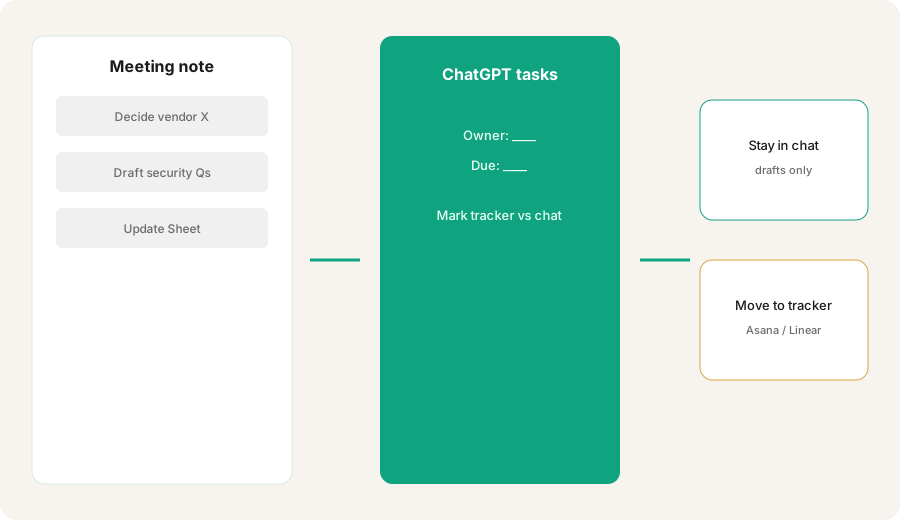
What it is: Paste the meeting bullets (or transcript summary). Ask ChatGPT for a numbered task list. Forbid inventing attendees, decisions, or tools that were not in the note.
Primary SoT workflow:
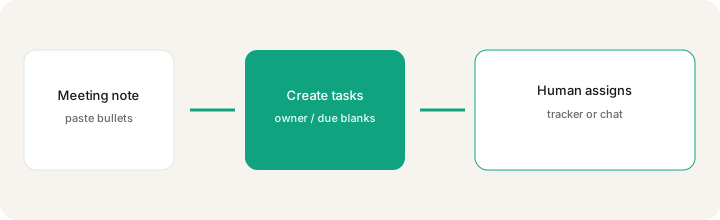
From this meeting note, create tasks with owner blanks and due-date blanks; mark which should live in the company tracker instead of chat.
2. Owner and due blanks (do not invent people)
What it is: Force Owner: ____ and Due: ____ when the note does not name them. Inventing “Sarah owns this by Friday” when Sarah was not in the meeting creates fake accountability.
Add to your extraction prompt:
For each task output: Title | Owner (use ____ if not named) | Due (use ____ if not named) | Source quote (≤12 words from the note). Never invent names, dates, or decisions.
3. What belongs in Asana / Linear instead
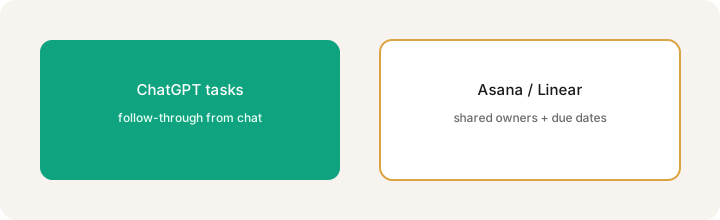
What it is: Chat is fine for drafts and personal reminders. Committed, shared work belongs in Asana, Linear, or your tracker — where owners, due dates, and status survive after the chat closes. Mark each task Stay-in-chat vs Move-to-tracker before anyone “feels done.”
After the task list:
Tag each task Stay-in-chat or Move-to-tracker. Rule: if it needs a shared owner, a hard due date, or cross-team visibility, it is Move-to-tracker. Output a copy-paste block for Asana/Linear titles only for Move-to-tracker items.
4. Hygiene and failure modes
What it is: Chat task lists go stale. People assume ChatGPT “owns” the work. Duplicate tasks appear in Slack and Asana. Bake in: the model drafts; a human assigns and copies; chat is not the system of record for committed ops work.
End every extraction with:
End with a Hygiene checklist: (1) who will paste Move-to-tracker items into Asana/Linear today, (2) which Stay-in-chat drafts expire in 48 hours, (3) do not claim any task is done until a human marks it in the real tracker.
Pricing context (September 2026)
Follow-through task extraction uses ordinary ChatGPT chat (and related task/remind features if your plan exposes them). It is not a separate SKU. Public consumer list prices often cited: Plus ~$20/month; higher Team/Business/Enterprise tiers cost more. Confirm on openai.com/chatgpt/pricing. For recurring cadences and plan gates on scheduled runs, see scheduled tasks and OpenAI help — labels change.
Uncertainty: In-product “Tasks,” reminders, and Scheduled surfaces have evolved. This how-to is about the ops job (meeting → to-dos → tracker), not a guarantee of a specific button name. Confirm in your account.
When follow-through tasks are useful (honest take)
Useful when meeting notes pile up and you need a fast draft list with honest blanks — then a human moves committed work into Asana/Linear. Less useful — and risky — when the team treats chat as the only tracker, invents owners, or never copies Move-to-tracker items out. Prefer scheduled tasks for Monday cadences; prefer Asana/Linear AI assists when the work already lives in those tools.
Paying for ChatGPT tasks and a few other AI tools? The $9 AI toolkit spreadsheet lists every AI subscription you have, what each one costs, and how fast it pays for itself, so you can see which ones are worth the money.
Want someone to do it for you? AI toolkit audit — $19
Related options (educational)
| Need | Better home | Why |
|---|---|---|
| Draft tasks from a meeting note | ChatGPT follow-through (this page) | Fast list + owner/due blanks + tracker flags |
| Recurring Monday check-in | ChatGPT scheduled tasks | Calendar cadence, not one-off follow-through |
| Shared owners + due dates | Asana AI / Linear AI | Company system of record |
| Ops chat patterns | ChatGPT for ops | Broader role guide |
| Standing tone rules | ChatGPT Memory | How drafts should look — not where work is tracked |
FAQ
What are ChatGPT tasks for ops follow-through?
Turning chat work — especially meeting notes — into a to-do list with owner and due-date blanks, then marking which items must move into Asana, Linear, or another company tracker.
How is this different from ChatGPT scheduled tasks?
Scheduled tasks run on a calendar cadence. This page is about action items from a conversation. See /reviews/chatgpt-scheduled-tasks.html.
What should live in Asana or Linear instead of ChatGPT?
Shared owners, hard due dates, cross-team visibility, or any status that must survive after the chat closes.
Where is the full ChatGPT product review?
See /reviews/chatgpt.html. Ops role: /reviews/chatgpt-for-ops.html. This page is the follow-through tasks how-to.
Optional next step (if seats overlap)
If ChatGPT, Asana, and Linear are overlapping for the same to-dos, optional help: $19 AI toolkit audit or $9 AI toolkit spreadsheet — only if overlapping seats are the real problem. Email Audit $19 or Toolkit spreadsheet $9.
Checkout is live via Stripe. After you pay, we email delivery (spreadsheet) or intake next steps (audit).