Feature how-to · ChatGPT · Ops cadences
ChatGPT scheduled tasks how-to (Sep 2026): recurring ops check-ins
Feature how-to — scheduled/recurring tasks for ops cadences; limits and what not to automate. Companion to the ChatGPT deep-dive, Memory, and Custom GPTs pages.
What ChatGPT scheduled tasks are
Scheduled tasks let ChatGPT run a recurring prompt on a cadence you set — useful for ops check-ins so Monday’s “what renews this week?” draft does not start from a blank chat. Availability, plan gates, and UI labels change; confirm in your ChatGPT account and OpenAI help. Full product context: ChatGPT review. For standing tone rules see Memory; for reusable intake bots see Custom GPTs.
Ops cadences that fit (and ones that do not)
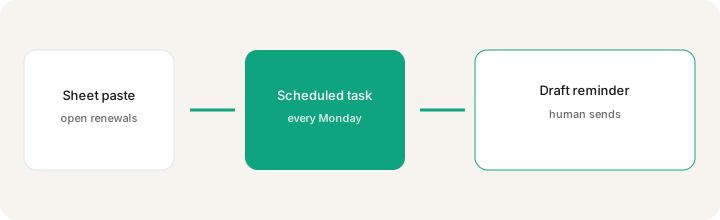
Fit: weekly renewals list, draft status reminder, “open tickets older than 7 days” checklist from a paste you refresh. Do not fit: auto-canceling vendors, charging cards, emailing customers without a human, or treating a stale Sheet as source of truth.
How to design a scheduled task for ops
Examples at a glance: each step has a concrete ops example plus a short Try this.
1. Design the Monday renewals task
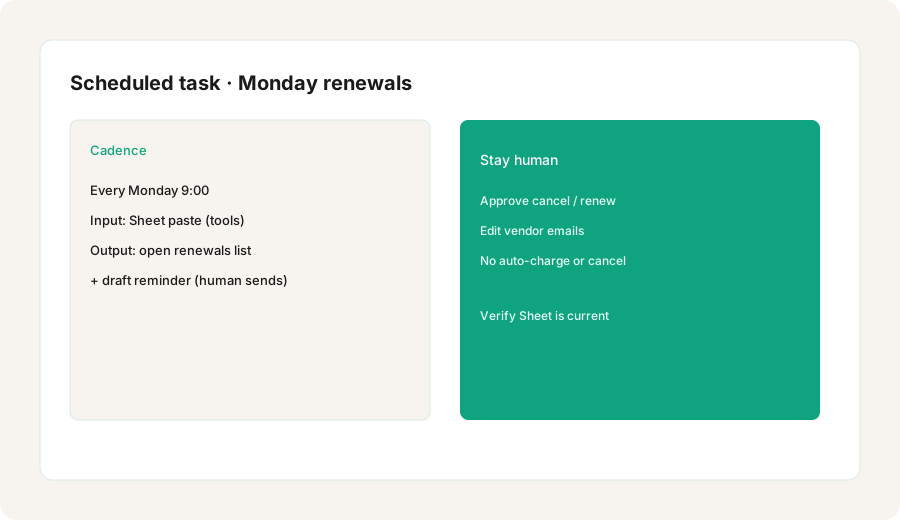
What it is: Name the cadence, the input (a Sheet paste of tools and renew dates), and the output (open renewals list + draft reminder). Keep the prompt short and forbid inventing tools not in the paste.
Primary SoT workflow:
Design a scheduled task: every Monday list open tools renewals from this Sheet paste and draft a reminder. Include what must stay human.
2. Inputs that stay fresh
What it is: A scheduled prompt is only as good as the data it sees. Prefer a paste or linked sheet you update before the run — not a six-month-old memory of “we use Zapier.”
When wiring the task instructions:
Every Monday: from ONLY the tools Sheet paste provided (or attached for this run), list open renewals in the next 30 days as: Tool | Renew date | Owner | Cost if present. Use Unknown for blanks. Do not invent tools, dates, or prices. Then draft a 5-bullet reminder for Slack.
3. What must stay human
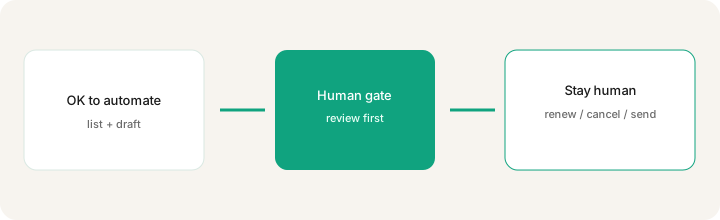
What it is: Draw a hard line: the model lists and drafts; a person decides renew/cancel, edits vendor email, and hits send. Never let a schedule auto-cancel or auto-charge.
Add to the task instructions:
End every run with a “Stay human” section: renew/cancel decision, vendor email send, payment changes, and Sheet updates must be done by a person. Never claim you canceled or emailed anyone.
4. Limits and failure modes
What it is: Scheduled tasks can miss a run, see stale context, or draft confident nonsense if the Sheet was empty. Treat output as a draft checklist — not an accounting system. Plan availability and notification UX change; confirm in-product.
Failure-mode prompt to bake in:
If no Sheet paste or attachment is present for this run, reply only: Missing input — paste the tools renewals Sheet before I can list open renewals. Do not use Memory or prior chats to invent the tool list.
Pricing context (September 2026)
Scheduled tasks are a ChatGPT product feature, not a separate SKU. Which plans can create or run them, how many tasks you get, and how notifications work have changed as OpenAI ships updates. Public consumer list prices often cited: Plus ~$20/month; higher tiers cost more. Confirm on openai.com/chatgpt/pricing and OpenAI help for scheduled / recurring tasks. Do not budget from this page alone.
Uncertainty: Plan gates, task caps, and workspace admin defaults move. Team/Business policies may restrict automation — check your workspace before relying on a Monday run for finance-adjacent renewals.
When scheduled tasks are useful (honest take)
Useful when you already maintain a tools Sheet and want a recurring draft checklist so renewals do not sneak up. Less useful — and riskier — when people expect the model to cancel vendors, send email, or remember last year’s stack without a fresh paste. Prefer Memory for tone rules, Custom GPTs for shared intake bots, and a human gate for money moves.
Paying for ChatGPT scheduled tasks and a few other AI tools? The $9 AI toolkit spreadsheet lists every AI subscription you have, what each one costs, and how fast it pays for itself, so you can see which ones are worth the money.
Want someone to do it for you? AI toolkit audit — $19
Related options (educational)
| Need | Better home | Why |
|---|---|---|
| Calendar cadence + draft list | ChatGPT scheduled tasks | Recurring prompt without opening a blank chat |
| Standing tone / format rules | ChatGPT Memory | Reusable across chats without storing renewals data |
| Shared SOP / intake bot | Custom GPT | Team reuses one instructed bot |
| Multi-step vendor workflows | Zapier / Make / n8n | Connectors + explicit failure ownership |
| Private recurring file set | ChatGPT Project / Claude Projects | Files stay scoped for deep account work |
FAQ
What are ChatGPT scheduled tasks?
A way to run a recurring prompt on a cadence you set — useful for ops check-ins like listing open tool renewals — so you get a draft reminder without starting from a blank chat every Monday.
What should stay human in a renewals scheduled task?
Renew/cancel decisions, vendor email sends, payment changes, and confirming the Sheet is current. The model can list and draft; a person approves and sends.
How do scheduled tasks relate to Memory and Custom GPTs?
Memory holds stable tone preferences; Custom GPTs hold reusable instructions; scheduled tasks fire on a calendar cadence. Do not park confidential renewals data in Memory.
Where is the full ChatGPT product review?
See /reviews/chatgpt.html. Memory: /reviews/chatgpt-memory.html. Custom GPTs: /reviews/chatgpt-custom-gpts.html. This page is the scheduled tasks how-to.
Optional next step (if seats overlap)
If ChatGPT scheduled tasks are one piece of a messy multi-seat ops stack, optional help: $19 AI toolkit audit or $9 AI toolkit spreadsheet — only if overlapping seats are the real problem. Email Audit $19 or Toolkit spreadsheet $9.
Checkout is live via Stripe. After you pay, we email delivery (spreadsheet) or intake next steps (audit).