How-to · Knowledge · Coda AI · Oct 9, 2026
Rewrite one Coda runbook section without adding new policy
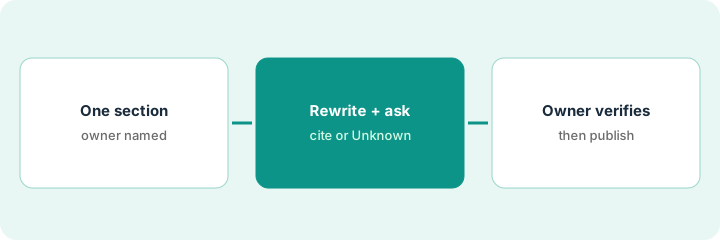
“Rewrite without new policy” means clearer wording and structure for a section you already trust — not new steps, owners, or response-time promises the doc never contained. Questions asked inside the doc must cite the page or say Unknown.
Who this is for
Ops teams whose SOPs already mix narrative and tables in Coda (now sold as Superhuman Docs) and who want a clearer section without inventing policy. If Notion is where your docs live, use Notion AI instead — see Notion AI vs Coda AI. If the runbook is in Confluence, the sibling routine is Turn one Confluence runbook into an FAQ without new steps. If the SOP does not exist yet, capture it first with Stop rewriting the SOP. Capture the clicks once.
How to do it
This page is a how-to. It is not a ranking of docs AI products. The Coda AI review covers Docs AI and the plan notes; this page is the narrower routine — one section, a rewrite for clarity only, two test questions, and an owner who compares before publishing. Check whether your workspace is on current Superhuman Docs plans or older Coda AI credits before you budget.

1. Step 1 — Pick one runbook section
What it is: Choose one headed section of a live runbook — not the whole doc. Small rewrites ship; giant rewrites stall.
- Name the doc, the section heading, and the owner.
- Note which tables or Packs (Coda’s integrations) the section depends on.
- Freeze the policy: no new steps, response-time promises, or escalation paths in this pass.
- If the section is wrong (not just unclear), fix the facts with the owner before any AI rewrite.
Clarity and correctness are different jobs. This routine only does the first one.
Doc: “Vendor intake runbook.” Section: “When to escalate to security.” Owner: the ops lead. The table of risk triggers stays as it is. Goal: clearer bullets, same triggers.
Write down the section heading and its word count. Put “no new policy” on a sticky note. If you cannot name the owner, do not rewrite yet.
2. Step 2 — Rewrite, then ask in the doc with a cite rule
What it is: Use Docs AI (included on paid plans while it is in beta) to rewrite the section for clarity, then ask a question in the doc that must cite the section or say Unknown.
- Rewrite pattern: shorter bullets, the same owners, dates, and triggers; mark any gap Unknown instead of inventing a step.
- Question pattern: “Answer only from this section and its linked tables; cite the heading; otherwise say Unknown.”
- Do not let the model add a new escalation path “because good runbooks have one.”
- Work in a copy of the page if your team worries about overwrites, then merge after review.
The second test question is the important one. A section that cannot say Unknown to a question it does not cover will invent policy later.
The rewrite turns a dense paragraph into six bullets with the same three triggers. Question: “When do we escalate vendor intake to security?” The answer cites the section. A question about legal review comes back Unknown, because that path is not in the section.
Rewrite one section. Then ask two questions in the doc: one the section answers and one it does not. Confirm the second comes back Unknown (or says the section does not cover it) — not invented policy.
3. Step 3 — Owner verifies before publish
What it is: The section owner compares the rewrite with the old text, side by side, and publishes only what matches existing policy.
- Compare: highlight any new step, owner, or response-time promise, and delete it.
- Spot-check that linked tables still match the bullets.
- Publish (or merge) with a dated note: “clarity rewrite — no policy change.”
- If Notion is being considered for the same job, read Notion AI vs Coda AI before buying a second docs AI seat for the identical runbook.
Once the section reads cleanly, the same doc can feed a weekly routine — for example the focus time in Link three focus holds to Notion tasks without inventing attendees if your tasks live in Notion.
The owner finds one invented “notify legal within 24 hours” bullet and deletes it. Five bullets that match the old triggers are published. Change note: clarity only.
Use a three-question check before publishing: new steps? new owners? new promises? Any yes means delete before publish. Ship one section this week — not the whole wiki.
Pricing context (October 2026)
This how-to is not a price sheet. Plan detail for Coda AI and Notion AI vs Coda AI lives on those reviews. Recheck each vendor’s site before you budget. Dated October 2026.
Checked Oct 9, 2026 on the vendor’s own pricing page: coda.io/pricing (now branded Superhuman Docs) lists Free at $0, Pro at $12 per Doc Maker per month billed annually or $15 monthly, Business at $33 billed annually or $40 monthly, and Enterprise at custom pricing. Its FAQ says Docs AI is included on any paid plan while it is in beta (fair use applies), Free gets a limited number of trials, and Editors and Viewers are always free — you pay for Doc Makers.
Uncertainty: Branding (Coda or Superhuman Docs), beta-included AI versus older credit meters, and Doc Maker rules can differ by account age. If an invoice and a review disagree, trust the invoice. Do not paste a marketing list price you did not pay. The only prices this site sells here are the optional $9 AI toolkit spreadsheet and $19 AI toolkit audit.
When this helps (honest take)
Useful when the runbook already lives in Coda, clarity is the pain, and an owner will compare old and new before publishing.
Not useful when the section is factually wrong, you want AI to invent policy, or Notion (or another wiki) is already the system of record for the same SOP. Two docs AI seats rewriting the same runbook is overlap — map it before renewing both.
Related options (educational)
| Need | Where to look | Why |
|---|---|---|
| Coda runbooks and Docs AI | Coda AI | When Coda holds the narrative and tables |
| Notion vs Coda for AI docs | Notion AI vs Coda AI | Educational compare |
| Notion as the docs home | Notion AI | When Notion is the system of record |
| Same routine in Confluence or Guru | Turn one Confluence runbook into an FAQ without new steps · Answer the same how-to from a Guru card — or say Unknown | Sibling how-tos with the same no-new-steps rule |
| Capture the SOP before rewriting | Stop rewriting the SOP. Capture the clicks once | Live how-to for a missing source |
Related reviews: Coda AI · Notion AI vs Coda AI · Notion AI. Related how-tos: Turn one Confluence runbook into an FAQ without new steps · Stop rewriting the SOP. Capture the clicks once · Clean messy status text in Airtable before you buy another tracker. Free: seat-waste calculator if Coda AI and Notion AI cover the same runbook job.
FAQ
Can the rewrite add escalation steps?
Not with this routine. Clarity only. New policy needs a named owner and an explicit change, not an AI pass.
What if the in-doc answer invents something?
Tighten the cite rule, prefer Unknown, and fix the section’s facts. Do not publish invented steps.
Do Editors need a paid seat to use the rewrite?
On Oct 9, 2026, Coda’s pricing FAQ said you pay for Doc Makers, while Editors and Viewers are free. Check which role your workspace gives Docs AI before planning who runs the rewrite.
Where do dated prices live?
On the Coda AI review and coda.io/pricing. This October 2026 how-to only repeats prices we checked on the vendor’s own pricing page on Oct 9, 2026.
Optional next step
Free reviews stay free. Neither offer is required to use this page. If Coda AI and another docs AI seat already rewrite the same runbooks, optional help: $9 AI toolkit spreadsheet (seats, spend, owner, cancel-by, overlap) or $19 AI toolkit audit when you want a written memo.