How-to · Knowledge · Guru · Oct 6, 2026
Answer the same how-to from a Guru card — or say Unknown
“Answer” here means a reply that cites a verified Guru card — not a fluent guess. If there is no card, you say Unknown (or create the card) instead of inventing steps.
Who this is for
Support and ops teams that already keep (or should keep) how-tos in Guru. If your canonical docs live only in Slack threads, start by picking a knowledge system of record — Guru is one option beside Notion, Confluence, and GitBook. Internal cards are not automatically safe to send to customers.
How to do it
This page is a how-to. It is not a ranking of knowledge bases. Product detail and dated pricing live on the Guru AI review.

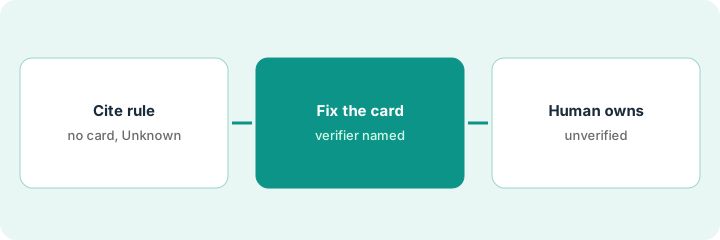
1. Step 1 — Ask with a cite rule
What it is: When you use Guru’s AI answers, require a card link (or card title and verifier) in the answer. No citation → treat it as Unknown.
- Phrase the question the way a teammate would ask it in Slack or the help desk.
- Reject answers that read smoothly but point at no card.
- Do not paste customer personal data into prompts if your policy forbids it.
- Verification is the point — stale cards count as failures, not “close enough.”
Question: “How do we request a new vendor?” Guru returns steps and a link to the Vendor intake card verified by Maya. If the answer adds a fourth approval step that is not on the card, that step is deleted.
Ask one real how-to. Keep the answer only if it cites a card. If it cannot, reply “Unknown — no verified card” and go to Step 2.
2. Step 2 — Fix or create the card
What it is: Gaps are a publishing job. Update the existing card or create a short new one — then ask again.
- Prefer editing the canonical card over starting a parallel doc in Notion “just for AI.”
- Keep the card short: purpose, steps, owner, last verified date.
- Do not invent policy. If legal or finance must approve, keep the card in draft until they do.
- After you publish and verify, ask the same question again and confirm the citation.
No vendor-intake card exists. Ops writes eight lines, assigns Maya as verifier, and publishes. The next AI answer cites that card. The old Slack guessing thread gets a link to the card.
From today’s Unknown, create or fix one card in under 20 minutes. Get a verifier. Ask the question again. Save the card link in your team’s FAQ channel.
3. Step 3 — A human owns unverified answers
What it is: Anything without a verified card stays human-owned. AI must not send customer-facing steps from memory.
- Internal draft answers can help a human writer — still cite or mark Unknown.
- Customer replies follow your support policy; an internal Guru card may need a public help article first.
- Schedule re-verification for cards that change with tools and vendors.
A teammate almost pasted an AI paragraph into a customer ticket. The card was last verified in June and the product screens have changed since. They tell the customer they are checking, fix the card, then reply with the verified steps.
Add a team rule: “No card link → no send.” For one week, react with ❌ on any how-to answer missing a Guru link.
Pricing context (October 2026)
This how-to is not a price sheet. Plan detail for Guru AI lives on that review. Recheck the vendor’s site before you budget. Dated October 2026.
Checked Oct 6, 2026 on the vendor’s own pricing page: getguru.com/pricing does not list a public per-seat price. Guru describes packaged pricing scoped to your organization, so there is no list figure to repeat here. Ask Guru for a quote and compare it with your current knowledge tools.
Uncertainty: Packaging, AI features by plan, and verification workflows change. If an invoice and a review disagree, trust the invoice. Do not paste a marketing list price you did not pay. The only prices this site sells here are the optional $9 AI toolkit spreadsheet and $19 AI toolkit audit.
When this helps (honest take)
Useful when you will maintain verified cards, and “Unknown” is an acceptable interim answer.
Not useful when nobody owns verification, or every answer is supposed to come from a general chatbot with no knowledge system of record. For docs-site knowledge see GitBook AI; for Notion wikis see Notion AI.
Related options (educational)
| Need | Where to look | Why |
|---|---|---|
| Verified cards and cite-first answers | Guru AI | Primary path on this page |
| Docs-site knowledge | GitBook AI | Canonical public or internal docs site |
| Wiki already in Notion | Notion AI · Notion AI for ops | Different system of record |
| Capture clicks as an SOP | Scribe | Capture the procedure, then link it from a card |
| Knowledge stack inventory | Stack map — knowledge ops | Job, tool, and owner map |
Related reviews: Guru AI · GitBook AI · Notion AI for ops · Scribe. Related how-to: Capture the SOP clicks once.
FAQ
What if Guru’s answer sounds right but cites no card?
Treat it as Unknown. Fix or create the card before you treat the text as policy.
Can I send internal card text to customers?
Only if your process allows it. Many teams keep a public help article separate from internal Guru cards.
Who verifies cards?
A named human. Verification is the point — not the AI paragraph.
Where do dated prices live?
On the Guru AI review and getguru.com/pricing, which showed no public list price on Oct 6, 2026.
Optional next step
Free reviews stay free. Neither offer is required to use this page. Optional help when knowledge seats overlap: $9 AI toolkit spreadsheet or $19 AI toolkit audit.