Tool · Data & BI · Qlik · Oct 2026
Qlik Answers review (Oct 2026): AI answers over documents and Qlik data
Qlik Answers is the AI chat inside Qlik Cloud. Point it at a curated knowledge base — policy PDFs, handbooks, SOPs — and at the Qlik apps you already use, and it answers in plain English with citations you can open. That citation trail is the whole point: a person curates the sources, and a person opens the cited passage before anyone acts on the answer. This page walks through each piece with a real job, a Try this, and the gotchas Qlik itself documents.
What this Qlik Answers page covers
This page is for the ops, HR, finance, or compliance lead whose company already runs Qlik Cloud for dashboards and who keeps getting the same questions about policies and numbers. The question it answers: what does it take to set up Qlik Answers so its answers can be checked, and where should a person stay in the loop?
Qlik Answers has two kinds of sources. Knowledge bases hold unstructured files (PDF, Word, PowerPoint, HTML, Markdown, text and a few more) uploaded or pulled from connections such as SharePoint, Google Drive, OneDrive, Dropbox, Amazon S3, or SFTP. Applications are your existing Qlik Sense apps, activated for Qlik Answers. An assistant bundles up to five knowledge bases (and can include apps), and users chat with it from Open Answers in the Qlik Cloud navigation.
Facts here come from Qlik’s help pages for Qlik Answers (each stamped “Last updated 10/5/2026” when we read them on 5 October 2026) and Qlik’s public pricing page. Qlik now describes the chat as an agentic experience — different agents interpret the question, search sources, and build the response — and keeps an older legacy assistant experience for tenants that don’t opt in to cross-region processing. We note where the two differ.
Major features (with how someone uses them)
Examples at a glance: each feature has a concrete example from a real job plus a short Try this you can run this week.
1. Build a small knowledge base and assistant (primary)
What it is: From the Create page of the Analytics activity center, choose Knowledge base, name it, pick a space, and add files — upload from your computer, choose from the catalog, or use a data connection (manual selection or dynamic rules by folder, file count, size, or modified date). Then click Index all. From the knowledge base, Create assistant wraps it in a chat users can open. Qlik lists limits: 50 MiB per file, 10,000 files per data source (5,000 from SharePoint), and five knowledge bases per assistant.
One setting matters for policy documents: Enhanced accuracy parses PDF, Word, and PowerPoint more carefully, handles tables better, and indexes images inside PDFs. Qlik warns it lengthens indexing and can’t be switched back to legacy parsing — you’d need a new knowledge base. It isn’t available in the Asia Pacific (Singapore) region.
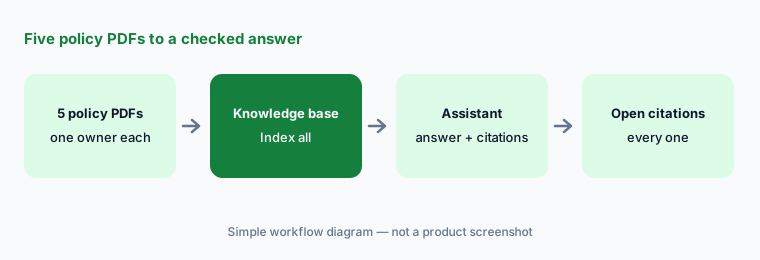
Primary workflow:
Load five policy PDFs into one knowledge base. Ask one question. Open every cited passage. If any citation points to an outdated file, remove that file and reindex before anyone else uses the assistant.
2. Citations, reasoning, and general-knowledge labels
What it is: Every response carries citation links, and View sources breaks the answer down by source: the prompt, how Qlik Answers arrived at the response, the text used from each knowledge base file, and — for charts — the data and expressions used. Show reasoning displays each agent’s steps as the answer is built. Users with access to the underlying file can download it.
The detail to train people on: when connected sources can’t fully answer, Qlik Answers fills in from the AI model’s general knowledge. Qlik says it labels this three ways — “AI” beside the citation, a note in the reasoning trace, and, in the answer breakdown, “This information came from the LLM and needs to be verified for accuracy.” Qlik also says it does not use web search for this. For a policy assistant, any AI-labeled sentence is a sentence nobody should quote.
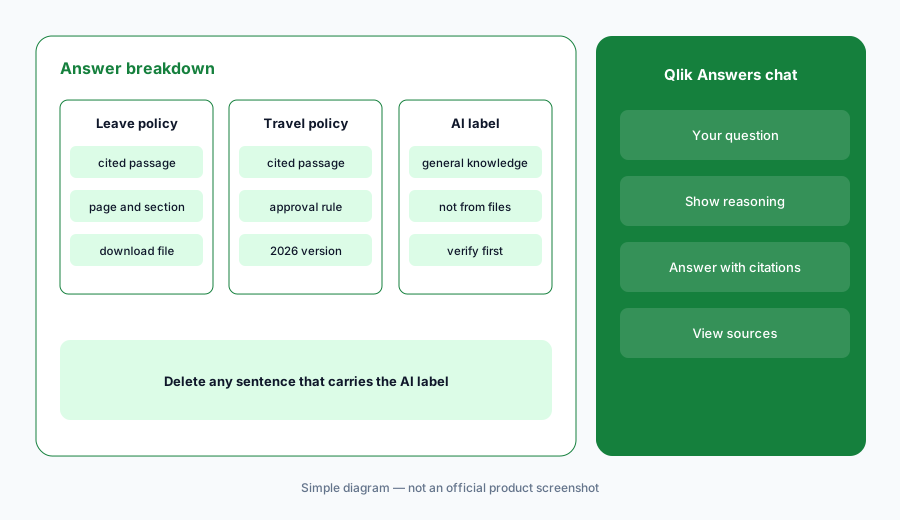
Spot the unsourced part:
Ask your assistant three questions where you suspect the documents are thin. Open View sources on each answer and highlight every sentence labeled as general knowledge. Send that list to the document owner.
3. Fast mode and thinking mode on Qlik apps
What it is: When you chat with an app or assistant, you pick a mode. Fast mode handles direct questions on structured app data — “total sales last quarter,” “top 10 customers by order value” — typically in 10 to 15 seconds, and can generate charts but not whole sheets. If it can’t answer, it says so and offers Think more; Qlik says fast mode doesn’t use question quota when it can’t answer. Thinking mode takes longer and handles multi-step analysis, questions that combine app data with knowledge-base documents, and requests to build sheets.
Generated charts (bar, combo, KPI, line, scatter, pie, tree map, table, pivot table) can be added to an existing or new sheet with Add to sheet; generated sheets land under Your own > AI Generated until you move or publish them. Qlik Answers respects your app permissions — no sheet-creation rights, no generated sheets. Questions are capped at 500 characters.
Pick the mode on purpose:
Ask one fast-mode question you already have a dashboard number for and compare the two. Then ask one thinking-mode question that needs a document plus data. Open View sources on both before you use either.
4. Gotchas Qlik documents for app data
What it is: Qlik’s limitations page names two traps worth checking before you activate an app. First, set identifiers in master measures: if a master measure’s expression contains $, 1, or an alternate state inside its set expression, the filter Qlik Answers wraps around it is silently discarded — the measure returns unfiltered results with no error. Second, free-text fields in structured tables (CRM notes, survey comments, churn reasons) aren’t analyzed semantically; Qlik suggests moving that text into a knowledge base if you need it reasoned over.
Qlik also lists what it indexes from an app — app name and description, data model fields, logical model groups, master item names and descriptions, vocabulary synonyms, and business glossary terms — and what it doesn’t, such as label expressions on master items. Good names and descriptions on master items do more than clever prompts.
{$< and finds SUV Revenue defined as Sum({$<Car_Type={'SUV'}>}Price). Asked “SUV revenue for Brand 1,” Qlik Answers would return all brands. He rewrites the measure without the inner set identifier, asks the same question again, and the number now matches the filtered dashboard.
Audit before you activate:
Open your app’s master measures and search the expressions for {$<, {1< and alternate state names. For each hit, ask Qlik Answers a filtered question and compare it to the dashboard with the same filter applied.
5. Indexing, freshness, and capacity
What it is: Files must be indexed before an assistant can use them. You can index everything, one connection, or single files, review how many files and how much data will be indexed first, or schedule daily indexing. Qlik measures indexing in pages — 2,000 characters of text each; images don’t count toward page size. Index capacity doesn’t reset monthly: adding, updating, or deleting pages changes what you’re using. Questions are a separate monthly quota that resets each month without carryover; Qlik says users can’t ask more once it’s used up, and overage is only allowed on capacity-based subscriptions.
Admins see both meters — Questions (monthly) and Knowledge base pages — on Home in the Administration activity center. Qlik also lists guardrails: 20 assistant questions per minute and 50 knowledge-base searches per minute per subscription. Questions that error and Qlik product-help questions don’t count.
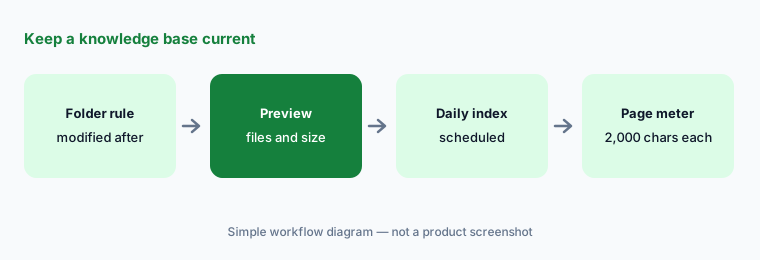
Keep sources current:
Write down the owner and review date for every file in one knowledge base. Turn on daily indexing for the connection. Next month, check Index history and remove any file nobody claims.
6. Actions, review portal, and where it fits
What it is: Assistant builders can add actions — Qlik Automate automations that, for example, send an email or update an external system. Depending on how the builder configured it, the assistant either asks you to confirm or runs without confirmation; Qlik says it shows what will be sent before running when input is needed. Automations don’t run in fast mode. On the governance side, admins grant permissions such as Manage assistants, Manage knowledge bases, and Search knowledge bases, and reviewers with the right role can read conversations and thumbs-down feedback in the Answers review portal.
For a policy or HR assistant, set every action to require confirmation and give one person the reviewer role. Qlik also points admins to the Qlik Cloud Answers Analyzer monitoring app for unused or never-cited sources — Qlik notes it is community-supported rather than officially supported.
Decide who reviews:
Name one reviewer for each assistant. Ask them to read ten conversations a week in the review portal and log every thumbs-down as missing document, wrong document, or wrong answer. Fix documents first.
Pricing context (October 2026)
Qlik publishes starting prices for Qlik Cloud Analytics, all billed annually, on qlik.com/us/pricing (checked 5 October 2026): Starter from $300/month for 10 users with a fixed 10 GB of data for analysis; Standard from $825/month for 25 GB with no charge for additional users; Premium from $2,750/month for 50 GB; and Enterprise (from 250 GB) by quote. The pricing page lists “Access to Answers Agents” starting at Starter and “additional Answers Agents” and “Additional GenAI capacity” at higher tiers. Qlik also offers a free trial.
Qlik Answers itself is metered in two ways. Questions come from a monthly quota set by your subscription (Qlik Answers and Qlik’s MCP server share it), and indexed pages (2,000 characters of text each) count against a capacity that doesn’t reset. Qlik’s help center says the number of included questions and pages depends on the edition, but the public pricing page doesn’t list those numbers, and overage is only available on capacity-based subscriptions.
Uncertainty: Qlik’s pages don’t fully agree. The pricing page lists Answers Agents from Starter, while the help center’s subscription page says Qlik Answers assistants are included with Standard, Premium, and Enterprise (and lists Starter with up to 25 questions for the MCP server). The pricing FAQ also says Qlik Answers queries stay in your AWS region, while the admin docs say the newer agentic experience requires opting in to cross-region inference (the legacy experience can stay in-region). Ask Qlik, in writing, for your edition’s monthly question quota, page capacity, overage price, and inference region before you roll it out.
When it’s useful (honest take)
Useful when Qlik Cloud is already your BI suite, a named person owns each set of documents, and people keep asking the same policy or process questions. Then a small, curated knowledge base with citations saves real time, thinking mode can combine a document with app data, and the review portal tells you which documents are missing.
Less useful when nobody will curate the files — an assistant over a messy shared drive will cite last year’s draft just as confidently. Less useful when you aren’t on Qlik Cloud (Qlik says there’s no on-premises deployment), when your app’s master measures rely on set identifiers you can’t change, or when you need published question quotas to budget before talking to sales.
Paying for Qlik Answers and a few other AI tools? The $9 AI toolkit spreadsheet lists every AI subscription you have, what each one costs, and how fast it pays for itself, so you can see which ones are worth the money.
Want someone to do it for you? AI toolkit audit — $19
Related options (educational)
| Need | Better home | Why |
|---|---|---|
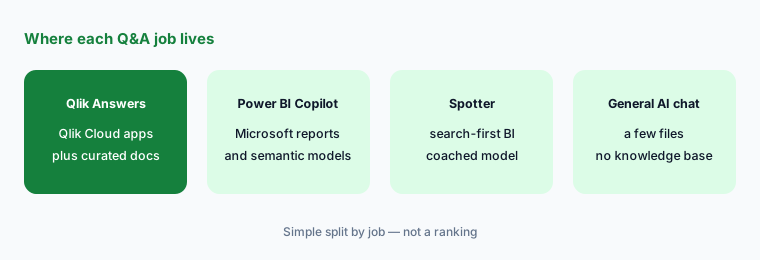
| Q&A over curated documents plus Qlik apps | Qlik Answers (this page) | Citations and app data in one chat, for Qlik Cloud tenants |
| Chat over existing Domo dashboards | Domo AI | Answers built from the cards and DataSets you already have |
| Reports already in Microsoft Power BI | Power BI Copilot | Summaries and questions on Power BI reports |
| Search-first BI on a coached model | ThoughtSpot Spotter | Business users ask; analysts coach the model |
| Company knowledge across many tools, not just BI | Guru or Confluence AI | Knowledge lives where people already write it |
| One-off questions about a few files | ChatGPT for knowledge work | No knowledge base to maintain; check every answer yourself |
FAQ
What is Qlik Answers?
It’s the AI chat in Qlik Cloud. It answers questions from curated knowledge bases (PDFs, Word, PowerPoint, HTML and more) and from Qlik apps activated for it, with citations you can open. Assistants bundle up to five knowledge bases.
Can Qlik Answers make things up?
When sources can’t fully answer, Qlik says it fills in from the AI model’s general knowledge and labels that part, including the note “This information came from the LLM and needs to be verified for accuracy.” Treat labeled sentences as unverified and open every citation.
How much does Qlik Answers cost in October 2026?
Qlik Cloud Analytics starts at $300/month for 10 users (Starter), $825/month (Standard), and $2,750/month (Premium), billed annually, with Enterprise by quote. Qlik Answers uses a monthly question quota and indexed-page capacity that vary by edition; Qlik doesn’t publish those numbers on its pricing page.
What file types can a Qlik Answers knowledge base use?
Qlik lists TXT, PDF, DOC and DOCX, PPTX, HTM and HTML, MD, ODT, and RTF, up to 50 MiB per file, from uploads or connections such as SharePoint, Google Drive, OneDrive, Dropbox, Amazon S3, Azure Storage, Google Cloud Storage, and SFTP.
Why does Qlik Answers ignore my filter on some measures?
Qlik documents that if a master measure’s expression contains a set identifier such as $ or 1, the outer filter Qlik Answers applies is silently discarded and the measure returns unfiltered results. Rewrite those measures without the inner identifier, or test filtered questions against the dashboard.
Optional next step (if seats overlap)
If your team pays for Qlik, a separate company-knowledge assistant, and a general AI chat that all answer the same policy questions, that overlap is worth mapping before the next renewal. Map the overlap with the $19 AI toolkit audit or the $9 AI toolkit spreadsheet. Email Audit $19 or Toolkit spreadsheet $9.
Checkout is live via Stripe. After you pay, we email delivery (spreadsheet) or intake next steps (audit).