How-to · Analytics · Qlik Answers · Oct 19, 2026
Build a Qlik Answers knowledge base from policy PDFs, and check every citation and general-knowledge label
Qlik Answers builds a knowledge base from documents such as policy PDFs and returns answers with citations and general-knowledge labels. A fluent answer without a real citation still misstates policy. This page shows how to check citations and labels before staff rely on it.
Who this is for
Teams already on Qlik Cloud who want policy answers with citations. The job here is citation and general-knowledge checks — not a Power BI Copilot ten-question pilot.
How to do it
This is a how-to, not a ranking of analytics chat. Per the Qlik Answers review, Answers uses knowledge bases from documents, citations, general-knowledge labels, fast vs thinking mode on Qlik apps, and indexing capacity. The ground rule: no rollout until the policy owner checks citations and flags general-knowledge answers.
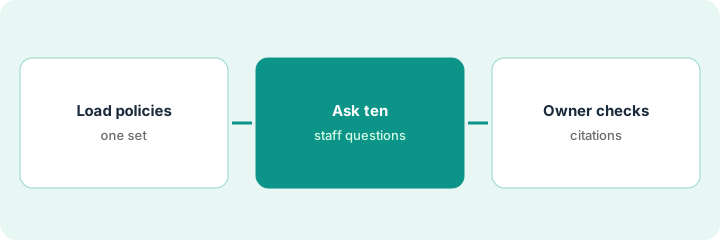
1. Load one policy set
What it is: Index one coherent policy set (for example HR leave policies), and record indexing capacity used.
- Pick PDFs with clear owners and versions.
- Note monthly question quota for your edition.
- Stay on one knowledge base for the pilot.
- Decide fast vs thinking mode for staff questions.
- Write who may ask during the pilot.
HR loads the 2026 leave policy pack. Benefits FAQs stay out of the first index.
Index one policy set and write the owner and version on the project page.
2. Ask ten staff questions
What it is: Have real staff ask ten questions they would ask HR, and capture every answer with its citations and labels.
- Include questions the PDFs answer and two they should not.
- Capture citation links for each answer.
- Note general-knowledge labels when they appear.
- Do not coach the model mid-pilot.
- Keep a sheet of question, answer, citations, label.
Staff ask about parental leave, carryover, and a medical exception the PDF never covers. The last one returns a general-knowledge style answer.
Log ten questions with citations and labels in one sheet.
3. Owner opens citations; flag general-knowledge; approve rollout
What it is: The policy owner opens each citation, corrects misses, and blocks rollout while general-knowledge answers are treated as policy.
- Open every citation PDF location.
- Fail answers that cite the wrong section.
- Treat general-knowledge labels as not policy.
- Owner signs go/no-go.
- Only then widen to more departments.
Two citations pointed at outdated appendices. Owner marks no-go until those PDFs are removed and reindexed.
Owner opens every citation before anyone calls Answers the policy source.
Pricing context (October 2026)
This how-to isn’t a price sheet. Per the Qlik Answers review and Qlik’s pricing page (checked Oct 19, 2026), Qlik Cloud Analytics starts at $300 per month for 10 users (Starter), $825 per month (Standard), and $2,750 per month (Premium), billed annually; Enterprise by quote. Answers question quotas and indexed-page capacity vary by edition and are not fully listed on the public pricing page. Dated October 2026.
Checked Oct 19, 2026 on the vendor’s own pricing page: Qlik’s pricing page lists Qlik Cloud Analytics from $300 per month (Starter), $825 (Standard), and $2,750 (Premium), billed annually. Answers quotas vary by edition.
Uncertainty: The only prices this site sells here are the optional $9 AI toolkit spreadsheet and $19 AI toolkit audit.
When this helps (honest take)
Useful when you already pay for Qlik Cloud and need policy answers with citation checks.
Not useful when documents have no owner, or you wanted Answers to invent policy.
Related options (educational)
| Need | Where to look | Why |
|---|---|---|
| Qlik Answers | Qlik Answers | Primary path |
| Data stack map | Stack map: data ops | Where Qlik fits |
| Power BI Copilot ten questions | Power BI Copilot ten questions | Related BI eval pattern |
FAQ
What is a general-knowledge label?
Per our review, Answers can label answers that are not grounded in your knowledge base. Treat those as not policy.
Do quotas reset?
Questions use a monthly quota; indexed pages count against capacity that does not reset the same way. Confirm for your edition with Qlik.
Optional next step
If you want a one-page toolkit map for the tools you already pay for, use the optional $9 AI toolkit spreadsheet. If you want a short review of seat waste and unused tools, use the optional $19 AI toolkit audit. Neither is required to follow this how-to.