How-to · Analytics · Power BI Copilot · Oct 12, 2026
Write ten Power BI Copilot questions your model can actually answer
Before Copilot goes to a whole team, it's worth knowing which questions it answers well on your data and which ones it gets wrong. This page shows a BI owner how to test it with ten real questions, grade each answer against the report, and turn the misses into a short fix list for whoever owns the semantic model.
Who this is for
BI leads, report authors, and finance or ops analysts who've been asked to roll out Copilot in Power BI. You'll need Copilot already enabled on a supported capacity; the Power BI Copilot review covers what that requires. If your team mainly wants one metric pushed to them each day, see Power BI Copilot vs Tableau Pulse.
How to do it
This is a how-to, not a ranking of BI tools. Feature detail lives on the Power BI Copilot review. The test is about your semantic model, not Copilot in general.

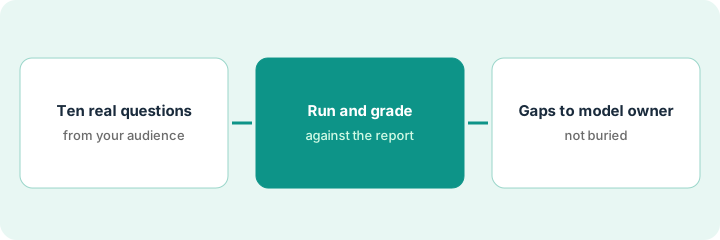
1. Step 1 — Write ten questions people really ask
What it is: Ten questions taken from real requests, each with the answer you already know is right.
- Pull questions from the last month of email, chat, and meeting notes. Use the wording people actually used.
- Mix them: four simple lookups, three comparisons over time, two breakdowns by a category, and one question the report doesn't cover.
- Write the correct answer next to each, taken from the report itself.
- Pick one report and one semantic model for the whole test.
Her list includes "What were operating expenses last month?", "How did travel spend change versus last quarter?", "Which region had the highest margin?", and "Why did revenue drop in March?" She writes the correct figures from the profit-and-loss report beside the first three and marks the fourth as "not in the report."
Make a sheet: # | Question (exact wording) | Correct answer | Where in the report.
2. Step 2 — Run each one and grade the answer
What it is: Ask each question in the Copilot pane and compare the answer to the one you wrote down. Microsoft's docs note that when a question isn't about the semantic model, Copilot can answer from general knowledge, which is the part to watch.
- Ask each question exactly as written, in a fresh session.
- Grade it Right, Partly right, Wrong, or Answered outside the data.
- If you've turned on the option that shows the DAX query and data table behind an answer, check that too.
- For the question the report doesn't cover, the best answer says so. A confident made-up reason gets graded Wrong.
Six right, two partly right (Copilot used gross revenue where the team means net), one wrong, and the "why did revenue drop" question got a paragraph about seasonal demand with nothing in the report behind it. That one is graded Answered outside the data.
Add columns to the sheet: Copilot's answer | Grade | What it used (measure or table) | Notes.
3. Step 3 — Send the gaps to the model owner
What it is: Most misses come from the model, not Copilot: unclear measure names, missing descriptions, or two measures that sound the same. Those go to whoever owns the semantic model as a short fix list.
- For each miss, write what Copilot picked and what it should have picked.
- Suggest the fix: rename a measure, add a one-line description, or hide a confusing field.
- After the owner makes the changes, rerun the same ten questions and compare grades.
- For sensitive models, ask the owner whether read-only users should be blocked from using Copilot on that model. Microsoft added that setting in September 2026, and by default Copilot stays allowed until someone changes it.
The model has measures named "Measure 3" and "Rev_final_v2." The owner renames them "Net revenue" and "Gross revenue" and adds a one-line description to each. On the rerun, both partly-right answers become right.
Fix list format: Question # | What Copilot used | What it should use | Suggested change | Owner | Done date.
Pricing context (October 2026)
This how-to isn't a price sheet. Copilot in Power BI needs paid Fabric capacity (F2 or higher) or Power BI Premium (P1 or higher), and Microsoft says a Pro or Premium Per User license alone isn't enough. Check Microsoft's pricing page and your admin; notes live on the Power BI Copilot review. Dated October 2026.
Checked Oct 12, 2026 on the vendor’s own pricing page: Microsoft’s Power BI pricing page lists Power BI Pro at $14.00 per user per month and Premium Per User at $24.00 per user per month. Copilot in Power BI still needs eligible Fabric capacity (F2 or higher) or Power BI Premium capacity (P1 or higher); a Pro or PPU license alone is not enough per Microsoft’s Copilot docs. This page does not invent Fabric capacity dollar figures; confirm capacity cost with your Microsoft admin.
Uncertainty: Copilot usage draws on capacity, and Microsoft changes features often. If Microsoft's pages and our review disagree, trust Microsoft's. The only prices this site sells here are the optional $9 AI toolkit spreadsheet and $19 AI toolkit audit.
When this helps (honest take)
Useful when Copilot is enabled, someone owns the semantic model, and leadership wants to know whether it's ready for a wider team.
Not useful when the capacity isn't in place yet, or the model hasn't been touched in a year and nobody owns it. Start with ownership.
Related options (educational)
| Need | Where to look | Why |
|---|---|---|
| Power BI Copilot features | Power BI Copilot | Primary path on this page |
| Metric digests instead of questions | Tableau Pulse · Power BI Copilot vs Tableau Pulse | Different way to get the same number |
| Data ops stack | Stack map for data ops | Job, tool, and owner in one view |
| Before another seat | Three checks before an AI seat | Live how-to |
Free: seat-waste calculator if you're paying for a separate AI analytics tool on the same data.
FAQ
Does Power BI Pro include Copilot?
Not on its own. Microsoft says it needs paid Fabric or Premium capacity.
Why did Copilot answer something that isn't in the report?
When a question isn't about the model, Copilot can answer from general knowledge. That's why the test includes one question the report doesn't cover.
How often should we rerun the ten questions?
After any big model change, and once a quarter otherwise.
Why grade answers against the report?
Copilot can sound confident on questions the semantic model cannot support. Grading makes the gaps visible for the model owner.
Optional next step
Free reviews stay free. If Power BI Copilot, a separate AI analytics tool, and a chat assistant are all being asked the same questions, the $9 AI toolkit spreadsheet helps you lay them out, or the $19 AI toolkit audit gets you a written memo.