Compare · Data & BI · Oct 2026
Power BI Copilot vs Tableau Pulse for ops (Oct 2026): ask-the-report vs metric digests
These two tools solve different jobs. Power BI Copilot lets you ask questions of a report or semantic model and get summaries, visuals, and DAX. Tableau Pulse sends you digests and alerts about a few metrics you follow, and can explain what moved. This page compares them by job — not as a ranking — with a Try this for each step.
What this comparison covers
This page is for the ops or finance lead who has been asked “should we use Copilot or Pulse?” — usually because the company has both Microsoft and Salesforce contracts, or is choosing a BI tool. The honest answer is that they answer different questions: “What’s going on in this report, and why?” versus “Did my handful of metrics move, and should I care?”
Most companies don’t choose between them; they already run one BI platform, and the AI feature follows. Where both exist, the split is usually by audience: analysts and report owners ask Copilot; managers who just want their numbers each morning follow Pulse metrics.
Facts come from Microsoft’s Power BI pricing page and Copilot documentation, the Power BI September 2026 Feature Summary, and Tableau’s Cloud pricing page and Tableau Pulse release notes, read on 5 October 2026.

Major features (with how someone uses them)
Examples at a glance: each feature has a concrete example from a real job plus a short Try this you can run this week.
1. Start with your one daily metric (primary)
What it is: Pulse is built around metrics you follow: Creators define a metric once; Explorers and Viewers follow it and get digests (by email, Slack, or — since 26 August 2026 — Microsoft Teams) and alerts. Copilot is built around a report or semantic model you ask: it summarizes pages, answers questions, builds visuals, and drafts DAX. If you only need to know whether a number moved, a digest is less work. If you need to ask why, you need the report.
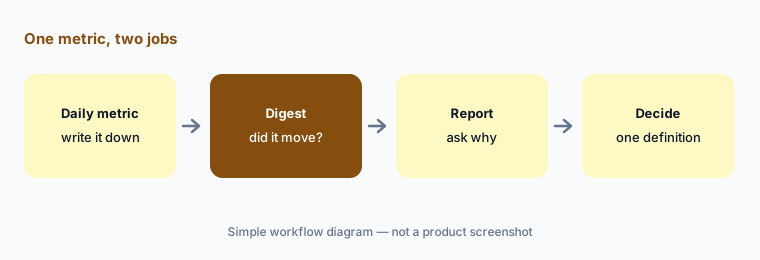
Primary workflow:
Write the one metric you check daily. If you only need its movement, try a digest; if you need to ask why, open the report.
2. What each needs before it works
What it is: Power BI Copilot: Microsoft Learn says it needs paid Fabric capacity (F2 or higher) or Power BI Premium (P1 or higher); a Pro or Premium Per User license alone isn’t enough, trial SKUs aren’t supported, and an admin must enable it. September 2026 added a semantic-model setting that lets model owners stop people with read-only access from using AI on that model (on by default). Tableau Pulse: Tableau’s pricing page says Pulse is included in every Tableau Cloud edition; Tableau Agent in Pulse (the conversational part) requires Tableau Cloud+ or the Tableau+ bundle, and Tableau’s release notes mark the newer agent features “Tableau+ or Try AI required.”
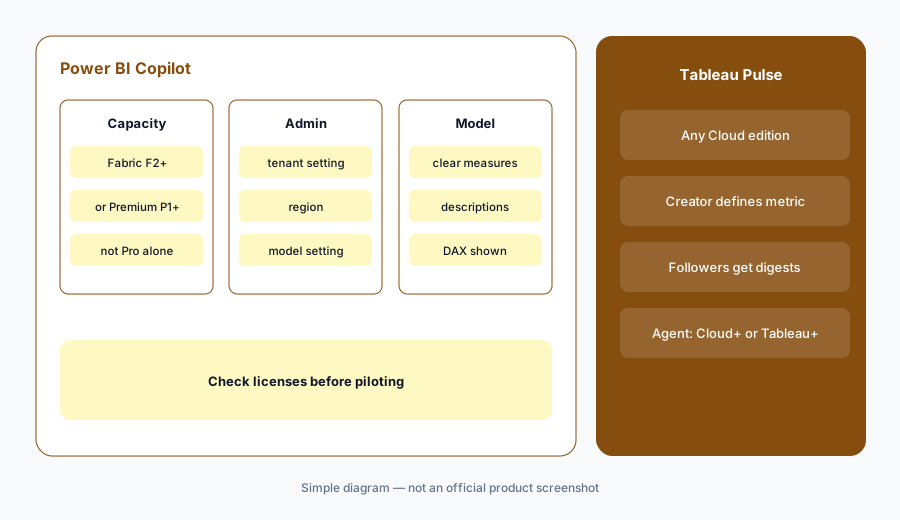
Check prerequisites:
Ask your admin two questions: do we have Fabric F2+ or Premium P1+ capacity, and which Tableau Cloud edition are we on? Write down which AI features those licenses actually unlock.
3. Checking the answer
What it is: Both tools are only as good as the model underneath. For Copilot, Microsoft’s September 2026 update to report Copilot with Fabric IQ shows the DAX and reasoning behind answers, which makes checking easier. For Pulse, the metric definition is set once by a Creator, so followers all see the same number; Tableau Agent in Pulse can then explain drivers and top or bottom contributors (default 7 dimension members, up to 50 if you ask).
Same number twice:
Pick one metric that exists in both places (or in a report and a spreadsheet). Compare the Copilot answer’s DAX with the Pulse metric definition. If they differ, settle the definition before anyone shares either number.
4. When you need neither, or both
What it is: If your five KPIs live in a spreadsheet and arrive by email, Gemini in Sheets or a scheduled email may be enough. If you’re on Google’s stack, Looker Studio with Gemini covers report narratives. Running both Copilot and Pulse only makes sense when both BI platforms are already paid for and serve different audiences.
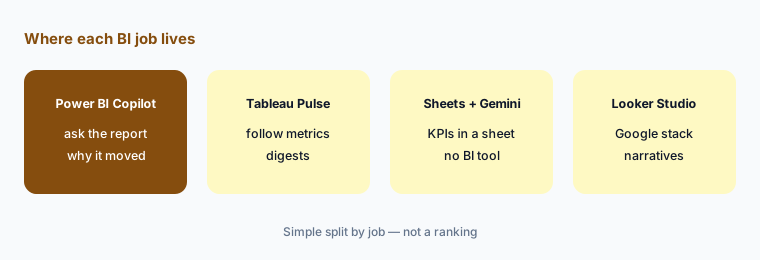
Follow the platform:
Write which BI platform your company already pays for. Use that platform’s AI first. Add the other only if a different audience needs a different job.
Pricing context (October 2026)
Power BI: Microsoft’s pricing page, read on 5 October 2026, listed Power BI Pro at $14.00 per user per month and Premium Per User at $24.00 per user per month, paid yearly. Copilot additionally needs Fabric F2+ or Premium P1+ capacity, priced separately by SKU and region; we don’t quote capacity prices.
Tableau: Tableau’s Cloud pricing page, read on 5 October 2026, listed Standard edition at $75 (Creator), $42 (Explorer), and $15 (Viewer) per user per month, and Enterprise at $115, $70, and $35, all billed annually. Tableau Cloud+ and the Tableau+ bundle are contact-sales. Pulse is included in every Cloud edition; Tableau Agent in Pulse needs Cloud+ or Tableau+.
Uncertainty: Capacity cost for Copilot depends on SKU, region, and usage; Tableau AI packaging (Cloud+, Tableau+, “Try AI”) is changing. Several Copilot surfaces are in preview. Check both live pricing pages and your admins before budgeting.
When it’s useful (honest take)
Copilot is useful when your reports live in Power BI, you have (or will buy) Fabric or Premium capacity, and people need to ask follow-up questions of a report.
Pulse is useful when you’re on Tableau Cloud, a small set of trusted metrics matters, and most people only need to know when those metrics move. Neither helps much if your metric definitions are still disputed.
Still choosing between Power BI Copilot and Tableau Pulse? The $19 AI toolkit audit gives you a written plan for which tools to keep using and which to drop across your whole AI stack, including this pair.
Prefer to do it yourself? Spreadsheet — $9
Related options (educational)
| Need | Better home | Why |
|---|---|---|
| Ask questions of a report or model | Power BI Copilot | Summaries, visuals, and DAX on capacity |
| Follow a few trusted metrics | Tableau Pulse | Digests and alerts; agent on Cloud+ |
| KPIs already in a spreadsheet | Sheets + Gemini | No BI platform needed |
| Report narratives on Google’s stack | Looker Studio + Gemini | Google-side reporting |
| Search-first BI | ThoughtSpot Spotter | Coached model for business users |
FAQ
Is Power BI Copilot or Tableau Pulse better for ops?
Neither is better in general; they do different jobs. Copilot answers questions about a report; Pulse sends digests and alerts about metrics you follow. Most teams use whichever BI platform they already pay for.
Does Power BI Copilot work with a Pro license?
Microsoft Learn says no: Copilot needs paid Fabric capacity (F2 or higher) or Power BI Premium (P1 or higher). A Pro or PPU license alone isn’t sufficient.
Is Tableau Pulse included in Tableau Cloud?
Tableau’s pricing page says Pulse is included in every Tableau Cloud edition. Tableau Agent in Pulse, the conversational part, requires Tableau Cloud+ or the Tableau+ bundle.
Can Tableau Pulse send digests to Microsoft Teams?
Yes. Tableau’s Pulse release notes from 26 August 2026 say digests and alerts can be delivered in Microsoft Teams.
Do I need both?
Only if both platforms are already paid for and serve different audiences. Otherwise, use the AI in the BI tool you have.
Optional next step (if seats overlap)
If your company pays for two BI platforms plus chat seats that all summarize the same weekly numbers, that overlap is worth mapping. Map the overlap with the $19 AI toolkit audit or the $9 AI toolkit spreadsheet.
Both pages explain what you get and how delivery works before you decide.