Tool · Data & BI · Domo · Oct 2026
Domo AI review (Oct 2026): AI chat and agents on Domo dashboards
Domo AI is the AI layer inside Domo: AI Chat answers questions about the cards and DataSets on the dashboard you’re looking at and shows the SQL it ran, and AI agent tasks in Domo Workflows draft summaries, route requests, and call tools. Both are only as good as the columns underneath. This page walks through each piece with a real job, a Try this, and the line we’d draw: AI drafts and explains, people own alerts and actions.
What this Domo AI page covers
This page is for the ops, finance, or sales manager who opens Domo dashboards every morning, and for the Domo admin or analyst who maintains them. The question it answers: if your company already runs on Domo, what can AI Chat and Domo’s agents safely take off your plate, and what should stay with the person who owns the number?
Domo splits its AI into two tiers. Everyday assists — Domo lists Beast Mode AI Assist and the AI SQL Assistant — stay included in your contract. Domo AI Pro covers consumption-priced features: AI agent tasks in Workflows, Magic ETL text generation, sentiment and classification tiles, AI Playground, AI in Jupyter, and direct AI Services calls. AI Chat is billed on its own credit rate, and Domo’s October 2026 notes say it now draws on the AI Pro consumption model (more on that in pricing).
Facts come from Domo’s documentation (including the page Domo now titles “AI Chat v1”), its September 2026 release notes and the 1 October fast-follow update, its AI Pro and Workflows docs, its pricing page, and its Consumption Supplemental Terms, as we read them on 5 October 2026.

Major features (with how someone uses them)
Examples at a glance: each feature has a concrete example from a real job plus a short Try this you can run this week.
1. Ask AI Chat why a card moved (primary)
What it is: Open a dashboard, card, DataSet, or App Studio app and select AI Chat in the Domo navigation. Chat is context-aware: it uses the cards and DataSets on the page you’re viewing. Each answer comes with a written statement and a visualization, and the Process steps show what it did — looking up the DataSet, generating the SQL, running the query, building the chart — each expandable to the DataSet link and the exact SQL. The Sources list shows which cards and DataSets it used, and the Focus dropdown lets you add, remove, or pin sources.
“Why did this move?” is where chat is most tempting and most risky: the model can offer plausible reasons that no column supports. Domo’s process steps make that checkable — a reason is only as good as the query behind it. Users need the Use AI Services and Use AI Chat grants; admins can turn chat off for everyone in Admin > Settings > AI Service Layer.
close_date count and one opportunity row. The third has no column at all, so she deletes it before forwarding the answer.
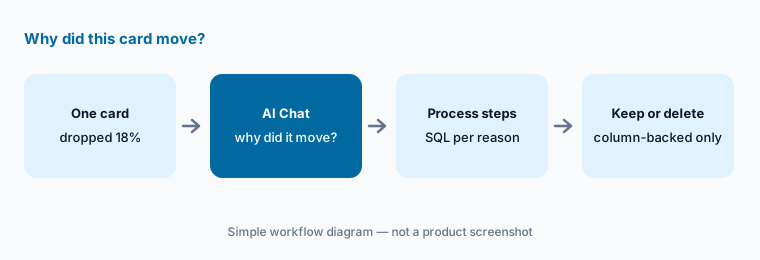
Primary workflow:
Pick one Domo card. Ask why it moved. Delete any reason not backed by a column you can open. Then expand Process steps and copy the SQL for each reason you kept into your note.
2. October 2026 chat update: more sources, more checking
What it is: Domo’s 1 October 2026 fast-follow notes say AI Chat can now handle complex, multi-part questions and questions that span multiple DataSets, works with Documents (unstructured files), can show and create visualizations, accepts uploaded files, pasted images, and @mentions as extra context, and has access to the Knowledge Base. One limit Domo states plainly: cross-DataSet joins and unions still aren’t supported — chat queries each DataSet on its own and then synthesizes the results.
That synthesis step is where to slow down. When an answer combines, say, a bookings DataSet and a support-tickets DataSet, there was no join — the model put two separate results side by side and wrote a sentence connecting them. Check that both queries used the same date range and the same definition of “customer” before you believe the connection.
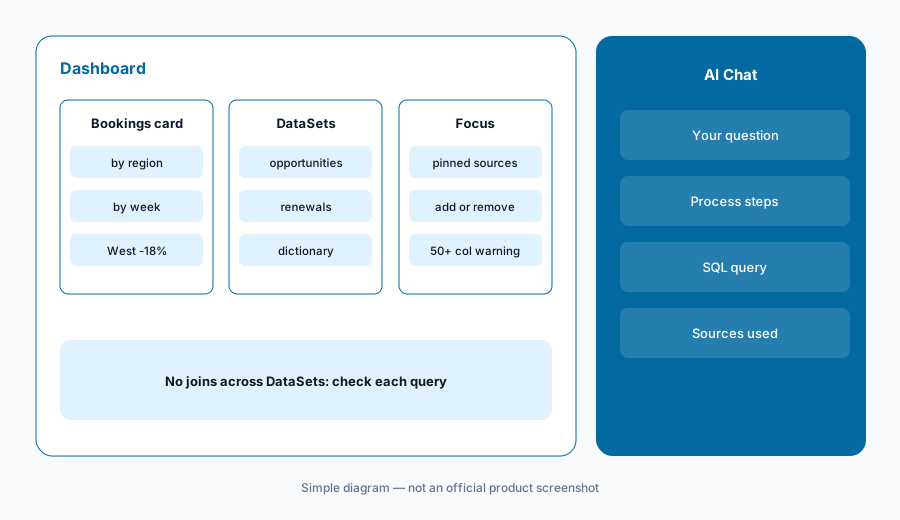
Check the synthesis:
Ask one question that needs two DataSets. Open the process steps for each query and write down its date filter and its customer or account key. Only share the answer if both match.
3. Data dictionaries and column descriptions
What it is: Domo’s chat reads your metadata, so the cheapest accuracy gain is better column names and descriptions. Domo’s AI Chat docs warn that for DataSets with more than 50 columns and no defined Data Dictionary, a “Not all columns used!” prompt appears under Sources — chat may simply not see the column you care about. Domo points to its AI Readiness article for defining a dictionary.
September 2026 brought two related changes. For Snowflake-backed data, the Schema tab can now sync column descriptions from Snowflake to give Domo AI more context (descriptions you edit in Domo stay in Domo; turning it on replaces hand-entered descriptions, and Domo says to contact your account team to enable it). And Domo’s data modeling is now integrated across Analyzer, App Studio, and Dashboards, so one semantic model can drive cards and filters.
gm_adj_v2. She adds a dictionary entry — “Gross margin after returns, in USD; use for any margin question” — and renames the display label. The next margin question picks the right column, and the Sources warning goes away.
Fix one DataSet:
Find the DataSet behind your most-used dashboard. If it has more than 50 columns, write dictionary descriptions for the ten columns people ask about most. Ask the same question before and after and compare the SQL.
4. AI agent tasks in Workflows: drafts, not decisions
What it is: In a Domo Workflow, Add action > AI Agent Task opens an agent builder. You write a prompt (with workflow variables), instructions for the agent’s role, and choose tools — Domo global functions, external functions, custom Code Engine functions, or other workflows. The Knowledge tab takes up to five DataSets, five FileSets, and five Files. You define output parameters, click Test Agent to see the data it accessed, its steps, and its output, then map outputs to later steps. Domo notes agents in a workflow step have a one-hour limit and recommends retesting several times for consistent results.
Domo’s own example lets an agent qualify a sales lead, assign it to a rep, and send notifications — all in one step. We’d split that: let the agent write its recommendation and reason to an output, and put a person (or at least a reviewed rule) between that output and anything that emails a customer or reassigns work. Agent tasks are an AI Pro feature, so each sub-call counts as an operation plus tokens.
qualifies, reason, and suggested_rep. Instead of letting it email reps directly, the workflow writes those outputs to a review DataSet. The sales manager approves assignments each morning and spot-checks five reasons a week.
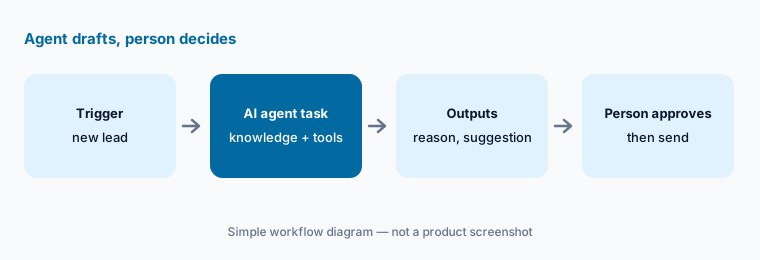
Keep a person in the step:
Build one agent task that only writes outputs — no tools that send or update. Run Test Agent on ten past cases and compare its reason field to what a person decided. Add an action tool only after it matches most of them.
5. Alerts and MCP: humans own the thresholds
What it is: Domo alerts on cards and DataSets are how numbers reach people without anyone opening a dashboard. That makes them the place to be strict about who decides. Domo’s September 2026 notes add an MCP trigger so AI tools can start a deployed workflow (the execution details show when AI started it), and a Beta MCP Toolkits – Alerts and Workspaces offering that lets Domo AI agents create, read, update, and delete alerts and workspaces. Domo says every tool respects the calling user’s access.
Permission-aware is necessary but not sufficient: an agent acting as an admin can still create a noisy alert. Decide in advance which alerts an AI may draft and who signs off on thresholds, and check the workflow execution details for AI-started runs.
Own one alert:
List the five alerts your team relies on. For each, write the owner, the threshold, and why that threshold. If an AI tool created any of them, review the threshold against the last 90 days before keeping it.
6. Watch credits, and where Domo AI fits
What it is: Because Domo bills by consumption, AI usage shows up in credits, not seats. Admins with the View Credit Reports grant can open Admin Settings > Company Settings > Credit Utilization > Rate Card to see the SKUs and credit rates for each AI feature and model, and Domo offers a credit usage stats report with AI fields. Domo’s AI Pro doc gives rough token sizes — a text-to-SQL prompt in AI Playground around 2,600 input and 40 output tokens; 300,000 rows through a Magic ETL text-generation tile around 4 million input tokens.
As for fit: Domo AI makes the most sense when Domo already holds the dashboards and DataSets, because chat works on what’s already there. If your reports live in Power BI, Tableau, or Qlik, those tools’ own assistants sit closer to the data.
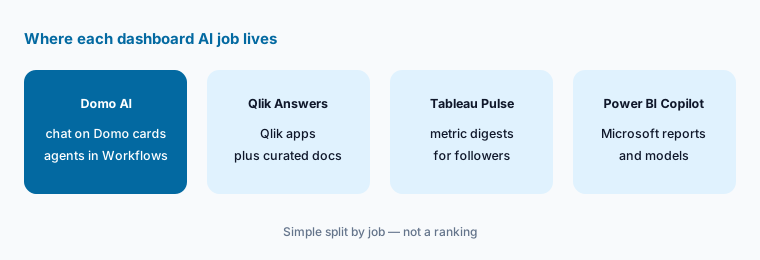
Price one feature:
Open the Rate Card with your admin. Pick one AI feature you plan to use, run it on a small sample, and multiply out a month of usage in credits. Decide the monthly limit before you schedule it.
Pricing context (October 2026)
Domo does not publish dollar prices. domo.com/pricing (checked 5 October 2026) offers a 30-day free trial (full platform, unlimited users, no credit card) and custom pricing through sales, built on consumption credits with no per-user charges. Credits are bought as a pool for the contract term (Domo says typically one to three years) at a contract rate set in your service order; Domo also lets you buy through cloud marketplaces. The older Freemium plan (300 credits a month) is closed to new sign-ups.
Domo’s Consumption Supplemental Terms list AI rates in credits: AI Chat requests 0.2 credits per request (effective 1 January 2025); AI Pro operations 0.01 credits per operation plus model tokens for Domo-provided models at a rate shown on your Rate Card (customer-provided models don’t consume token credits); and, from 1 August 2026, credits for Documents storage, Agent Knowledge processing, and Agent Knowledge queries. Platform activity also uses credits — for example, 1 credit per table ingested or updated and 1 per Magic ETL output table.
Uncertainty: We can’t tell you what a Domo credit costs: it’s set per contract. AI Chat’s rate is also in flux — the terms page still lists 0.2 credits per request, Domo’s AI Pro doc says chat keeps its existing rate until it’s fully integrated into AI Pro, and the 1 October 2026 notes say AI Chat now draws on the AI Pro consumption model. Ask Domo which applies to your contract, what your per-credit rate is, and what the Rate Card shows for the models you’ll use.
When it’s useful (honest take)
Useful when Domo already holds your dashboards and DataSets, someone maintains data dictionaries, and your team wants quick, checkable answers about the cards they already look at. AI Chat’s process steps and SQL make answers verifiable, and agent tasks can draft summaries or recommendations inside workflows you already run.
Less useful when your key DataSets are wide and undocumented — chat may not see the right column. Less useful when you need joined analysis across DataSets (chat doesn’t join; it synthesizes), when you need a dollar price before a sales call, or when nobody is willing to own alert thresholds and agent outputs.
Paying for Domo AI and a few other AI tools? The $9 AI toolkit spreadsheet lists every AI subscription you have, what each one costs, and how fast it pays for itself, so you can see which ones are worth the money.
Want someone to do it for you? AI toolkit audit — $19
Related options (educational)
| Need | Better home | Why |
|---|---|---|
| Chat and agents on existing Domo dashboards | Domo AI (this page) | Works on the cards and DataSets you already have |
| Documents plus Qlik apps with citations | Qlik Answers | Curated knowledge bases inside Qlik Cloud |
| Metric digests pushed to people | Tableau Pulse | Followed metrics with plain-English summaries |
| Reports already in Microsoft Power BI | Power BI Copilot | Copilot on reports and semantic models |
| Plain-English questions in the warehouse | Snowflake Cortex or Databricks Genie | Assistant lives where the data lives |
| Workflow automation outside a BI tool | Zapier or n8n | Triggers and approvals across many apps |
FAQ
What does Domo AI Chat do?
It answers plain-English questions using the cards and DataSets on the dashboard or app you’re viewing, and shows its process steps — the DataSet it used, the SQL it generated, and the query it ran — plus a visualization. Since 1 October 2026 it can also handle multi-part questions, several DataSets (without joining them), and Documents.
Can Domo AI Chat join two DataSets?
No. Domo’s October 2026 notes say cross-DataSet joins and unions still aren’t supported; chat queries each DataSet independently and synthesizes the results. Check that each query used the same filters before trusting a combined answer.
How much does Domo AI cost in October 2026?
Domo doesn’t publish dollar prices; it sells consumption credits at a contract rate, with a 30-day free trial. Its terms list AI Chat at 0.2 credits per request and AI Pro at 0.01 credits per operation plus model tokens, though Domo’s 1 October 2026 notes say AI Chat now uses the AI Pro consumption model. Ask Domo for your rate.
What are Domo AI agent tasks?
They’re steps in Domo Workflows where an AI agent follows your prompt and instructions, uses tools such as Code Engine functions or other workflows, references up to five DataSets, FileSets, and Files, and returns defined outputs. Each has a one-hour limit and is billed as AI Pro usage.
Why does Domo AI Chat miss columns in my DataSet?
Domo’s docs say that for DataSets with more than 50 columns and no Data Dictionary, a “Not all columns used!” notice appears under Sources. Add dictionary descriptions for the columns people ask about, and use the Focus dropdown to pick the right sources.
Optional next step (if seats overlap)
If your team pays for Domo credits, a separate BI tool’s AI add-on, and a general AI chat that all summarize the same weekly numbers, that overlap is worth mapping before the next renewal. Map the overlap with the $19 AI toolkit audit or the $9 AI toolkit spreadsheet. Email Audit $19 or Toolkit spreadsheet $9.
Checkout is live via Stripe. After you pay, we email delivery (spreadsheet) or intake next steps (audit).