Tool · Asset & work management · IBM Maximo · Oct 2026
IBM Maximo AI review (Oct 2026): AI for enterprise asset management and work management
IBM Maximo Application Suite (MAS) is enterprise asset management for plants, utilities, transit, and facilities. Its AI shows up in several places: Maximo Assistant (a natural-language assistant built on watsonx.ai), scheduling and dispatch optimization, anomaly detection on sensor data, and Maximo Visual Inspection. This page is about using those suggestions on a real work queue while the planner and asset owner still decide what moves. Each section has a Try this.
What this IBM Maximo page covers
This page is for a maintenance planner, reliability engineer, or asset owner who runs Maximo or is weighing it against a lighter CMMS. The question it answers: where Maximo’s AI helps with today’s work queue, what the assistant can and cannot do in your version, what IBM publishes about price, and who has to sign off before an AI suggestion changes the plan.
IBM’s AI for asset management page (read 12 October 2026) describes AI across maintenance, field execution, reliability, and planning: plain-language asset history, anomalies explained in plain words, help prioritizing work, AI lease abstraction for real-estate documents, and incident categorization for safety teams. The field service page adds scheduling and dispatch optimization with more than 600 configurable parameters and Maximo Assistant on mobile. IBM’s AI Service documentation explains that these features run through an add-on called AI Service, backed by watsonx.ai.
Ground rules: an AI-prioritized queue is a draft until the planner checks it against outages, permits, and parts; the asset owner approves any change to a critical asset’s work; Maximo Assistant answers are checked against the record before anyone acts on them; and no plant drawings or personal data go into a general chat tool. Facts below come from IBM’s own pages as read on 12 October 2026; IBM’s marketing statistics are not repeated.

Major features (with how someone uses them)
Examples at a glance: each feature has a concrete example from a real job plus a short Try this you can run this week.
1. Prioritize today’s work for one site (primary)
What it is: Maximo brings work, asset, and operational data together so AI can suggest which work orders matter most today and how to fit them to available crews. IBM describes this as help to “prioritize work, allocate resources” and optimize schedules. The suggestion does not know about every planned outage, permit window, or lockout your operations team agreed last week — that is the planner’s job.
Treat the AI order as a first pass. Anything that touches a planned outage, a permit, or a shared crew goes back to the planner.
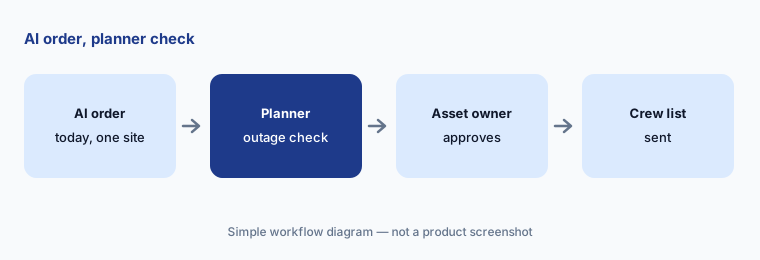
Primary workflow:
Ask Maximo’s AI to prioritize today’s work for one site. Have the planner reorder anything that conflicts with a planned outage.
2. Maximo Assistant: ask your asset data in plain language
What it is: Maximo Assistant is IBM’s generative AI chat inside Maximo, built with watsonx.ai. IBM’s documentation says what it can do depends on your version: in MAS 9.1 it retrieves data about assets, work orders, and service requests; in MAS 9.2 it can also act as an agentic assistant that completes specific tasks and is available in Maximo Mobile when connected. Older material sometimes says “Maximo Assist” — that is a separate, older application still listed in IBM’s pricing table, not the chat assistant.
Ask questions you can check: which work orders are missing job plans, which assets had repeat failures this quarter. Open the records before you act.
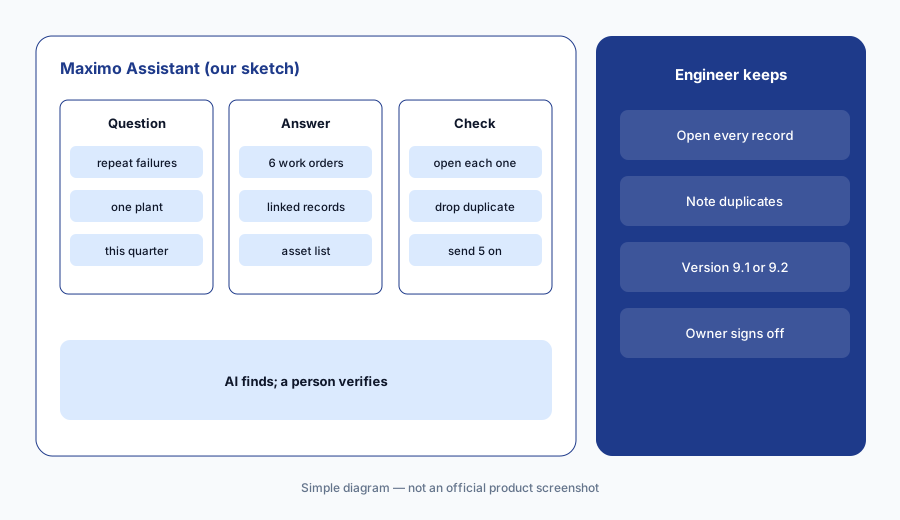
Ask, then open the records:
Ask Maximo Assistant one question about repeat failures at one site. Open every record it returns before you act on the list.
3. Anomaly detection and condition signals
What it is: Maximo’s asset performance tools (Monitor, Predict, Health) use sensor and meter data to spot abnormal behavior and support condition-based maintenance. IBM’s AI page says abnormal behavior is “explained in plain language.” An anomaly is a reason to inspect, not proof of a failure — sensors drift, meters get swapped, and a process change can look like a fault.
Write which anomaly types create a work order automatically and which wait for a reliability engineer.
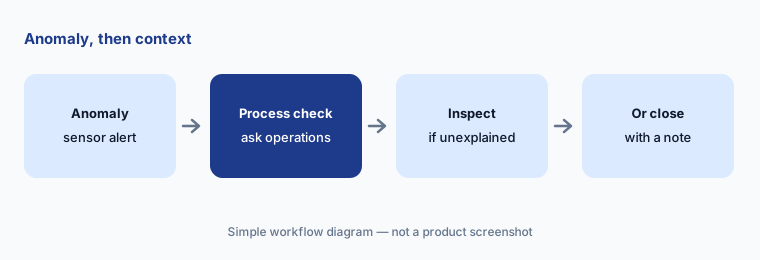
Check the process first:
For the next anomaly alert on a critical asset, ask operations whether anything changed that day before a work order is created.
4. Maximo Visual Inspection
What it is: Maximo Visual Inspection (MVI) analyzes images and video from cameras, drones, and mobile devices to flag defects such as corrosion or cracks. On IBM’s pricing page, Inspection is its own Essentials option with limits on devices, inferences per hour, and storage. A model trained on last year’s photos can miss a new defect type, so an inspector reviews flagged and unflagged samples.
Keep a small set of known-good and known-bad photos to re-check the model after any change.
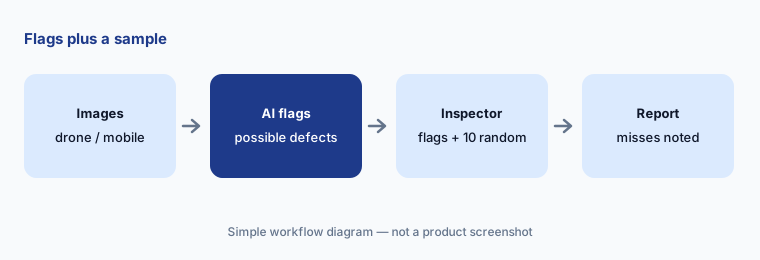
Sample the misses:
On one inspection run, review every AI-flagged photo plus ten unflagged photos at random. Note any defect the model missed.
5. Field service: dispatch and emergency work
What it is: Maximo Field Service Management is built into MAS. IBM describes constraint-based scheduling (skills, SLAs, travel time, parts, asset criticality, regulations) and recommendations for who should take emergency work. For a company that sends technicians to customer sites, this sits next to tools like Salesforce Field Service AI — Maximo leans toward asset-heavy operators running their own equipment.
When AI suggests reassigning a crew to emergency work, the dispatcher confirms the crew holds the right permits and that the bumped job is safe to delay.
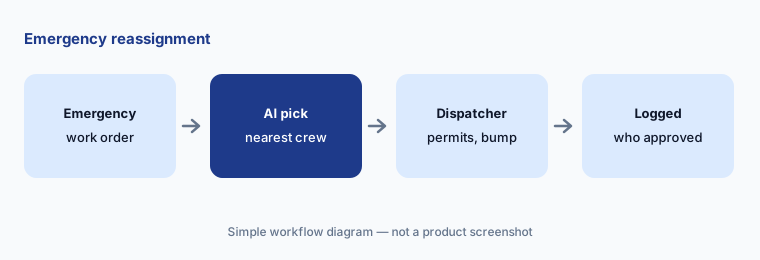
Log the bump:
The next time AI reassigns a crew to emergency work, write which job was bumped, why it was safe to delay, and who approved it.
6. AppPoints pricing and who approves AI changes
What it is: Maximo is licensed in AppPoints, credits that each app and user type draw from. IBM publishes starting prices for the Essentials options and quotes the larger Standard and Premium packages. IBM’s documentation says AI Service includes a limited watsonx.ai license and costs additional AppPoints, so ask for the AI line separately. Write down who may approve an AI-driven change to a critical asset’s work before the assistant is turned on.
Ask for two quotes side by side: with AI Service and without, at the same user count.
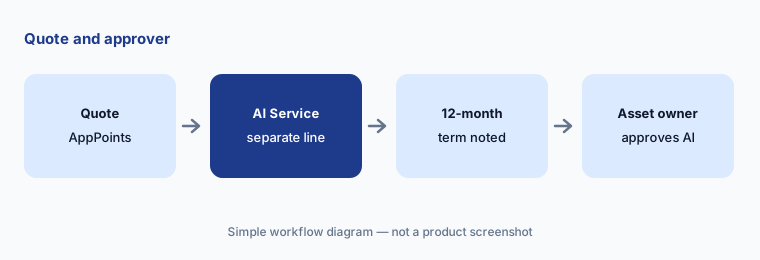
Quote + approver:
Request a Maximo quote with and without AI Service at your user count. Name the asset owner who approves AI-prioritized work changes.
Pricing context (October 2026)
IBM’s Maximo pricing page (read 12 Oct 2026) lists MAS as SaaS (Essentials, Standard, Premium) or client-managed software, licensed in AppPoints. Essentials Maintenance starts under US$40K per year (150 AppPoints, one environment, up to 25 users); Inspection starts under US$47K; Space Management, Capital Planning, and Lease Management each start under US$40K; Inventory Optimization starts under US$40K plus a service package.
Standard, Premium, and client-managed software have no published price — IBM points to its price estimator or a quote. Subscriptions are a minimum 12-month, non-cancellable term. IBM offers a guided trial for Manage and Health. AI Service (which powers Maximo Assistant) uses additional AppPoints per IBM’s documentation; the AppPoint cost is not listed on the pricing page.
Uncertainty: Which AI features you get depends on your MAS version (9.1 vs 9.2), whether AI Service is installed, and your AppPoint balance — confirm in writing. IBM pages use several names (Maximo Assistant, AI Service, watsonx.ai, Maximo Assist); this page uses IBM’s current ones as of 12 Oct 2026. Starting prices are IBM’s “under” figures, not a quote. IBM’s productivity statistics are not repeated here.
When it’s useful (honest take)
Useful when you run many critical assets across sites, already keep asset and work history in Maximo, and have planners and asset owners who will check AI suggestions against outages and permits.
Less useful when you are a small team that needs a simple work-order app (look at Limble AI or UpKeep AI), your asset data is thin, or nobody owns sign-off on AI-driven queue changes.
Paying for IBM Maximo AI and a few other AI tools? The $9 AI toolkit spreadsheet lists every AI subscription you have, what each one costs, and how fast it pays for itself, so you can see which ones are worth the money.
Want someone to do it for you? AI toolkit audit — $19
Related options (educational)
| Need | Better home | Why |
|---|---|---|
| Enterprise asset and work management | IBM Maximo AI (this page) | AppPoints; Essentials from under US$40K/yr |
| Facilities and building ops agents | Facilio AI | Quote-only; Atom agents |
| Field service for customer sites | Salesforce Field Service AI | Published per-user list prices |
| Fleet telematics insights | Geotab AI | Geotab Ace in MyGeotab |
| Mid-market CMMS | Fiix AI · MaintainX AI | Lighter setup |
| General chat for sanitized SOP drafts | ChatGPT · Claude | No live asset data |
FAQ
What is the AI in IBM Maximo called in October 2026?
The chat assistant is Maximo Assistant, built with watsonx.ai and enabled through the AI Service add-on. Other AI features include work prioritization and scheduling help, anomaly detection, and Maximo Visual Inspection (checked 12 October 2026).
Is Maximo Assist the same as Maximo Assistant?
No. Maximo Assist is an older application that still appears in IBM’s pricing table. Maximo Assistant is the generative AI chat; what it can do depends on whether you run MAS 9.1 (data retrieval) or 9.2 (agentic tasks and mobile).
How much does IBM Maximo cost?
IBM’s pricing page lists Essentials options starting under US$40K per year (Inspection under US$47K), licensed in AppPoints with a 12-month minimum. Standard, Premium, and client-managed packages are quoted. AI Service uses additional AppPoints.
Can Maximo’s AI change the work plan on its own?
Treat AI prioritization as a draft. Have the planner check it against outages, permits, and parts, and have the asset owner approve changes to critical asset work before crews get the list.
Is Maximo a field service tool?
It includes Maximo Field Service Management for crews working on your own assets. For service companies sending technicians to customer sites, also look at Salesforce Field Service AI.
Optional next step (if seats overlap)
If you pay for an EAM, a separate scheduling tool, and chat seats that all summarize the same work orders, that overlap is worth a look. Map the overlap with the $19 AI toolkit audit or the $9 AI toolkit spreadsheet. Email Audit $19 or Toolkit spreadsheet $9.
Checkout is live via Stripe. After you pay, we email delivery (spreadsheet) or intake next steps (audit).