How-to · Maintenance · IBM Maximo · Oct 17, 2026
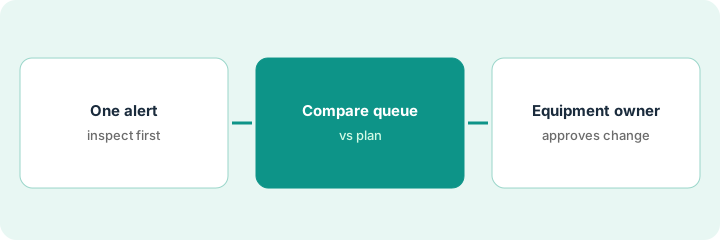
Review Maximo's AI work prioritization, and have the equipment owner approve every queue change
IBM Maximo can suggest which work orders matter most today and flag abnormal equipment behavior. The suggestion does not know about every planned outage or permit window. This page shows how to read one alert, compare the AI queue with the plan, and have the equipment owner approve every change.
Who this is for
Maintenance planners, reliability engineers, and equipment owners at plants and utilities on IBM Maximo Application Suite. For Facilio's Mira helpdesk and AI-triggered work orders — a different job — see Facilio Mira work order approval.
How to do it
This is a how-to, not a ranking of maintenance systems. Per the IBM Maximo AI review, Maximo brings work and equipment data together so AI can suggest work priorities; anomaly detection flags abnormal behavior from sensor and meter data; and Maximo Assistant (built with watsonx.ai) depends on the AI Service add-on and your MAS version. The ground rule: the equipment owner approves every AI-driven queue change.

1. Read one anomaly alert
What it is: Open one anomaly alert and decide whether it needs an inspection, not a repair.
- Pick one alert on important equipment.
- Check for sensor drift, meter swaps, or a process change.
- Look at the equipment's recent work history.
- Name the equipment owner who approves queue changes.
An alert flags rising vibration on a pump. The reliability engineer sees a meter was replaced last week and the baseline shifted. She schedules an inspection instead of a repair.
Write the alert, likely causes, and your decision in one note.
2. Compare the AI-prioritized queue with the current plan
What it is: Put today's AI-prioritized queue next to the planner's schedule and mark differences.
- List work orders the AI moved up or down.
- Check each against planned outages, permits, and shared crews.
- Ask Maximo Assistant a question you can check, such as which work orders lack job plans.
- Open the records before acting on any answer.
The AI moves a valve repair ahead of a planned filter change. The valve sits in a section with a permit window next Tuesday, so the planner keeps the original order.
Mark each difference: accept, reject, or ask the owner.
3. Equipment owner approves reprioritization
What it is: The equipment owner approves any change the AI suggests before crews are reassigned.
- Approve or reject each queue change.
- Confirm crews hold the right permits for emergency moves.
- Check the bumped job is safe to delay.
- Log approvals and reasons.
- Review AI suggestions vs outcomes monthly.
The owner approves two changes and rejects one. A monthly review shows the AI's order matched the planner's 70% of the time.
Keep a queue log: work order, AI position, approved position, approved by, reason.
Pricing context (October 2026)
This how-to isn't a price sheet. Per the IBM Maximo AI review and IBM's Maximo pricing page (checked Oct 17, 2026), Essentials Maintenance starts under US$40K a year; Standard and Premium are quoted. AI Service, which powers Maximo Assistant, uses additional AppPoints. Dated October 2026.
Checked Oct 17, 2026 on the vendor’s own pricing page: IBM’s Maximo pricing page lists Essentials Maintenance starting under US$40K per year; Standard, Premium, and client-managed software are quoted. AI Service, which powers Maximo Assistant, uses additional AppPoints.
Uncertainty: The only prices this site sells here are the optional $9 AI toolkit spreadsheet and $19 AI toolkit audit.
When this helps (honest take)
Useful when you run maintenance on Maximo with sensors on important equipment and a planner who owns the schedule.
Not useful when you run a building helpdesk rather than plant maintenance — see the Facilio how-to — or sensor data is too patchy to trust.
Related options (educational)
| Need | Where to look | Why |
|---|---|---|
| IBM Maximo AI features | IBM Maximo AI | Primary path |
| Facilio Mira work orders | Facilio Mira work order approval | A different job |
| Work order insights | Fiix work order insights | Planner review |
| IT ops stack map | Stack map: IT ops | Related stack |
FAQ
How is this different from the Facilio how-to?
A different job: this page is AI work prioritization approved by the equipment owner. The Facilio page is Mira helpdesk requests and AI-triggered work orders approved by the facilities manager.
Does Maximo Assistant come with every plan?
Per IBM's documentation in our review, it depends on the AI Service add-on, which costs additional AppPoints, and on your MAS version.
Where do Maximo prices live?
Essentials options start under US$40K a year on IBM's page; larger packages are quoted. Our Oct 17, 2026 check of the vendor’s own pricing page is summarized in the pricing section above.
Is Maximo Assist the same as Maximo Assistant?
No. Per our review, Maximo Assist is an older separate application; Maximo Assistant is the watsonx.ai chat inside Maximo.
Optional next step
If you want a one-page toolkit map for the tools you already pay for, use the optional $9 AI toolkit spreadsheet. If you want a short review of seat waste and unused tools, use the optional $19 AI toolkit audit. Neither is required to follow this how-to.