How-to · Facilities · Facilio · Oct 17, 2026
Let Facilio's Mira take helpdesk calls, and have the facilities manager approve every AI-triggered work order
Facilio's Mira answers helpdesk calls and messages and turns them into service requests, and FM Copilot can create, close, or reschedule work orders. The most common error is a duplicate — two occupants reporting the same broken lift. This page shows how to script Mira, review what it creates, and have the facilities manager approve every work order.
Who this is for
Facilities and real-estate operations teams on Facilio's maintenance platform who are trying the Atom agents. For IBM Maximo's AI work prioritization with the equipment owner approving queue changes — a different job — see Maximo AI work queue approval.
How to do it
This is a how-to, not a ranking of maintenance systems. Per the Facilio AI review, Mira takes requests by phone, chat, email, and WhatsApp, detects urgency, and can trigger a callback; FM Copilot can close work orders, add comments, or reschedule jobs; and Luca checks invoices. The ground rule: the facilities manager approves every AI-triggered work order.

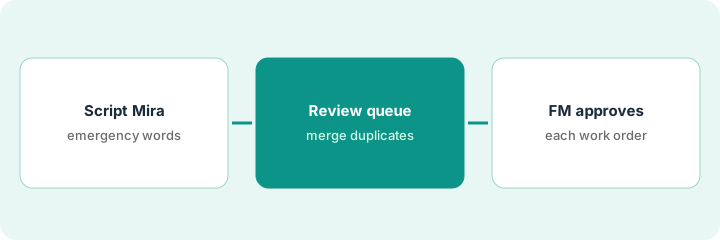
1. Script Mira's most common request types
What it is: Write the request types Mira should handle and the emergency words that always page a person.
- List the five most common requests (lighting, HVAC comfort, lifts, leaks, access).
- Write the required fields for each.
- Write the emergency word list: 'flooded', 'smoke', 'trapped' always page on-call.
- Name the facilities manager who approves work orders.
The FM team lists five request types and an emergency list. 'Lift stuck with people inside' always pages the on-call engineer, whatever Mira decides.
Put request types, fields, and the emergency list on one page.
2. Route Mira's requests into the work order queue for review
What it is: Let Mira create service requests, and review them daily before they become dispatched work orders.
- Check each new request for duplicates: same equipment, floor, symptom, short time window.
- Merge or cancel duplicates before a technician is sent twice.
- Limit FM Copilot's actions: no closing work orders without a supervisor.
- Keep emergency calls on the paging path, not the review queue.
Mira logs three requests about the same lift within 20 minutes. The coordinator merges them into one work order before dispatch.
Review a sample of Mira's requests every morning and tick merged, kept, or cancelled.
3. Facilities manager approves each work order
What it is: The facilities manager approves AI-triggered work orders before dispatch and reviews closures weekly.
- Approve or edit each AI-triggered work order.
- Check any work order FM Copilot wants to close has a technician note.
- Review Luca-matched invoices by sample, not only flagged ones.
- Log approvals and duplicates found.
- Adjust Mira's script when the same mistake repeats.
The manager approves 22 work orders, rejects one duplicate, and refuses a closure with no technician note. Mira's script gets a new question to tell lifts apart.
Keep a weekly log: AI-triggered work orders, approved, merged, closures refused.
Pricing context (October 2026)
This how-to isn't a price sheet. Per the Facilio AI review, Facilio's pricing page lists Standard, Essential, and Enterprise with no prices, and the Atom agents are credit-based with no public credit price. Treat it as quote-only. Dated October 2026.
Checked Oct 17, 2026 on the vendor’s own pricing page: Facilio shows no public list price. Facilio’s pricing page lists Standard, Essential, and Enterprise with feature lists and a request for a custom quote; the Atom agents are credit-based with no public credit price. This page quotes no Facilio dollar figure; confirm what your contract includes with Facilio or your admin.
Uncertainty: The only prices this site sells here are the optional $9 AI toolkit spreadsheet and $19 AI toolkit audit.
When this helps (honest take)
Useful when you run a building portfolio on Facilio with a busy helpdesk and a facilities manager who owns dispatch.
Not useful when you run equipment-heavy plant maintenance on Maximo — see the Maximo how-to — or nobody reviews the request queue daily.
Related options (educational)
| Need | Where to look | Why |
|---|---|---|
| Facilio AI features | Facilio AI | Primary path |
| Maximo AI work queues | Maximo AI work queue approval | A different job |
| Maintenance planning | MaintainX planner approval | Preventive work |
| IT ops stack map | Stack map: IT ops | Related stack |
FAQ
How is this different from the Maximo how-to?
A different job: this page is Mira helpdesk requests and AI-triggered work orders approved by the facilities manager. The Maximo page is AI work prioritization approved by the equipment owner.
Should FM Copilot close work orders on its own?
Not in this routine. Closing a work order without a technician note hides repeat failures; a supervisor approves closures.
Where do Facilio prices live?
Facilio publishes no prices; ask for a quote and an agent-credit estimate at your call volume. Our Oct 17, 2026 check of the vendor’s own pricing page is summarized in the pricing section above.
Does Mira replace the service desk team?
Per our review, Facilio positions Mira above your maintenance system, not as a replacement for the service desk team.
Optional next step
If you want a one-page toolkit map for the tools you already pay for, use the optional $9 AI toolkit spreadsheet. If you want a short review of seat waste and unused tools, use the optional $19 AI toolkit audit. Neither is required to follow this how-to.