How-to · Maintenance · MaintainX · Oct 14, 2026
Draft preventive maintenance in MaintainX and have the planner approve every AI-created routine
MaintainX Assist can draft procedures, and Smart Time Estimates suggest how long work takes from your history. An AI procedure isn't safe preventive maintenance until the planner edits it against how your site actually works. This page shows how to draft one routine with AI and put the planner's approval between the draft and the schedule.
Who this is for
Maintenance planners, reliability leads, and facilities managers on MaintainX who want to build preventive maintenance faster. The job here is one routine with a planner's approval. For a weekly business number checked by hand, see a different job: Ask Housecall Pro's Analyst one weekly question.
How to do it
This is a how-to, not a ranking of maintenance software. Per the MaintainX AI review, MaintainX Assist (Enterprise) helps generate procedures, and Smart Time Estimates are AI estimates from historical work-order data. The review's ground rules: an AI procedure isn't safe until the planner edits it, and Smart Time Estimates are history-based guesses, not promises.

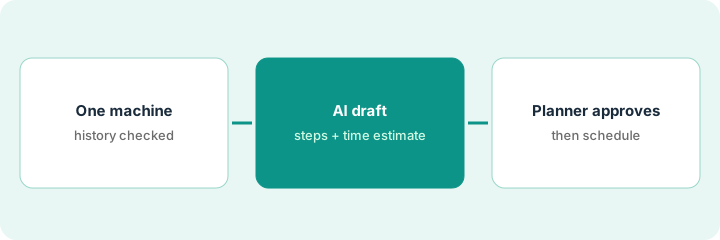
1. Step 1 — Pick one machine and check its history
What it is: Choose one machine that needs a regular routine and has some work-order history. The history feeds the time estimate and tells the planner what actually goes wrong.
- Pick one machine with at least five past work orders.
- Read the last five: what was done, how long it took, what parts were used.
- Note anything the history misses (travel, permits, cleanup).
- Name the planner who approves.
The planner picks a packing-line conveyor. The last five jobs averaged three and a half hours including cleanup, which the work orders logged inconsistently.
Write the average real duration of the last five jobs, including cleanup and lockout time, before you look at any AI estimate.
2. Step 2 — AI drafts the procedure and a time estimate
What it is: Ask Assist to draft the procedure for the machine and read the Smart Time Estimate. Treat both as drafts. Mark every step that doesn't match your site.
- Ask Assist for a procedure for this machine.
- Mark steps that don't match your site (tools, lockout, sequence).
- Read the Smart Time Estimate and compare with your own average.
- Note where the estimate comes from.
Assist drafts twelve steps, including a lubrication step for a bearing type the conveyor doesn't use. Smart Time Estimates suggests two hours; the planner's own average was three and a half.
Put the AI estimate and your own average side by side. If they differ by more than half an hour, use yours and note why.
3. Step 3 — The planner approves, then schedules
What it is: The planner edits the procedure, sets the duration, and approves it before it's scheduled or assigned. Per the review, never assign an AI-drafted procedure to critical equipment on the first pass without a walkdown.
- Delete or rewrite steps that don't match.
- Add site-specific safety steps (lockout, permits).
- Set the duration from history, not just the estimate.
- Walk down the procedure with a technician for critical equipment.
- Approve and schedule.
The planner removes the wrong lubrication step, adds lockout, books four hours with a note that the estimate excluded cleanup, walks it down with the line technician, and only then schedules it monthly.
Add a line at the top of each AI-drafted procedure: "Approved by [planner], [date]; walked down: yes/no." Schedule nothing without it.
Pricing context (October 2026)
This how-to isn't a price sheet. Per the MaintainX AI review, MaintainX publishes per-user prices for Basic, Essential, and Premium, with Enterprise custom; MaintainX Assist and Report Builder AI are listed with Enterprise. Dated October 2026.
Checked Oct 14, 2026 on the vendor’s own pricing page: MaintainX’s pricing page lists Basic at $0, Essential at $20 per user per month billed annually ($25 monthly), and Premium at $65 per user per month billed annually ($75 monthly), with Enterprise custom; MaintainX Assist is listed with Enterprise.
Uncertainty: Confirm where Smart Time Estimates sit for your plan in your own account. Implementation services and some integrations may cost extra. The only prices this site sells here are the optional $9 AI toolkit spreadsheet and $19 AI toolkit audit.
When this helps (honest take)
Useful when you have many machines without written routines, some work-order history, and a planner who can review drafts each week.
Not useful when work orders are logged inconsistently (estimates will be wrong) or the machine is safety-critical and needs an engineer's procedure from the manufacturer.
Related options (educational)
| Need | Where to look | Why |
|---|---|---|
| MaintainX AI features | MaintainX AI | Primary path on this page |
| A close alternative | MaintainX vs UpKeep | Side-by-side |
| Routines built from a manufacturer's manual | Limble builder from a manual | Same day's how-to |
| Scheduled AI checks with a supervisor gate | UpKeep Nova Pulse | Same day's how-to |
| A whole map of field-service tools | Stack map: field service ops | Where MaintainX fits |
FAQ
Can technicians use Assist directly?
Per our review, Assist helps technicians find information and streamline reporting. New routines still go through the planner.
How often should we review AI estimates?
After every few completed jobs. Compare actual duration with the estimate and adjust.
Where do current prices live?
On MaintainX's pricing page; Enterprise is quote-only. Our Oct 14, 2026 check of the vendor’s own pricing page is summarized in the pricing section above.
Should we trust Smart Time Estimates for new equipment?
Not at first. Estimates come from history, and new equipment has none. Book the planner’s own estimate and compare after a few jobs.
Optional next step
Free reviews stay free. If you pay for a maintenance system, a separate reporting tool, and a general AI chat tool, the $9 AI toolkit spreadsheet helps you lay them out, or the $19 AI toolkit audit gets you a written memo.