How-to · Maintenance · Limble · Oct 14, 2026
Build preventive maintenance from an equipment manual with Limble's AI builder, and approve each routine before it's assigned
Limble's AI-powered preventive maintenance builder reads a manufacturer manual and suggests preventive maintenance routines. Manuals assume ideal conditions; your duty cycle, environment, and shutdown windows decide what belongs on the schedule. This page shows how to turn one manual into routines a planner has checked and approved.
Who this is for
Reliability engineers and maintenance planners on Limble with a shelf of manufacturer manuals and machines that have no written routines. The job here is one machine's routines from its manual. For drafting routines from your own history instead, see MaintainX planner approval.
How to do it
This is a how-to, not a ranking of maintenance software. Per the Limble AI review, the builder reads a manual from Limble's library or a machine-readable PDF you upload, and Limble's help article says it generates only the routine name, schedule, and checkbox instructions; assigned users, tags, description, parts, and tools are left for you. Limble itself says to verify the AI's accuracy.

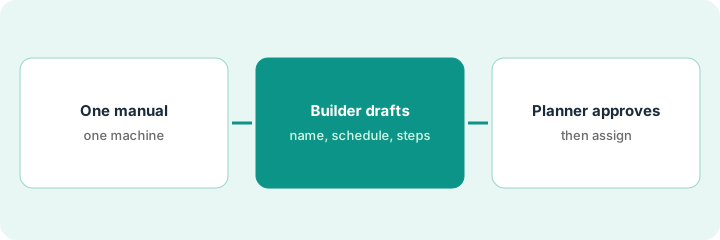
1. Step 1 — Pick one manual and one machine
What it is: Choose a machine with a clear manufacturer manual and no current routine. Confirm the manual matches the model and revision on site.
- Check the nameplate model against the manual.
- Find the manual in Limble's library or upload a machine-readable PDF.
- Note your site's conditions: hours per day, dust, heat, shutdown windows.
- Name the planner who approves.
The planner picks an air compressor installed last year. The manual matches the nameplate. The plant runs two shifts and only schedules shutdowns monthly.
Write three facts next to the manual: daily run hours, environment, and when you can shut the machine down. You'll check every suggested interval against them.
2. Step 2 — Let the builder suggest routines
What it is: Run the builder on the manual and read each suggestion: name, interval, and checkbox steps. Don't create any yet.
- Run the builder and list each suggested routine.
- Compare each interval with your site conditions.
- Mark steps that need a shutdown you can't schedule.
- Mark steps that name parts or consumables you stock differently.
The builder suggests five routines. One weekly step needs a shutdown the plant only schedules monthly. The filter step names a generic filter; the site uses a specific part number.
For each suggestion, write "keep," "change interval," "rewrite," or "drop." Create nothing until each has a mark.
3. Step 3 — The planner checks intervals and approves
What it is: The planner creates only the routines marked keep or change, edits every step, and adds what the builder leaves out: assigned technician, parts, tools, and description. Then the planner approves and assigns.
- Create the kept routines.
- Adjust intervals to your conditions and shutdown windows.
- Rewrite steps to name your parts and tools.
- Add the assigned technician, parts, and safety notes.
- Approve and let the routine go live.
The planner creates three routines, moves the shutdown step to monthly, rewrites the filter step with the site's part number, adds the assigned technician and parts, and only then lets them go live.
Before a builder-made routine goes live, check four fields are filled: interval adjusted, parts, assigned technician, safety note. If any is blank, it stays a draft.
Pricing context (October 2026)
This how-to isn't a price sheet. Per the Limble AI review, Limble publishes no dollar prices; each plan links to a price calculator. The AI-powered preventive maintenance builder is listed on Standard, Premium+, and Enterprise. Dated October 2026.
Checked Oct 14, 2026 on the vendor’s own pricing page: Limble shows no public list price. Limble’s pricing page lists Standard, Premium+, and Enterprise plans, each with a price calculator rather than a dollar figure. This page quotes no Limble dollar figure; confirm what your contract includes with Limble or your admin.
Uncertainty: Limble's pages have disagreed on which plan includes some AI features; confirm in writing. Upload size limits differ by region per our review. The only prices this site sells here are the optional $9 AI toolkit spreadsheet and $19 AI toolkit audit.
When this helps (honest take)
Useful when you have many machines with good manuals and no routines. The builder saves typing; the planner supplies the site knowledge.
Not useful when the machine has been modified, runs far outside the manual's assumptions, or the manual is a scanned image the builder can't read.
Related options (educational)
| Need | Where to look | Why |
|---|---|---|
| Limble AI features | Limble AI | Primary path on this page |
| Another maintenance system with AI insights | Fiix AI | Comparison point |
| Routines from your own history | MaintainX planner approval | Same day's how-to |
| Weekly insights a planner owns | Fiix Work Order Insights | Same day's how-to |
| A whole map of field-service tools | Stack map: field service ops | Where Limble fits |
FAQ
Does the builder add parts and tools?
Per our review, no. It drafts the name, schedule, and checkbox steps; the planner adds the rest.
Should we follow the manual's intervals exactly?
Start from them, then adjust to your run hours and environment. Write down why you changed any interval.
Where do current prices live?
With Limble, through its price calculator and sales team. Our Oct 14, 2026 check of the vendor’s own pricing page is summarized in the pricing section above.
Does the builder add parts and tools?
Per our review, no. It drafts the name, schedule, and checkbox steps; the planner adds the assigned technician, parts, and tools.
Optional next step
Free reviews stay free. If you pay for a maintenance system, a manual library, and a general AI chat tool that all draft routines, the $9 AI toolkit spreadsheet helps you lay them out, or the $19 AI toolkit audit gets you a written memo.