How-to · Maintenance · Fiix · Oct 14, 2026
Read Fiix Work Order Insights once a week and have the planner own every suggestion
Fiix Foresight's Work Order Insights shows which open work orders are at risk of running late, and Parts Forecaster flags possible stockouts. The dashboards point at problems; they don't know a technician is on leave or a part is on back order. This page shows a planner how to turn the weekly view into three owned actions.
Who this is for
Maintenance planners and managers on Fiix Professional or Enterprise, often in manufacturing, who have the Foresight dashboards but no habit for using them. The job here is a weekly 20-minute review. For building routines from manuals, see Limble builder from a manual.
How to do it
This is a how-to, not a ranking of maintenance software. Per the Fiix AI review, Fiix Foresight adds AI dashboards, including Work Order Insights and Parts Forecaster, on Professional and Enterprise; Work Order Insights analyzes history to show which open work orders are at risk of delays and compliance issues. Dashboards fill in only once your account has enough history.

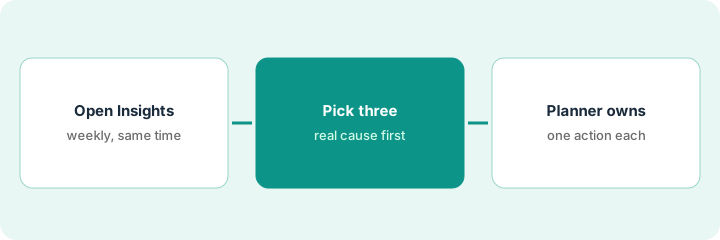
1. Step 1 — Open Work Order Insights at the same time each week
What it is: A fixed slot turns a dashboard into a routine. The planner and the maintenance manager open it together for 20 minutes.
- Book a weekly 20-minute slot.
- Open Work Order Insights for one site.
- Sort by risk.
- Glance at Parts Forecaster for anything due this week.
Every Tuesday at 9 a.m., the planner and the maintenance manager open Work Order Insights for the main plant. This week it flags six routines at risk of running late.
Put the slot in both calendars now, titled "Work Order Insights — three actions."
2. Step 2 — Pick the three and find the real cause
What it is: Take the three highest-risk items and find out why each is at risk before changing anything. Per the review, write down the real cause first.
- Pick the three highest-risk items.
- For each, check assignment, parts, and access.
- Write the real cause in one line.
- Note if several share a cause.
Four of the six share one technician who is out on leave. Two are waiting on parts on back order. The real causes are staffing and supply, not planning.
For each of the three items, finish this sentence before acting: "It's at risk because..." If you can't, find out before changing the schedule.
3. Step 3 — The planner owns one action each
What it is: The planner decides one action per item and owns it until it's done. The dashboard suggests; the planner decides.
- Choose one action per item (reassign, reschedule, expedite, or accept the delay).
- Write the action and the owner's name on the work order.
- For Parts Forecaster suggestions, have the storeroom lead check usage before ordering.
- Review last week's three actions at the start of the next session.
The planner reassigns the four to another technician and leaves a note on the two waiting for parts. A Parts Forecaster suggestion for four belts is cut to two after the storeroom lead sees last quarter included a one-off rebuild.
End each session with three lines: "Item, action, owner." Start the next session by checking those three lines.
Pricing context (October 2026)
This how-to isn't a price sheet. Per the Fiix AI review, Fiix publishes per-user prices for Basic and Professional, with Enterprise custom; Fiix Foresight is on Professional and Enterprise, and Fiix MAX is a paid add-on with contact-for-pricing. Dated October 2026.
Checked Oct 14, 2026 on the vendor’s own pricing page: Fiix’s pricing page lists Free at $0, Basic at $45 per user per month, and Professional at $75 per user per month, with Enterprise custom. Fiix Foresight, which includes Work Order Insights and Parts Forecaster, is on Professional and Enterprise per our review.
Uncertainty: Fiix MAX, Enterprise, and predictive products have no public prices. Dashboards need enough history to show anything useful. The only prices this site sells here are the optional $9 AI toolkit spreadsheet and $19 AI toolkit audit.
When this helps (honest take)
Useful when you're already on Professional or Enterprise, log work orders fully, and need a habit that turns dashboards into action.
Not useful when work-order history is thin or inconsistent. Fix logging first; the dashboards will be empty or misleading.
Related options (educational)
| Need | Where to look | Why |
|---|---|---|
| Fiix AI features | Fiix AI | Primary path on this page |
| Another maintenance system with AI | Limble AI | Comparison point |
| Routines from a manufacturer's manual | Limble builder from a manual | Same day's how-to |
| Scheduled AI checks with a supervisor gate | UpKeep Nova Pulse | Same day's how-to |
| A whole map of field-service tools | Stack map: field service ops | Where Fiix fits |
FAQ
Why only three items?
Three is enough to act on in one session and follow up the next week. A longer list tends to become a report nobody acts on.
Is Fiix MAX needed for this?
No. This routine uses Fiix Foresight dashboards, which per our review are on Professional and Enterprise.
Where do current prices live?
On Fiix's pricing page; MAX and Enterprise are quoted. Our Oct 14, 2026 check of the vendor’s own pricing page is summarized in the pricing section above.
What if the dashboards are empty?
Per our review, they fill in only once your account has enough work-order history. Keep logging work orders fully and check back.
Optional next step
Free reviews stay free. If you pay for a maintenance system, a separate analytics add-on, and a general AI chat tool, the $9 AI toolkit spreadsheet helps you lay them out, or the $19 AI toolkit audit gets you a written memo.