How-to · Field service · Housecall Pro · Oct 14, 2026
Ask Housecall Pro's AI Analyst one weekly question and check the number before you act on it
Housecall Pro's Analyst AI builds reports from your account data when you ask in plain language. A wrong filter (jobs still in progress, a missing technician) gives a confident wrong number. This page shows how to ask one question every week and have one person re-check a number by hand before it guides pay, pricing, or scheduling.
Who this is for
Owners and office managers at home-service businesses on Housecall Pro who want a weekly number without building reports. The job here is one question, one checked number. For planning maintenance work instead, see a different job: Draft preventive maintenance in MaintainX.
How to do it
This is a how-to, not a ranking of field-service tools. Per the Housecall Pro AI review, Analyst AI builds custom reports from your data, is included on every plan, and is reachable in the AI Team chat; you can save a report in one click. The review's ground rule: Analyst numbers aren't for payroll or pricing decisions until you recompute a sample.

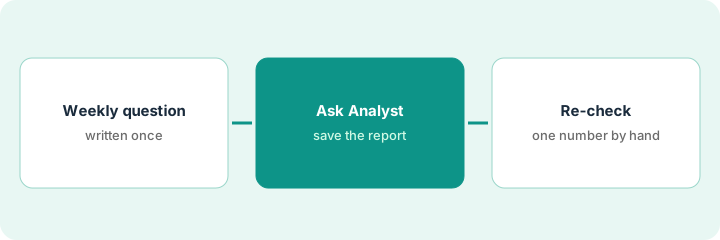
1. Step 1 — Write the weekly question
What it is: A good weekly question is specific about what is counted, over which dates, and for whom. Write it once and ask it the same way every week so numbers compare.
- Pick one decision the number feeds (crew schedule, follow-ups, a bonus).
- Write the question with the date range and status: "completed jobs, Monday to Sunday."
- Name who checks the number.
- Save the wording somewhere you'll reuse it.
The owner wants to see workload by technician. Her question: "How many jobs did each technician complete last week, Monday to Sunday, counting only jobs marked complete?"
Write your question with three parts: what is counted, which dates, and which status. If any part is missing, add it before you ask.
2. Step 2 — Ask Analyst and save the report
What it is: Ask Analyst the exact question in the AI Team chat and save the report so next week starts from the same filters. Read the filters it applied, not just the answer.
- Ask the saved question word for word.
- Look at the date range and status filters in the report.
- Save the report with a clear name.
- Note anything that looks off before sharing.
Analyst returns a list of completed jobs by technician. The top technician shows 23. The owner saves it as "Completed jobs by tech — weekly."
Before you read the answer, read the filters. Write them next to your question and check they match.
3. Step 3 — Re-check one number by hand
What it is: The named person picks one number from the report and recomputes it from the jobs list. If it matches, use the report; if not, find the filter that's wrong and fix the saved report.
- Pick the number that matters most (often the top or bottom line).
- Open the jobs list with the same dates and technician.
- Count by hand.
- Compare with the report.
- Fix the filter and save if they differ; note the check either way.
The office manager counts 21 completed jobs for the top technician; Analyst said 23. Two jobs were still in progress but had been scheduled in the week. She fixes the status filter, saves the report, and the owner uses the corrected list in standup.
Each week, re-check one number by hand before you share the report. Write "checked: [number], [name]" at the top.
Pricing context (October 2026)
This how-to isn't a price sheet. Per the Housecall Pro AI review, Housecall Pro publishes plan prices; AI Team members including Analyst are included on every plan, and CSR AI is a separate paid add-on without a published price. Dated October 2026.
Checked Oct 14, 2026 on the vendor’s own pricing page: Housecall Pro’s pricing page shows plans from $59/month with a 14-day free trial; CSR AI is listed as a paid add-on with no published price.
Uncertainty: Which AI teammates are in chat can change; check the help center for your account. Monthly and annual totals differ, so confirm on the live pricing page for your user count. The only prices this site sells here are the optional $9 AI toolkit spreadsheet and $19 AI toolkit audit.
When this helps (honest take)
Useful when you want one reliable weekly number without learning a report builder, and one person can spend ten minutes checking it.
Not useful when the number feeds payroll directly. Run payroll from your payroll process, not from an AI summary.
Related options (educational)
| Need | Where to look | Why |
|---|---|---|
| Housecall Pro AI features | Housecall Pro AI | Primary path on this page |
| A close alternative | Jobber vs Housecall Pro | Side-by-side |
| Planner-approved maintenance schedules | MaintainX planner approval | A different job |
| An AI receptionist with owner review | Jobber AI Receptionist | Same day's how-to |
| A whole map of field-service tools | Stack map: field service ops | Where Housecall Pro fits |
FAQ
Why only one number?
One checked number catches most filter mistakes. If it's wrong, the whole report is suspect, and you fix the filter once.
Can Coach AI tell me what to do with the number?
Per our review, Coach tips are suggestions, not a substitute for your accountant or employment counsel. The decision stays with you.
Where do current prices live?
On Housecall Pro's pricing page; CSR AI is quoted separately. Our Oct 14, 2026 check of the vendor’s own pricing page is summarized in the pricing section above.
What if the number is off every week?
Look at the filter first: job status, date range, and which technicians are included. Save the corrected report so next week starts from it.
Optional next step
Free reviews stay free. If you pay for job software, a reporting tool, and a general AI chat tool that all answer business questions, the $9 AI toolkit spreadsheet helps you lay them out, or the $19 AI toolkit audit gets you a written memo.