How-to · Incident ops · Incident.io · Oct 9, 2026
Draft an incident update that marks Unknowns instead of guessing severity
“Unknowns” here means the gaps the timeline does not support — customer counts, how far the impact spread, root cause — written plainly instead of guessed. The severity level and the send button stay with a person.
Who this is for
Responders who already run incidents in Incident.io and need stakeholder or status-page drafts without invented impact. If paging is the pain, see Write the always-page-a-human list before you enable PagerDuty AI grouping. If graphs are the pain, see Draft investigation questions Bits may answer vs owner-owned. If the draft lives in a Claude Project instead of the incident record, see Claude for incident ops and Set up one Claude Project for a recurring ops loop — not a second incident tool.
How to do it
This page is a how-to. It is not a ranking of incident platforms. The Incident.io review covers the features and AI assists; this page is the narrower writing routine — one update with a fixed shape, an Unknowns section, and a person who sets severity and presses send. Check which AI controls your workspace actually shows before you tell the team a button exists.

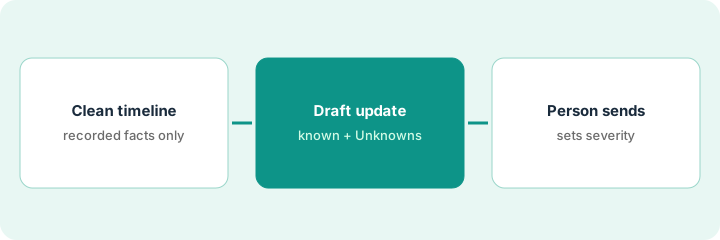
1. Step 1 — Paste a cleaned-up timeline only
What it is: Gather the times, systems, and actions you already recorded. Do not add customer names, guessed counts, or a root cause the timeline does not state.
- Prefer Incident.io timeline entries, alert titles, and change notes you trust.
- Strip personal data and customer identifiers before anything goes into a general chat seat.
- Label the gap between detection and fix as Unknown — do not invent “customer reported” entries.
- Name the incident commander (the person running the incident) who owns the send.
A thin, accurate timeline beats a long one padded with guesses. The draft in Step 2 can only be as honest as this paste.
Timeline: errors started 14:10, rollback finished 14:42. Three Slack lines and two alert titles go in. The gap between detection and the fix is labeled Unknown. There is no “all regions” entry that was not in the paste.
Copy five timeline bullets from Incident.io with identifiers removed. If a bullet is a guess, rewrite it as Unknown or delete it before any AI draft.
2. Step 2 — Draft the update with Unknowns
What it is: Ask Incident.io’s AI assist (where your plan includes it) — or a Project set up as in Claude for incident ops — for an internal update and a short status-page line based only on that timeline.
- Fixed shape: what happened (quoted) | what we know | Unknowns | next check-in time.
- Mark customer count, spread of impact, and root cause Unknown unless the timeline states them.
- Delete sentences that guess “all regions” or “no user impact” without evidence.
- Keep the draft where responders already edit it — the Incident.io update field, the status-page draft, or the Project.
Incident.io’s pricing page lists its AI features (Suggestions, Scribe, the AI-native post-incident editor, and the AI agent) on Pro and Enterprise, not on Basic or Team. On Basic or Team, the Project route is the fallback.
The internal update quotes 14:10 and 14:42, lists the customer count as Unknown, and sets the next check-in in thirty minutes. The lead deletes a sentence that guessed “all regions.” The status-page line stays one sentence with no invented severity label.
From the cleaned-up timeline, draft one internal update and one status-page line. Highlight every claim not tied to a timeline bullet, then delete it or move it to Unknowns.
3. Step 3 — Keep severity human before send
What it is: The severity level, customer-impact labels, and the send button stay with a person. AI drafts the text; it does not set severity or publish.
- The incident commander (or the role your policy names) sets severity from your playbook — not from the tone of the draft.
- Read the Unknowns out loud before sending.
- Do not auto-publish status updates from AI output.
- Post-incident review outlines follow the same rule: each action item has a named owner or says Unknown.
If an alert was muted or grouped by mistake, that is the paging list’s job — Write the always-page-a-human list before you enable PagerDuty AI grouping.
The draft reads calm; the commander still sets severity from the payment-path policy. The customer count stays Unknown on the status page until support confirms a number. Nobody lets the model “pick SEV-2” — severity level 2 — because the draft sounded mild.
Add three questions to the incident checklist: “Severity set by a person? Unknowns reviewed? Sent by a person?” Run one five-minute dry run with a draft that invents impact, and confirm it cannot publish.
Pricing context (October 2026)
This how-to is not a price sheet. Plan detail for Incident.io and Claude for incident ops lives on those reviews. Recheck each vendor’s site before you budget. Dated October 2026.
Checked Oct 9, 2026 on the vendor’s own pricing page: incident.io/pricing lists Basic as free; Team at $15 per user per month billed annually or $19 monthly, plus $10 per user per month for on-call; Pro at $25 per user per month (the page does not say which billing period), plus $20 per user per month for on-call; Enterprise at custom pricing; and an on-call-only plan at $20 per user per month. The comparison table marks Suggestions, Scribe, the AI-native post-incident editor, and the AI agent for Pro and Enterprise only; root-cause analysis and the autonomous agent are add-ons on those plans. Claude plans were not rechecked.
Uncertainty: Which plans include the AI features, on-call add-ons, and regional availability change. If an invoice and a review disagree, trust the invoice. Do not paste a marketing list price you did not pay. The only prices this site sells here are the optional $9 AI toolkit spreadsheet and $19 AI toolkit audit.
When this helps (honest take)
Useful when Incident.io is already the incident record, updates are frequent, and the team is comfortable saying Unknown.
Not useful when you want AI to invent severity, customer counts, or root cause — or the timeline itself is empty. Fix the record first. Paying for a separate writing seat to summarize the same timeline is overlap worth checking.
Related options (educational)
| Need | Where to look | Why |
|---|---|---|
| Incident record and status drafts | Incident.io | When Incident.io is the timeline’s system of record |
| Project-based drafts and review outlines | Claude for incident ops · Set up one Claude Project for a recurring ops loop | Writing seat, same Unknown rule |
| Paging and alert noise | PagerDuty AI · Write the always-page-a-human list before you enable PagerDuty AI grouping | If PagerDuty already pages |
| Graphs and queries | Datadog Bits · Draft investigation questions Bits may answer vs owner-owned | If Datadog holds the signals |
| Side by side | Incident.io vs PagerDuty | Educational compare |
Related reviews: Incident.io · Claude for incident ops · Incident.io vs PagerDuty. Related how-tos: Write the always-page-a-human list before you enable PagerDuty AI grouping · Draft investigation questions Bits may answer vs owner-owned · Set up one Claude Project for a recurring ops loop. Free: seat-waste calculator if the incident record and a chat seat draft the same update.
FAQ
Can AI set severity with this routine?
No. Severity and customer impact stay human decisions. People send.
What if the draft has zero Unknowns on a messy incident?
Treat that as too confident. Send it back and require an Unknowns section.
Which Incident.io plan has the AI assists?
On Oct 9, 2026, the pricing page marked the AI features for Pro and Enterprise. On Basic or Team, draft in a Project with the same fixed shape and Unknown rule.
Where do dated prices live?
On the Incident.io review and incident.io/pricing. This October 2026 how-to only repeats prices we checked on the vendor’s own pricing page on Oct 9, 2026.
Optional next step
Free reviews stay free. Neither offer is required to use this page. If Incident.io, a pager, and a writing seat already draft the same update, optional help: $9 AI toolkit spreadsheet (seats, spend, owner, cancel-by, overlap) or $19 AI toolkit audit when you want a written memo.