Tool · Ops & automation · PagerDuty · Oct 2026
PagerDuty AI review (Oct 2026): AIOps and SRE Agent assists for incident ops
PagerDuty AIOps and SRE Agent for noise reduction and triage drafts — responders confirm before suppress or page. Complements ServiceNow AI and observability peers.
What PagerDuty AI covers here
This page is for incident ops and SRE leads who already page through PagerDuty and want AIOps/SRE Agent help for noise and triage — without silent suppresses on customer-facing services or invented root cause. We focus on grouping/suppress candidates with human confirm, SRE Agent context drafts, orchestration suggestions, and when observability or ITSM tools are the better home. Feature names and packaging change — verify live on PagerDuty’s site.
Major features (with how someone uses them)
Examples at a glance: each feature has a concrete ops example plus a short Try this.
1. Alert grouping + suppress candidates (primary)
What it is: Use AIOps to propose which noisy alerts may group or suppress, and which must always page. Responders confirm before rules apply. Never invent severity from blank titles.
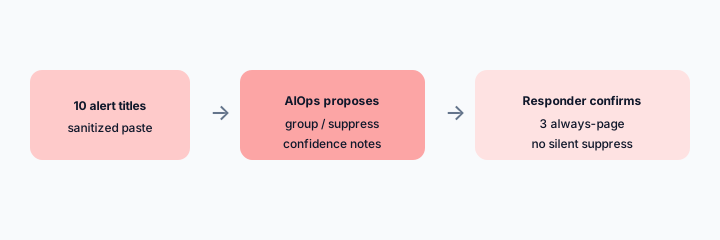
Primary SoT workflow:
From 10 sanitized alert titles: propose grouping/suppress candidates and 3 that must always page a human.
2. SRE Agent triage assists
What it is: Ask for past-incident context, related incidents, and runbook drafts. Treat answers as investigation aids — mark Unknown when logs or change events are missing. Do not accept invented root cause.
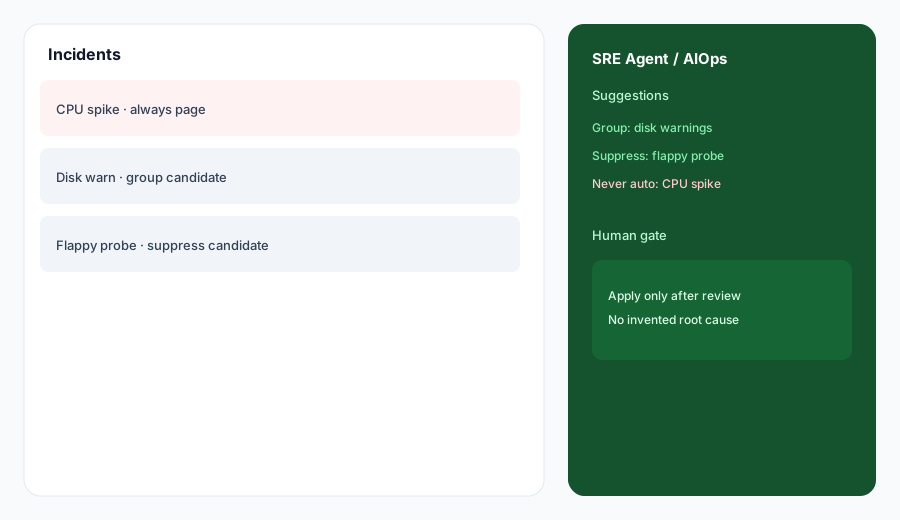
Triage honesty:
Paste a sanitized incident title + 5 timeline bullets. Draft triage questions and Unknowns — never invent root cause or blast radius.
3. AI Orchestrations suggestions
What it is: Review AI-suggested event orchestration rules (severity, priority, suppress) with impact metrics before applying. Existing manual rules stay first. Dismiss bad suggestions so feedback improves.
Orchestration QA:
List 5 candidate orchestration rules (suppress / severity / priority). For each: apply, staging-only, or dismiss — one sentence why. No silent prod suppress.
4. Vs Datadog / ServiceNow
What it is: Stay in the tool you already pay for. PagerDuty AI for page/triage response; Datadog Bits-class tools for observability queries; ServiceNow AI for ITSM ticket graphs. Soft $19/$9 below only if PagerDuty AI and other seats overlap on the same incident jobs.
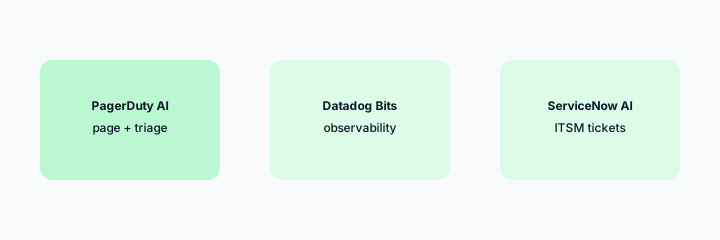
Home-for-the-job:
List 6 recurring incident jobs this quarter. Assign each to PagerDuty AI, Datadog Bits, or ServiceNow AI — one sentence why. Do not invent a tool you do not use.
Pricing context (October 2026)
PagerDuty publishes plans and AIOps / Advance packaging on its public site (start from pagerduty.com/pricing). This page is dated October 2026 and is not a price sheet — we do not invent exact per-seat or AI Actions prices.
Uncertainty: Which tiers include AIOps, SRE Agent, Advance AI Actions allotments, and regional availability change. Always verify on live PagerDuty pages and your admin before budgeting.
When PagerDuty AI is useful (honest take)
Useful when PagerDuty is already your paging SoR, responders confirm suppress/group rules, and SRE Agent drafts stay investigation aids. Less useful when monitors are unowned and noisy by design, or when you hoped AI alone would invent root cause without logs or change data.
Paying for PagerDuty AI and a few other AI tools? The $9 AI toolkit spreadsheet lists every AI subscription you have, what each one costs, and how fast it pays for itself, so you can see which ones are worth the money.
Want someone to do it for you? AI toolkit audit — $19
Related options (educational)
| Need | Better home | Why |
|---|---|---|
| Page + triage response | PagerDuty AI (this page) | AIOps + SRE Agent with human confirm |
| Observability query assists | Datadog Bits-class tools | Metrics/logs investigation home |
| ITSM ticket graphs | ServiceNow AI | Enterprise ITSM SoR |
| Postmortem writing assist | Claude for ops / Projects | Long-form drafts outside the pager |
| Incident channel digests | Slack AI | When Slack is the bridge home |
Same job, two products: Datadog Bits vs PagerDuty AI.
Same job, two products: Incident.io vs PagerDuty AI.
FAQ
What is PagerDuty AI?
AIOps and SRE Agent assists for noise reduction and triage drafts a human should confirm. Verify live feature names on PagerDuty’s site.
How much does it cost?
Confirm on PagerDuty’s public pricing — this Oct 2026 page does not invent exact prices.
Should AI suppress customer-facing outages?
No. Drafts only. Always-page services stay human-confirmed. No invented root cause.
PagerDuty vs Datadog / ServiceNow?
Stay in the tool you already pay for. See related reviews linked above.
Optional next step (if seats overlap)
If several AI seats would cover the same incident and ops jobs, optional help mapping overlap: $19 AI toolkit audit or $9 AI toolkit spreadsheet. Email Audit $19 or Toolkit spreadsheet $9.
Checkout is live via Stripe. After you pay, we email delivery (spreadsheet) or intake next steps (audit).