How-to · Incident ops · PagerDuty AI · Oct 9, 2026
Write the always-page-a-human list before you enable PagerDuty AI grouping
“Always-page list” here means the alert titles that must wake a person even when PagerDuty’s AI suggests grouping or muting them. You turn the assists on only after that list exists — not the other way around.
Who this is for
Incident and site reliability engineering (SRE) leads who already page through PagerDuty and want help with alert noise — without silent mutes on customer-facing services. AIOps is PagerDuty’s name for its noise-reduction features: alert grouping, suppression, and related-incident hints. If paging is not where your alerts actually land, start there. If the real job is digging through dashboards, see Draft investigation questions Bits may answer vs owner-owned. If the real job is the incident record and status updates, see Draft an incident update that marks Unknowns instead of guessing severity.
How to do it
This page is a how-to. It is not a ranking of incident tools. The PagerDuty AI review covers the AIOps and SRE Agent features; this page is the narrower prep job you do first — one short list of alerts that always reach a person, agreed before any grouping rule goes live.
1. Step 1 — List ten alert titles you actually get
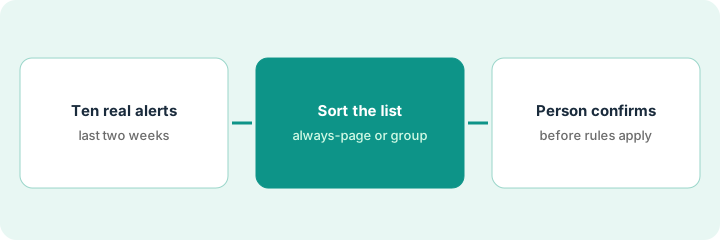
What it is: Pull ten real alert titles from the last two weeks, with customer names and internal hostnames removed. Do not guess severity from blank titles or from targets nobody tracks.
- Prefer titles that already page, or should.
- Note the service, the urgency, and whether a customer-facing path is involved.
- Mark noisy repeat titles — the ones that fire and clear over and over — separately from rare, high-impact ones.
- Name the person who owns the always-page list (the on-call lead or the incident commander role).
Ten is enough to see the pattern. A list of two hundred titles turns into a project nobody finishes before the AI features go live.
The ten titles include checkout latency high, payment authorization errors, database primary failover, and three noisy disk alerts that re-page every night. The customer-facing titles go on a sticky note labeled “never silent.”
Copy ten alert titles from PagerDuty (or your alert history) into a shared doc. If you cannot find ten real titles, you are not ready for AI grouping yet — fix how alerts arrive first.
2. Step 2 — Separate group candidates from always-page
What it is: Label each title as a group candidate or always-page. The AI may suggest grouping; it does not decide that a customer-facing alert goes quiet.
- Always-page: customer-facing outages, the payment path, data-loss risk, and any security alerts your policy says must page.
- Group candidates: known noisy duplicates with a documented parent alert.
- Unknown: leave it Unknown — do not guess severity to fill the sheet.
- Keep the list short enough to check in fifteen minutes.
The service owner settles each Unknown. Until then it behaves like always-page.
Always-page: checkout latency, payment authorization errors, primary failover. Group candidates: the three disk alerts, under one parent alert for node disk. Two titles stay Unknown until the service owner answers.
Add three columns next to your ten titles: Always-page | Group candidate | Unknown. Fill every row; any blank becomes Unknown. Share the sheet with the on-call rotation before you turn on grouping suggestions.
3. Step 3 — A person confirms before rules apply
What it is: Turn on grouping or suppression suggestions only with a confirmation step by a named responder. SRE Agent drafts (PagerDuty’s agent is called Paige) are investigation notes — not a finished root-cause analysis.
- Ban silent suppression on anything on the always-page list.
- Require a named responder (or an agreed change window) before a suppression rule ships.
- Treat the agent’s lists of past and related incidents as drafts; mark Unknown when logs or change events are missing.
- Revisit the list after the first noisy week, and do not widen grouping until the list is stable.
When an incident does open, the status update is a separate job — Draft an incident update that marks Unknowns instead of guessing severity keeps severity and the send button with a person.
A suggestion proposes suppressing a checkout latency alert because it looks like yesterday’s noise. The responder rejects it: the title is on the always-page list. The post-incident review adds a rule — always-page titles cannot be auto-suppressed.
Do a five-minute dry run with one suppression suggestion against your list. Confirm the process blocks silence without a person. Add one line to the runbook: “AI suggests; people confirm; always-page never goes silent.”
Pricing context (October 2026)
This how-to is not a price sheet. Plan detail for PagerDuty AI lives on that review. Recheck the vendor’s site before you budget. Dated October 2026.
Checked Oct 9, 2026 on the vendor’s own pricing page: pagerduty.com/pricing lists two families. Incident Management: Free at $0 (5 users, one schedule) and Professional at $21 per user per month billed annually or $25 monthly; on Professional, AIOps (alert grouping, suppression, related incidents), PagerDuty Advance (the generative AI features), and the agents, including the SRE Agent, are add-ons. The newer PD Reliability Platform is a yearly platform fee: Starter $2,800 (10 seats, 5,000 events), Essential $12,000 (20 seats, 40,000 events), Plus $48,000 (in the comparison table), and Ultimate at custom pricing; alert grouping and suppression are included on those tiers. The page’s FAQ says the AIOps and Advance add-ons are still sold, and that inside the platform they are called Signal Intelligence and AI Actions.
Uncertainty: Which plans include AIOps, the SRE Agent, and AI Actions, and how many events or actions each tier includes, change. If an invoice and a review disagree, trust the invoice. Do not paste a marketing list price you did not pay. The only prices this site sells here are the optional $9 AI toolkit spreadsheet and $19 AI toolkit audit.
When this helps (honest take)
Useful when PagerDuty is already where pages fire, alert noise is a weekly problem, and a person confirming each suppression rule is non-negotiable.
Not useful when you want AI to invent the root cause, silently mute customer-facing paths, or replace on-call judgment. Paying for noise reduction when nobody maintains an always-page list is a common overspend — write the list first.
Related options (educational)
| Need | Where to look | Why |
|---|---|---|
| AI grouping and SRE Agent | PagerDuty AI | When PagerDuty is the system of record for pages |
| Dashboard and log questions | Datadog Bits · Draft investigation questions Bits may answer vs owner-owned | Query drafts and short summaries |
| Incident record and status updates | Incident.io · Draft an incident update that marks Unknowns instead of guessing severity | Timeline and stakeholder updates |
| Paging vs incident record, side by side | Incident.io vs PagerDuty · Datadog vs PagerDuty AI | Educational compares |
| IT service management tickets | ServiceNow AI | When ServiceNow holds the tickets |
Related reviews: PagerDuty AI · Datadog Bits · Incident.io. Related how-tos: Draft investigation questions Bits may answer vs owner-owned · Draft an incident update that marks Unknowns instead of guessing severity. Free: seat-waste calculator if paging AI and a separate writing seat draft the same triage notes.
FAQ
Should AI suppress customer-facing outages without a person?
No. Always-page titles stay human-confirmed. The AI suggests; responders decide.
Does the SRE Agent invent a root cause?
It can if you accept confident drafts. Require Unknown when logs or change windows are missing. People own the root-cause analysis.
Do I need the Reliability Platform for grouping?
Not necessarily. On Oct 9, 2026, PagerDuty’s pricing page offered grouping and suppression as the AIOps add-on on Professional, and included them in the Reliability Platform tiers. Write the always-page list either way.
Where do dated prices live?
On the PagerDuty AI review and pagerduty.com/pricing. This October 2026 how-to only repeats prices we checked on the vendor’s own pricing page on Oct 9, 2026.
Optional next step
Free reviews stay free. Neither offer is required to use this page. If PagerDuty AIOps and another noise-reduction or writing seat already cover the same triage job, optional help: $9 AI toolkit spreadsheet (seats, spend, owner, cancel-by, overlap) or $19 AI toolkit audit when you want a written memo.