How-to · Observability · Datadog Bits · Oct 9, 2026
Draft investigation questions Bits may answer vs owner-owned
“Bits-ok questions” here means investigation prompts grounded in dashboards and data you already trust — not silent alert changes or guessed severity. “Owner-owned” means paging rules, alert thresholds, and how many customers are affected stay with a person.
Who this is for
On-call responders and site reliability engineering (SRE) leads who already investigate in Datadog and want Bits AI to draft queries and short summaries. If errors land first in Sentry, start with Sentry AI (its Seer assistant) for issue triage — not a second observability seat for the same stack. If the pain is paging noise, see Write the always-page-a-human list before you enable PagerDuty AI grouping.
How to do it
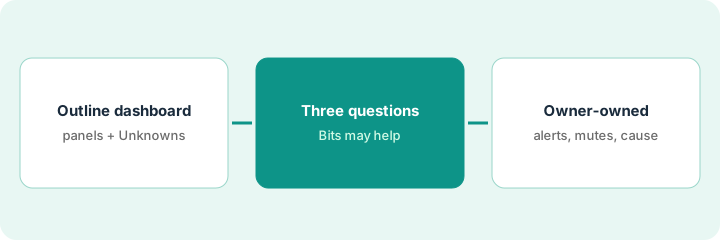
This page is a how-to. It is not a ranking of observability AI products. The Datadog Bits review covers what Bits AI can do across Datadog; this page is the narrower habit — three questions per incident that Bits may help answer, and a clear line around the decisions it may not make. For error-first triage, pair it with Sentry AI.
1. Step 1 — Outline the dashboard you already trust
What it is: A short, cleaned-up outline of one dashboard (or notebook) you already use in incidents. Do not invent widgets or severity from a blank screen.
- Name the services and the three to five panels that matter (latency, errors, saturation).
- Note the time range and whether a deploy or change window is known.
- Mark gaps as Unknown — missing tags, sampled data, or panels with no owner.
- Pick one incident or one practice window — not “all of production.”
The outline is what keeps Bits’ answers checkable: anything it says should trace back to a panel, a log, or a trace on this list.
Dashboard: checkout latency at the 95th percentile, payment error rate, database saturation. Time range: the last two hours. Deploy window Unknown until the change owner confirms. Panels without an owner stay labeled Unknown.
Write a five-line outline: dashboard name — panels — time range — known change — Unknowns. If you cannot name the dashboard link, fix that before asking Bits anything.
2. Step 2 — Draft three Bits-ok questions
What it is: From the outline, write three questions Bits may help answer — metric trends, related log patterns, similar past windows — and list the ones that stay owner-owned.
- Bits-ok: which service spiked first, which log patterns line up with the spike, query drafts for metrics, logs, and application traces (APM).
- Not Bits-ok on its own: who gets paged, mute windows, how many customers are affected, and the final root cause you tell customers.
- Require Unknown when sampling, missing tags, or change windows leave gaps.
- Treat Bits’ summaries as investigation notes — not copy you can send to customers.
Bits Investigation can also run on its own when an alert fires. The same rule applies: its findings are a starting point the responder checks.
Bits-ok: (1) Which service’s latency rose first in this window? (2) Draft a log query for payment authorization errors that line up with the latency rise. (3) List similar past windows from related dashboards. Owner-owned: paging rules, alert mutes, the customer-facing root cause.
Paste the cleaned-up outline into Bits Chat. Ask only the three Bits-ok questions. Delete any sentence that invents a root cause or a user count that is not in the outline.
3. Step 3 — Keep alerts owner-owned
What it is: A hard line: Bits drafts queries and summaries; people create alerts, change thresholds, and mute monitors.
- Ban silent mutes or threshold edits from AI output.
- Name the alert owner before any proposed change ships.
- If Sentry holds the error issue, keep triage notes there — see Sentry AI — and use Datadog for the graphs.
- Log Unknowns in the incident channel; do not fill them with confident guesses.
If a noisy alert is the real problem, that is a paging decision — Write the always-page-a-human list before you enable PagerDuty AI grouping. The stakeholder update belongs to Draft an incident update that marks Unknowns instead of guessing severity.
Bits drafts a log query and a five-bullet summary. The deploy window stays Unknown until the change owner confirms. The incident commander keeps the root-cause call. Nobody mutes the payment error monitor from the chat draft.
Add one line to the runbook: “Bits may draft queries; Bits may not mute.” Run one five-minute dry run where Bits suggests a mute, and confirm your process still needs a named owner.
Pricing context (October 2026)
This how-to is not a price sheet. Plan detail for Datadog Bits and Sentry AI lives on those reviews. Recheck each vendor’s site before you budget. Dated October 2026.
Checked Oct 9, 2026 on the vendor’s own pricing page: datadoghq.com/pricing prices Bits AI through AI Credits: starting at $500 per 500 credits per month billed annually, or $1.30 per credit on demand. The page estimates about 0.5 credits per Bits Chat message and about 6.5 credits per autonomous Bits Investigation, and says actual use varies. Credits reset on the first day of each month and do not roll over; usage past your bundle bills at the on-demand rate. Sentry was not rechecked.
Uncertainty: Credit estimates, which Bits features use credits, and regional availability change. If an invoice and a review disagree, trust the invoice. Do not paste a marketing list price you did not pay. The only prices this site sells here are the optional $9 AI toolkit spreadsheet and $19 AI toolkit audit.
When this helps (honest take)
Useful when Datadog already holds the graphs, investigation questions come up every week, and alert ownership is clear.
Not useful when you want Bits to guess severity, mute customer-facing paths, or replace paging judgment. If the question starts from a Sentry issue, stay in Sentry first — see Sentry vs Datadog.
Related options (educational)
| Need | Where to look | Why |
|---|---|---|
| Query drafts and summaries | Datadog Bits | When Datadog is the system of record for telemetry |
| Error issue triage and fix proposals | Sentry AI | When errors already land in Sentry |
| Compare homes | Sentry vs Datadog · Datadog vs PagerDuty AI | Educational only |
| Paging and alert noise | PagerDuty AI · Write the always-page-a-human list before you enable PagerDuty AI grouping | A person confirms before any suppression |
| Stakeholder update | Draft an incident update that marks Unknowns instead of guessing severity | Unknowns instead of guessed severity |
Related reviews: Datadog Bits · Sentry AI · PagerDuty AI. Related how-tos: Write the always-page-a-human list before you enable PagerDuty AI grouping · Draft an incident update that marks Unknowns instead of guessing severity. Free: seat-waste calculator if Datadog Bits and a separate chat seat draft the same incident summary.
FAQ
Should Bits create or silence alerts without a person?
No. People own alert creation, thresholds, and mutes.
When do I use Sentry instead?
When the investigation starts from an error issue you already capture in Sentry. Use Datadog Bits when the question is a dashboard or trace that does not start from that issue.
How do I keep the credit bill predictable?
Ask fewer, sharper questions. On Oct 9, 2026, Datadog estimated an autonomous investigation at roughly thirteen times the credits of a chat message, and unused credits did not roll over.
Where do dated prices live?
On the Datadog Bits review and datadoghq.com/pricing (and Sentry AI for Seer notes). This October 2026 how-to only repeats prices we checked on the vendor’s own pricing page on Oct 9, 2026.
Optional next step
Free reviews stay free. Neither offer is required to use this page. If Datadog Bits, Sentry Seer, and a writing seat already cover the same investigation summary, optional help: $9 AI toolkit spreadsheet (seats, spend, owner, cancel-by, overlap) or $19 AI toolkit audit when you want a written memo.