How-to · Support · Front AI · Oct 11, 2026
List Autopilot steps that must stay human-gated in Front
“Human-gated Autopilot steps” here means naming which Front shared-inbox actions Autopilot (or Front AI assists on your plan) may draft versus which steps a human must take before send, tag, or close. This is a Front shared-inbox pattern — not an Intercom Fin deflection guide. Terms: QA means a quality check done by a person.
Who this is for
Support and shared-inbox leads whose customer email home is already Front and who want Autopilot boundaries before broad enablement. If Help Scout is the home, see Help Scout AI. If Zendesk is the ticket system of record, see Zendesk AI. If Intercom Fin is your bot, use the Fin-specific human-gates how-to (Turn on Fin only for how-tos you already publish) — different product and controls.
How to do it
This page is a how-to. It is not a ranking of support AI. Product detail and dated packaging notes live on Front AI. Confirm Autopilot / AI features on your Front plan before you pilot.

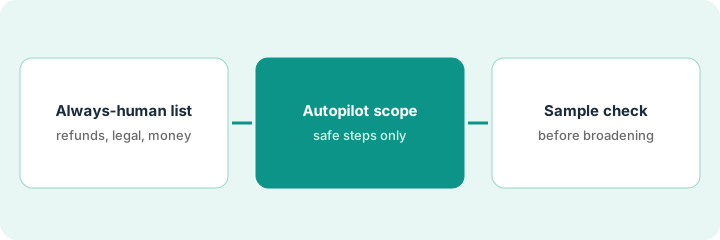
1. Step 1 — Write the always-human list for shared inboxes
What it is: List conversation types and actions that must stay human in Front (not just “topics Fin shouldn’t answer”).
- Always-human actions: send on legal threats, approve refunds over policy, change account ownership tags that trigger billing, close security reports, snooze executive escalations without a note.
- Always-human conversation types: chargebacks, data deletion, harassment, “cc’d our lawyer,” outages with unclear severity.
- Map each to a Front inbox/tag/assignment rule you already use.
- Keep the list short enough the pod memorizes it (≤10).
Always-human: refunds > policy, security@ reports, enterprise contract changes, any send that includes a credit memo. Autopilot may draft: “where is my order status link” when a macro exists, password-reset pointer to docs. Assignment rules route security@ to on-call human.
Two columns: Always-human action | Front tag/inbox. Fill from last 30 days of risky sends — not from an Intercom playbook paste.
2. Step 2 — Scope Autopilot to safe steps only
What it is: Enable Autopilot (or AI draft) only on steps that stop before send when risk tags apply.
- Safe steps examples: draft reply from a macro, suggest tag, summarize thread for the assignee — still human-send on gated types.
- Disable unattended send / unattended close for always-human tags.
- Point drafts at current macros and help links you maintain in Front.
- Do not mirror an Intercom “Fin answers alone” setup inside Front without Front-native controls.
Autopilot drafts shipping-how-to from Macro A for tag shipping-ok. Tag refund-over-policy forces assignee + blocks auto-send. Thread summary available; send button human-only on gated tags.
For one inbox: list Autopilot-enabled steps. Remove send/close from any step touching the always-human list. Screenshot settings for the ops log.
3. Step 3 — QA a sample before broadening
What it is: Score a fixed sample of Autopilot drafts before more inboxes.
- Sample e.g. 30 conversations spanning safe and gated types.
- Pass/fail on: wrong promise, missing Unknown, auto-send risk, tone.
- Broaden only after a dated pass with pod lead initials.
- Do not add Zendesk AI to the same Front shared inbox job in week one.
30 threads: 2 fails (draft promised a refund Autopilot should not), settings tightened. Gated types: 0 auto-sends. Enable remains limited to shipping-ok + howto-password. Pod lead initials Oct 11, 2026.
QA sheet: Conv ID | Type | Draft OK | Would auto-send have been wrong? | Fix. Zero wrong auto-sends required before broadening.
Pricing context (October 2026)
This how-to is not a price sheet. Plan notes live on Front AI. Recheck front.com/pricing and your Front admin before you budget. Related paths: Help Scout AI, Zendesk AI. Dated October 2026.
Checked Oct 11, 2026 on the vendor’s own pricing page: Front’s pricing page (Billed Annually shown, “Save 24%”) lists Starter at $25 per seat per month (up to 10 seats), Professional at $65 (up to 50 seats) and Enterprise at $105. Autopilot, Front’s AI agent, is listed as starting at $0.05 per conversation (talk to sales), and Copilot at $20 per seat per month as an add-on for Starter and Professional, included in Enterprise.
Uncertainty: Front Autopilot and AI packaging change by plan. If an invoice and a review disagree, trust the invoice. Do not paste a marketing list price you did not pay. The only prices this site sells here are the optional $9 AI toolkit spreadsheet and $19 AI toolkit audit.
When this helps (honest take)
Useful when Front is the shared-inbox system of record, the always-human action list is real, and QA gates broadening.
Not useful when you want unattended sends on refunds/security, or Intercom/Zendesk is the real ticket home for the same queue.
Related options (educational)
| Need | Where to look | Why |
|---|---|---|
| Front AI / Autopilot | Front AI | Primary path — Front shared inbox |
| Help Scout Answers from Docs | Help Scout AI | Docs-centered support |
| Zendesk macro QA | Zendesk AI | When Zendesk is system of record |
| Support stack map | Stack map for support ops | Job | Tool | Owner |
| Before another seat | Three checks before an AI seat · Find unused AI seats | Live how-tos |
Related reviews: Front AI · Help Scout AI · Zendesk AI. Free: seat-waste calculator if multiple support AI seats draft the same shared inbox.
FAQ
Is this the same as turning on Intercom Fin?
No. Front Autopilot gates are shared-inbox action gates. Fin is a different product with different controls — use the Fin-specific how-to if that is your system of record.
Can Autopilot send on “easy” refunds?
Not if refunds are on your always-human list. Easy is how policy leaks start.
Where do dated prices live?
On the Front AI review plus the vendor site. This October 2026 how-to does not invent list prices. Our Oct 11, 2026 check of the vendor’s own pricing page is summarized in the pricing section above.
Is Autopilot billed per seat?
Front’s Oct 11, 2026 pricing page listed Autopilot as starting at a per-conversation price with a talk-to-sales link, and Copilot as a per-seat add-on. Ask Front how conversations are counted before you widen scope in Step 3.
Optional next step
Free reviews stay free. Neither offer is required to use this page. If Front and another support AI seat already draft the same shared inbox, optional help: $9 AI toolkit spreadsheet or $19 AI toolkit audit when you want a written memo.