How-to · Support · Intercom · Oct 6, 2026
Turn on Fin only for how-tos you already publish
“Turn on Fin” here does not mean blank-check deflection. It means Fin answers from help content you already publish, while an always-human list keeps risky tickets with people.
Who this is for
Support leads already on Intercom who want deflection for repetitive how-tos without letting the bot own billing disputes, security incidents, or legal threats. If your help center is empty or stale, Fin will amplify that — fix content first.
How to do it
This page is a how-to. It is not a ranking of support AI bots. Product detail and dated pricing, including per-outcome pricing, live on the Intercom Fin review.

1. Step 1 — List always-human ticket types
What it is: Write the always-escalate list before Fin is live for customers.
- Types many teams include: chargebacks, data deletion, suspected account takeover, harassment, “talk to a lawyer,” and outages of unknown severity.
- Route those types to humans using inbox rules and Fin’s handoff settings — confirm the options in your Intercom admin and on the Intercom Fin review.
- Share the list with the whole support team so nobody “temporarily” lets Fin try.
- Keep the list short enough to remember — ten types beat a long policy document.
Always-human: refunds outside policy, security reports, enterprise contract changes. Fin may try: password reset how-to, where a feature lives, and “how do I export?” when articles exist.
Draft ten always-human types in a shared doc. Get one other lead to edit it. Do not enable Fin for customers until this list is saved in your playbook.
2. Step 2 — Point Fin at current help only
What it is: Fin should answer from help articles you already publish and maintain — not from internal Slack lore.
- Check the top twenty how-to articles for accuracy this month.
- Remove or unpublish articles you would not want quoted.
- Connect Fin to that curated help set. Help content comes first.
- Do not write new policies into Fin’s instructions that are not on the help site.
Three “export” articles contradict each other. The lead unpublishes two, updates one, then enables Fin for that topic only. The contradiction is gone before volume rises.
Pick five repetitive how-to questions from last month’s tickets. Confirm each has one current help article. Only those five are in scope for Fin’s first week.
3. Step 3 — Sample conversations before you broaden
What it is: For one week, review Fin conversations the way a human QA desk would — then widen topics.
- Review a fixed sample daily (for example ten conversations Fin handled).
- Mark each one: correct with a cited article / wrong / should have been always-human.
- Broaden only topics with clean samples; pull back anything that drifts.
- Watch the outcome meter on your plan — volume without review is expensive noise (see the pricing note below).
Fin handled forty conversations; a sample of twenty shows two billing-related misses. Those topics move to the always-human list. Password reset stays. The in-scope list grows by one topic, not twenty.
Put 20 minutes on the calendar daily for five business days to sample Fin. Send a Friday note in plain language: topics that stay in scope, topics to remove from Fin, and articles that need a fix.
Pricing context (October 2026)
This how-to is not a price sheet. Plan detail for Intercom Fin lives on that review. Recheck the vendor’s site before you budget. Dated October 2026.
Checked Oct 6, 2026 on the vendor’s own pricing page: intercom.com/pricing lists Fin at $0.99 per outcome, charged once per conversation, with seat prices billed separately by plan (Essential, Advanced, Expert). Intercom counts an outcome when a customer confirms the issue is resolved, does not ask for more help after Fin responds, or when Fin completes a workflow — including handoffs. Check how your always-human routing is counted before you estimate volume.
Uncertainty: Outcome definitions, minimum commitments, seat prices, and which content sources Fin may use change. If an invoice and a review disagree, trust the invoice. Do not paste a marketing list price you did not pay. The only prices this site sells here are the optional $9 AI toolkit spreadsheet and $19 AI toolkit audit.
When this helps (honest take)
Useful when repetitive how-tos already have current articles, and you will keep an always-human list plus a daily sample review.
Not useful when your help content is out of date, or you want Fin to negotiate refunds and security issues. Other support platforms have their own AI — see Help Scout AI or Freshdesk Freddy only if that platform is already your system of record.
Related options (educational)
| Need | Where to look | Why |
|---|---|---|
| Fin setup, handoff, outcome pricing | Intercom Fin | Primary path on this page |
| Help Scout is already the system of record | Help Scout AI | Different platform |
| Freshdesk is already the system of record | Freshdesk Freddy | Different platform |
| Zendesk comparison context | Freshdesk vs Zendesk AI | Educational comparison |
| Support stack inventory | Stack map — support ops | Job, tool, and owner map |
Related reviews: Intercom Fin · Help Scout AI · Freshdesk Freddy. Free: seat-waste calculator.
FAQ
Should we turn Fin on for all tickets on day one?
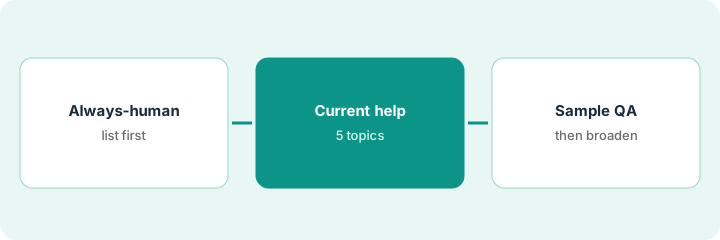
No. Always-human list first, curated how-tos second, sample review third — then broaden.
What if Fin answers from an outdated article?
Unpublish or fix the article. Content is how you control Fin.
Does this page tell us whether Fin is worth it?
No. It describes a safe rollout shape. Pricing and fit depend on the review and your ticket mix.
Where do dated prices live?
On the Intercom Fin review and intercom.com/pricing. This October 2026 how-to only repeats prices we checked on the vendor’s own pricing page on Oct 6, 2026.
Optional next step
Free reviews stay free. Neither offer is required to use this page. Optional help when support AI seats overlap: $9 AI toolkit spreadsheet or $19 AI toolkit audit.