Tool · Ops & automation · Help Scout · Oct 2026
Help Scout AI review (Oct 2026): AI Answers and drafts for Docs-first support
Help Scout AI Answers and inbox drafts when Docs/Beacon is already the support SoR — verify resolution pricing live. Complements Front AI, Intercom Fin, and Zendesk AI.
What Help Scout AI covers here
This page is for support leads who already publish Docs and run Beacon in Help Scout and want AI Answers plus inbox drafts — without inventing policy or letting resolution spend run uncapped. We focus on Beacon coverage maps, escalation topics, inbox drafts, and when Front, Intercom Fin, or Zendesk AI is the better home. Feature names and packaging change — verify live on Help Scout’s site.
Major features (with how someone uses them)
Examples at a glance: each feature has a concrete ops example plus a short Try this.
1. AI Answers coverage map (primary)
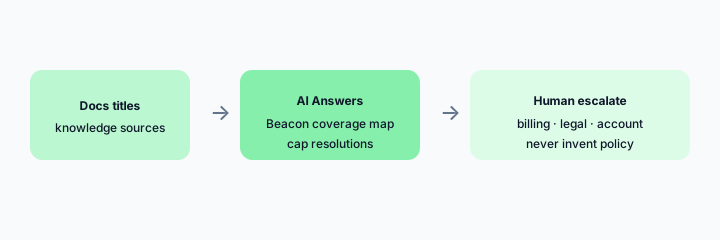
What it is: Map which Docs topics AI Answers may resolve in Beacon versus which must escalate to humans. Keep refunds, legal, and account-security out of silent auto-resolve. Set a monthly resolution cap so spend stays predictable.
Primary SoT workflow:
From 8 Docs article titles: propose Beacon AI Answers coverage and 3 topics that must escalate to humans.
2. Inbox AI drafts and summarize
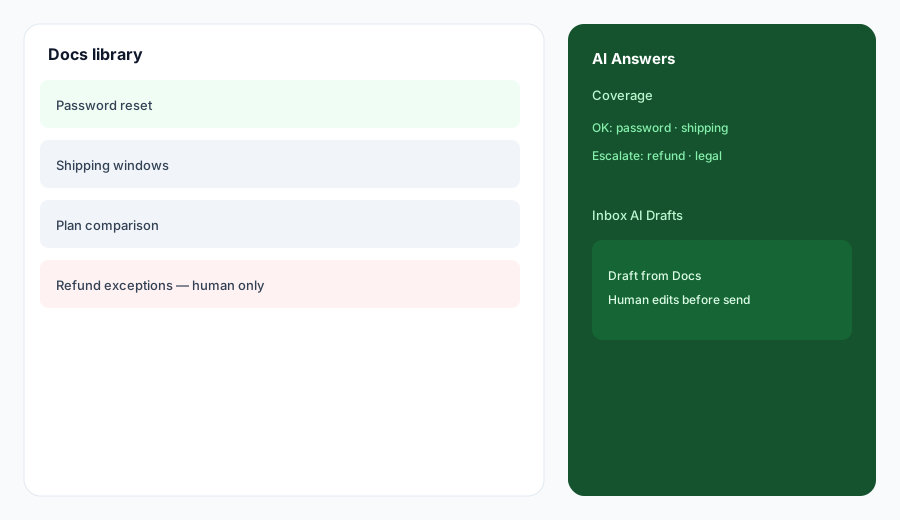
What it is: Draft replies and thread summaries from Docs + conversation evidence. Never invent order status, balances, or policy exceptions. Mark Unknown when the mailbox lacks truth.
Draft honesty:
Paste a sanitized 6-message thread. Draft a reply grounded only in listed Docs titles; mark Unknown for any number, status, or policy not in the paste.
3. Knowledge sources and caps
What it is: Curate Docs and public sources that ground AI Answers. Stale pricing pages poison answers — treat source freshness as an ops job. Caps prevent surprise resolution bills.
Source QA:
List 5 knowledge sources feeding AI Answers. Flag any older than 90 days. Propose a monthly owner and a resolution-cap check.
4. Vs Front / Intercom / Zendesk
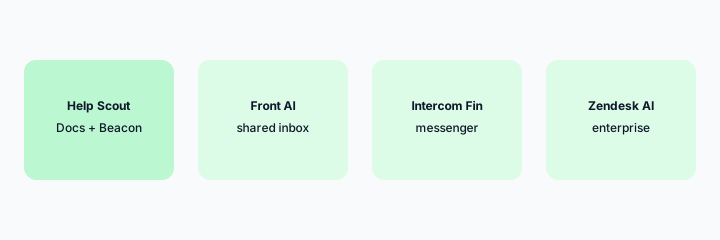
What it is: Stay in the desk you already pay for. Help Scout AI for Docs/Beacon; Front AI for shared-inbox ops; Intercom Fin for messenger; Zendesk AI for enterprise desks. Soft $19/$9 below only if Help Scout AI and other seats overlap on the same FAQ jobs.
Home-for-the-job:
List 6 recurring support jobs this quarter. Assign each to Help Scout AI, Front AI, Intercom Fin, or Zendesk AI — one sentence why. Do not invent a tool you do not use.
Pricing context (October 2026)
Help Scout publishes plans and AI Answers packaging on its public site (start from helpscout.com/pricing). Resolution-based AI Answers pricing has been listed publicly (verify the live per-resolution rate and any trial). This page is dated October 2026 and is not a price sheet — we do not invent exact plan or seat prices.
Uncertainty: Plan tiers, what counts as a resolution, monthly caps, and trial eligibility change. Always verify on live Help Scout pages and your admin before budgeting.
When Help Scout AI is useful (honest take)
Useful when Docs are maintained, Beacon is already the self-serve surface, and humans own refunds/legal escalations with a resolution cap. Less useful when Docs are stale or empty, or when you hoped AI alone would invent policy the team never wrote down.
Paying for Help Scout AI and a few other AI tools? The $9 AI toolkit spreadsheet lists every AI subscription you have, what each one costs, and how fast it pays for itself, so you can see which ones are worth the money.
Want someone to do it for you? AI toolkit audit — $19
Related options (educational)
| Need | Better home | Why |
|---|---|---|
| Docs + Beacon self-serve | Help Scout AI (this page) | AI Answers + inbox drafts |
| Shared inbox customer ops | Front AI | Copilot + Autopilot gates |
| Product messenger AI | Intercom Fin | In-app messenger SoR |
| Enterprise helpdesk | Zendesk AI | Large desk graphs |
| Mid-market Freddy desk | Freshdesk Freddy | Freddy packaging fit |
Inventory seats by job on the stack map for support ops.
FAQ
What is Help Scout AI?
AI Answers on Beacon/Docs plus inbox drafts a human should review. Verify live feature names on Help Scout’s site.
How much does it cost?
Confirm plans and AI Answers resolution pricing on Help Scout’s public pricing — this Oct 2026 page does not invent exact prices.
Should AI Answers auto-handle refunds?
No. Escalate refunds, legal, and account-security. Cap monthly resolutions.
Help Scout vs Front / Intercom / Zendesk?
Stay in the desk you already pay for. See related reviews linked above.
Optional next step (if seats overlap)
If several AI seats would cover the same support and ops jobs, optional help mapping overlap: $19 AI toolkit audit or $9 AI toolkit spreadsheet. Email Audit $19 or Toolkit spreadsheet $9.
Checkout is live via Stripe. After you pay, we email delivery (spreadsheet) or intake next steps (audit).