How-to · Support · Help Scout AI · Oct 11, 2026
Propose Help Scout AI Answers coverage from Docs titles you already have
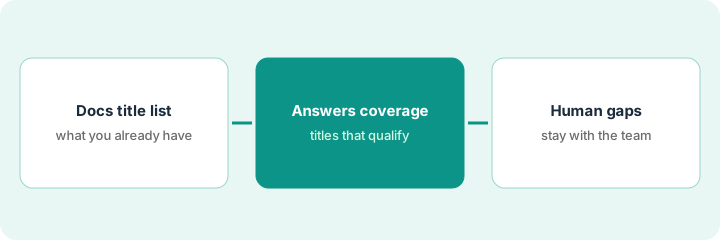
“Answers coverage from Docs titles” means mapping Help Scout Docs you already publish to AI Answers topics — and listing gaps humans must fill. You do not invent articles to feed the bot. This is Help Scout-specific, not an Intercom Fin enablement guide. Terms: QA means a quality check done by a person.
Who this is for
Support leads whose help center + mailbox home is already Help Scout and who want AI Answers only where Docs exist. If Front is the shared inbox, see Front AI. If Gorgias + Shopify is the commerce support home, see Gorgias AI.
How to do it
This page is a how-to. It is not a ranking of support AI. Product detail and dated packaging notes live on Help Scout AI. Confirm AI Answers features on your Help Scout plan before you pilot.
1. Step 1 — Export the Docs title list
What it is: Pull current Docs titles/collections — stale and draft pages included so you can exclude them.
- Export or copy titles from Help Scout Docs.
- Mark each: Current | Stale | Draft | Internal-only.
- Only Current titles are Answer candidates.
- Do not create ten new articles just to “have coverage” in week one.
42 Docs titles: 28 Current, 9 Stale, 5 Draft. Stale “2023 shipping holiday” excluded. Internal-only “refund decision tree” excluded from Answers.
Spreadsheet: Title | Collection | Status | Last updated. Filter Status=Current. That filter is your candidate set.
2. Step 2 — Propose Answers coverage
What it is: Map high-volume ticket intents to Current titles; AI may propose the map, humans lock it.
- Intents from last 30 days of Help Scout tags or folders.
- Each intent → one primary Doc title (or None).
- Reject maps to Stale/Draft.
- Cap pilot Answers to intents with a Current primary Doc.
Intent password-reset → Doc “Reset your password.” Intent invoice-copy → Doc “Download invoices.” Intent chargeback → None (human-only). AI suggested mapping chargeback to an old FAQ — rejected (Stale + sensitive).
The 15 most common intents by volume. Fill Primary Doc or None. Enable Answers only where Primary Doc is Current.
3. Step 3 — Mark human gaps
What it is: Every None or sensitive intent stays human; publish a gap list instead of forcing Answers.
- Gap list: intent | why human | owner | Doc to write later (optional).
- Sample QA on enabled intents before sitewide Answers.
- Revisit when Docs update dates change.
- Do not bolt Front Autopilot onto the same Help Scout Docs job without a clear split.
Gaps: chargeback, data deletion, enterprise master services agreement edits. Owner: support lead. Answers enabled for 8 how-to intents only after 20-thread QA pass.
Publish gap list in the support wiki. QA 20 Answer drafts. Broaden only with dated initials.
Pricing context (October 2026)
This how-to is not a price sheet. Plan notes live on Help Scout AI. Recheck helpscout.com/pricing and your account before you budget. Related paths: Front AI, Gorgias AI. Dated October 2026.
Checked Oct 11, 2026 on the vendor’s own pricing page: Help Scout’s pricing page (Annual selected, 16% off) lists Standard at $25, Plus at $45 and Pro at $75 per user per month, and a Free plan with 5 users, 1 inbox and 1 Docs site. AI Answers is an add-on at $0.75 per resolution, billed monthly, with a three-month free trial. Docs sites by plan: Free 1, Standard 2, Plus 3, Pro 5.
Uncertainty: Help Scout AI Answers packaging varies by plan. If an invoice and a review disagree, trust the invoice. Do not paste a marketing list price you did not pay. The only prices this site sells here are the optional $9 AI toolkit spreadsheet and $19 AI toolkit audit.
When this helps (honest take)
Useful when Docs are mostly Current, intents map cleanly, and gaps stay human.
Not useful when Docs are stale, you invent articles for the bot, or Gorgias/Front is the real support system of record.
Related options (educational)
| Need | Where to look | Why |
|---|---|---|
| Help Scout AI Answers | Help Scout AI | Primary path |
| Front Autopilot gates | Front AI | Shared-inbox action gates |
| Gorgias + Shopify Unknowns | Gorgias AI | Commerce support |
| Support stack map | Stack map for support ops | Job | Tool | Owner |
| Before another seat | Three checks before an AI seat · Find unused AI seats | Live how-tos |
Related reviews: Help Scout AI · Front AI · Gorgias AI. Free: seat-waste calculator if multiple support AI seats answer from the same docs.
FAQ
Should we write new Docs just so Answers has coverage?
Not in week one. Map Current titles first. Add Docs from the gap list with owners and dates.
Can Answers handle chargebacks if we add a Doc?
Sensitive money disputes stay human on this pattern even with a Doc — put them on the gap/always-human list.
Where do dated prices live?
On the Help Scout AI review plus the vendor site. This October 2026 how-to does not invent list prices. Our Oct 11, 2026 check of the vendor’s own pricing page is summarized in the pricing section above.
What does AI Answers cost per answer?
On Oct 11, 2026 Help Scout listed AI Answers at $0.75 per resolution with a three-month free trial. Coverage you limit in Step 2 also limits what you pay for.
Optional next step
Free reviews stay free. Neither offer is required to use this page. If Help Scout and another support AI seat already cover the same Docs intents, optional help: $9 AI toolkit spreadsheet or $19 AI toolkit audit when you want a written memo.