Tool · Ops & automation · Front · Oct 2026
Front AI review (Oct 2026): Copilot and Autopilot for customer ops inboxes
Front AI Copilot drafts and Autopilot playbooks for shared inboxes — humans approve before customer send. Complements Help Scout AI, Intercom Fin, and Zendesk AI.
What Front AI covers here
This page is for customer ops and support leads who already run shared inboxes in Front and want AI help for drafts and gated playbooks — without inventing policy or auto-sending refunds. We focus on Copilot reply drafts, Autopilot human gates, topics hygiene, and when Help Scout, Intercom Fin, or Zendesk AI is the better home. Feature names and packaging change — verify live on Front’s site.
Major features (with how someone uses them)
Examples at a glance: each feature has a concrete ops example plus a short Try this.
1. Copilot drafts + Autopilot gates (primary)
What it is: Use Copilot to draft replies and next steps from the thread and connected context. Use Autopilot playbooks only with explicit human gates for refunds, legal, and account-security steps. Front remains the inbox of record — AI does not silently send high-risk outcomes.
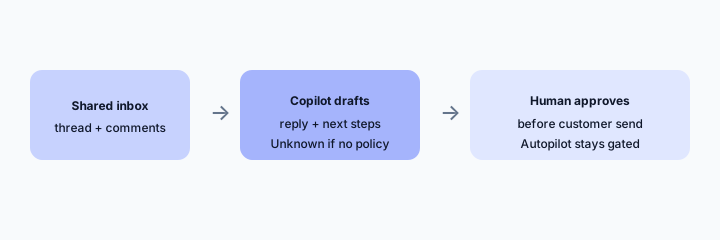
Primary SoT workflow:
From a sanitized shared-inbox thread: draft a reply + list 3 Autopilot steps that must stay human-gated.
2. Topics and conversation hygiene
What it is: Propose Topics labels from real conversation evidence so queues stay scannable. Prefer a small vocabulary. Mark Unknown when the thread has no clear job.
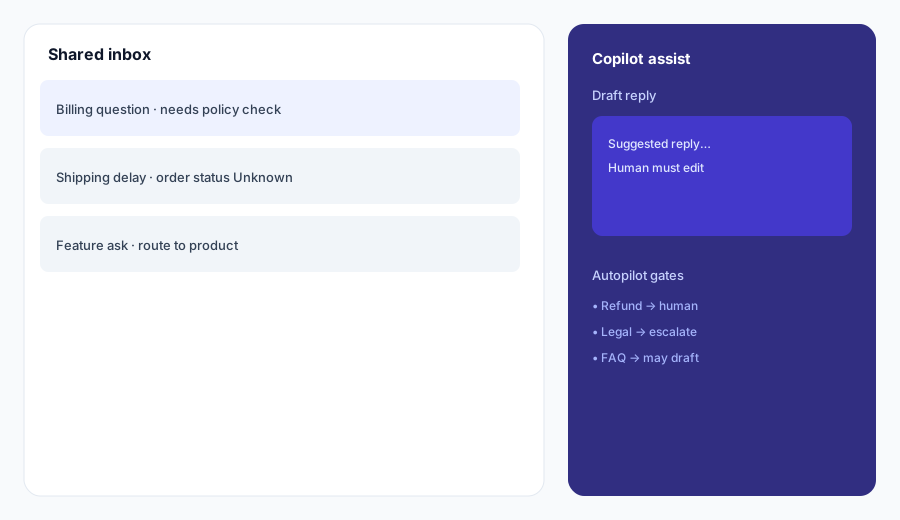
Topic honesty:
Define 6 Topics you allow. For 8 sample subject lines, propose at most one Topic or Unknown — never invent priority or SLA.
3. Smart QA / CSAT assists
What it is: Use AI QA/CSAT surfaces as coaching signals, not as automatic agent scores that replace managers. Sample before you trust trends.
QA sample:
Design a weekly QA sample: 8 AI-flagged threads, 2 human-picked. List what a manager must confirm before coaching.
4. Vs Help Scout / Intercom / Zendesk
What it is: Stay in the desk you already pay for. Front AI for shared-inbox customer ops; Help Scout AI for Docs/Beacon; Intercom Fin for messenger AI; Zendesk AI for enterprise desk graphs. Soft $19/$9 below only if Front AI and other seats overlap on the same reply jobs.
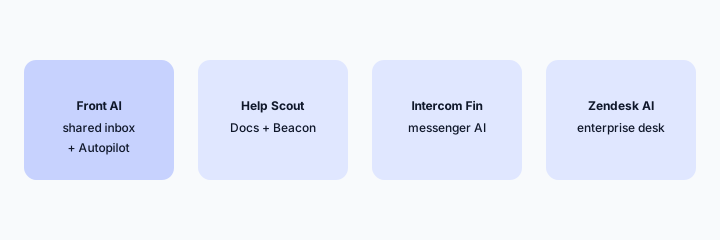
Home-for-the-job:
List 6 recurring customer-ops jobs this quarter. Assign each to Front AI, Help Scout AI, Intercom Fin, or Zendesk AI — one sentence why. Do not invent a tool you do not use.
Pricing context (October 2026)
Front publishes plans and AI packaging (including Copilot and Autopilot add-ons) on its public site (start from front.com/pricing). This page is dated October 2026 and is not a price sheet — we do not invent exact per-seat or usage prices.
Uncertainty: Which tiers include which AI surfaces, Autopilot usage pricing, seat minimums, and regional availability change. Always verify on live Front pages and your admin before budgeting.
When Front AI is useful (honest take)
Useful when Front is already your shared-inbox SoR, Copilot drafts get human edit, and Autopilot playbooks keep refunds/legal gated. Less useful when the real work lives in another desk and Front is a forwarding dump, or when you hoped Autopilot alone would invent policy from empty macros.
Paying for Front AI and a few other AI tools? The $9 AI toolkit spreadsheet lists every AI subscription you have, what each one costs, and how fast it pays for itself, so you can see which ones are worth the money.
Want someone to do it for you? AI toolkit audit — $19
Related options (educational)
| Need | Better home | Why |
|---|---|---|
| Shared inbox customer ops | Front AI (this page) | Copilot + gated Autopilot |
| Docs / Beacon self-serve | Help Scout AI | AI Answers on Docs |
| Product messenger AI | Intercom Fin | In-app messenger SoR |
| Enterprise helpdesk graph | Zendesk AI | Large desk + macros |
| Mid-market Freddy desk | Freshdesk Freddy | Freddy packaging fit |
Inventory seats by job on the stack map for support ops.
FAQ
What is Front AI?
Assists inside Front for Copilot drafts and Autopilot playbooks a human should gate. Verify live feature names on Front’s site.
How much does it cost?
Confirm on Front’s public pricing — this Oct 2026 page does not invent exact prices.
Should Autopilot auto-send refunds?
No. Keep refunds, legal, and account-security human-gated.
Front vs Help Scout / Intercom / Zendesk?
Stay in the desk you already pay for. See related reviews linked above.
Optional next step (if seats overlap)
If several AI seats would cover the same support and ops jobs, optional help mapping overlap: $19 AI toolkit audit or $9 AI toolkit spreadsheet. Email Audit $19 or Toolkit spreadsheet $9.
Checkout is live via Stripe. After you pay, we email delivery (spreadsheet) or intake next steps (audit).