Compare · Property ops · Oct 2026
PriceLabs vs Wheelhouse (Oct 2026): dynamic pricing tools for short-term rentals
PriceLabs and Wheelhouse both recommend and sync nightly rates and minimum stays for short-term rentals, and both publish per-listing prices. They differ in how you set the rules, how comp sets are built and priced, and how their AI assistants sit on top. This page compares the controls you would actually use — minimum price, minimum stay, orphan nights — plus comp sets, published prices, and who approves every rate rule. It is not a ranking, and each section has a Try this.
What this comparison covers
This page is for a host, owner, or revenue manager at a short-term rental company choosing between PriceLabs and Wheelhouse, or running one and wondering about the other. The question it answers: by pricing controls, comp sets, market data, and published prices, how do the two compare — and who approves the rules before either tool changes a rate.
We re-read both pricing pages on 13 October 2026. PriceLabs’ plans page lists Dynamic Pricing at $19.99 USD per listing per month in the USA, UK, Canada, Europe, Australia, New Zealand, and Israel and $9.99 in the rest of the world (plus taxes), with a 30-day free trial and discounts from the second listing. Wheelhouse’s pricing page lists Pro Flat at $19.99 per listing per month ($16.99 for 10–49 listings), Pro Flex at 1% of revenue with a $2.99 monthly minimum, and a Free tier every listing starts on.
Ground rules for either tool: the owner signs off the floor, ceiling, minimum stay, and orphan-night rule before anything syncs; recommendations are suggestions until someone has reviewed two weeks of them on one listing; and local short-term rental permits, taxes, and occupancy rules are checked by a person, not a pricing tool. Facts align with our PriceLabs AI and Wheelhouse AI reviews; vendor revenue-lift figures are left out. This comparison is not a ranking.
| Question | PriceLabs | Wheelhouse |
|---|---|---|
| Published price (flat) | $19.99 per listing per month in the USA, UK, Canada, Europe, Australia, New Zealand, and Israel; $9.99 in the rest of the world (plus taxes); discounted from the second listing | Pro Flat $19.99 per listing per month; $16.99 for 10–49 listings; 50+ listings contact sales |
| Percentage option | 1% of total revenue from your connected platform — ask support after the trial | Pro Flex 1% of revenue, $2.99 minimum monthly fee, billed at reservation; cancellations refunded |
| Free option | 30-day free trial when you first add listings | Free tier — every listing starts there; no card needed |
| Price limits and stays | Base, minimum, and maximum prices; dynamic minimum stays; check-in and check-out rules; date overrides | Minimum and maximum prices; minimum stays; check-in and check-out; custom rates on dates |
| Orphan / gap nights | Orphan-day adjustments | Gaps and adjacencies settings (gaps under six nights) |
| Comp sets | Market Dashboard comp sets (up to 30 per dashboard), from $9.99 per dashboard per month after one free credit | Dynamic Sets via Navigator (18 filter categories), $12.99 per set per month |
| AI layer | Athena AI revenue analyst (free in beta; suggestions wait for Accept, Review, or Reject); MCP connector (free in beta) | Wheelhouse MCP for Claude and other AI tools (read and write); Skills library |
| Who approves | The owner signs off the minimum price, minimum stay, and orphan-day rules | The owner approves every pricing strategy change |
Major features (with how someone uses them)
Examples at a glance: each feature has a concrete example from a real job plus a short Try this you can run this week.
1. Write your three rules first (primary)
What it is: Before you compare algorithms, write down the three rules you want for one listing: the minimum nightly price (often above cleaning plus turnover cost), the minimum stay by season, and what should happen to a one- or two-night gap between bookings. Then check how each tool lets you set them. PriceLabs uses minimum and maximum prices, dynamic minimum stays, and orphan-day adjustments; Wheelhouse uses minimum and maximum prices, minimum stays, and its gaps and adjacencies settings.
If a rule cannot be expressed in one tool’s settings, that is a real difference — write it down. If it can be expressed in both, the choice is about comp sets, prices, and workflow, not the rule.
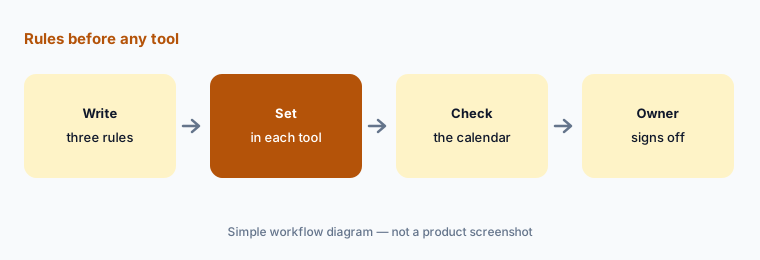
Three rules, one listing:
Pick one listing. Write down the minimum price, minimum stay, and orphan-night rule you want, then check how each tool lets you set them.
2. Published prices: flat per listing or a percentage
What it is: Both flat plans list $19.99 per listing per month. PriceLabs is $9.99 per listing outside its listed regions (47.50 BRL in Brazil) and discounts from the second listing on a sliding scale; Wheelhouse drops to $16.99 per listing for 10–49 listings and asks 50+ portfolios to contact sales. Both offer a 1% of revenue option: Wheelhouse’s Pro Flex has a $2.99 monthly minimum and refunds cancellations; PriceLabs’ percentage plan is arranged through support. PriceLabs gives a 30-day free trial; Wheelhouse has a Free tier.
Run your own numbers: a listing that earns little in winter may cost less on a percentage plan; a busy listing usually costs less flat. PriceLabs itself says flat plans are generally cheaper.
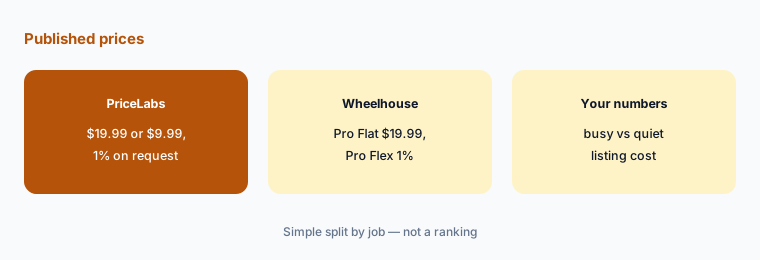
Flat or percentage:
For two listings — one busy, one quiet — work out last year’s cost on each tool’s flat plan and on 1% of revenue. Use only the prices on the pricing pages.
3. Comp sets: Market Dashboards vs Dynamic Sets
What it is: PriceLabs builds comp sets inside Market Dashboards — up to 30 per dashboard, from public Airbnb and Vrbo listing data (no direct-booking data) — and they flow into Dynamic Pricing and Portfolio Analytics; dashboards start at $9.99 per month after one free credit. Wheelhouse sells Dynamic Sets at $12.99 per set per month, built in its Navigator map with 18 filter categories including amenities, operators, occupancy, and cleaning fees, and used to shape its pricing strategy.
Whichever you use, read the comp list yourself. A comp with a hot tub, twice the bedrooms, or a different block of the beach will drag the recommendation in the wrong direction.
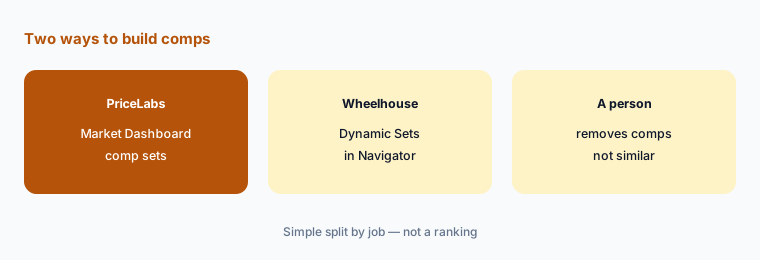
Clean the comps:
Build one comp set for the same listing in each tool. Remove any comp that is not truly similar and note how the recommended rate changes.
4. Strategy controls: profiles and overrides vs data-driven, rule-based, or hybrid
What it is: PriceLabs’ Dynamic Pricing recalculates prices and minimum stays daily and syncs to Airbnb, Vrbo, and 160+ PMSs, with groups, pricing profiles, seasonal profiles, and date-specific overrides layered on top of your base, minimum, and maximum prices. Wheelhouse’s Dynamic Pricing lets you run fully data-driven, fully rule-based, or hybrid strategies, with a custom rules builder and settings such as seasonality, day of week, last minute, far future, demand sensitivity, and occupancy and revenue pacing.
More settings are not automatically better. Change one setting at a time on one listing and keep a short log of what changed and why, so you can undo it.
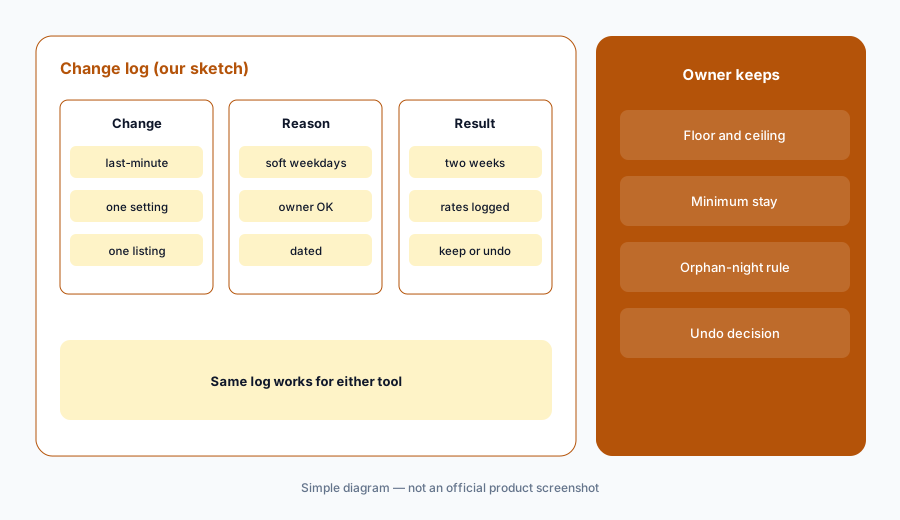
One change at a time:
Change one pricing setting on one listing in either tool. Log the date, the setting, the reason, and the next two weeks of rates before changing anything else.
5. AI layer: Athena and MCP vs Wheelhouse MCP and Skills
What it is: PriceLabs’ AI page describes Athena, an AI revenue analyst free in beta, whose suggestions wait for you to accept, review, or reject — PriceLabs says its pricing engine sets prices and Athena only suggests — plus an MCP connector, also free in beta. Wheelhouse’s API and MCP page describes Wheelhouse MCP to connect Claude and other AI tools with read and write tools, and a Skills library (for example occupancy pickup and future-rate overpricing checks).
An assistant with write access can change rates. Start read-only, ask it to explain a recommendation, and keep any write action behind a named person’s approval.
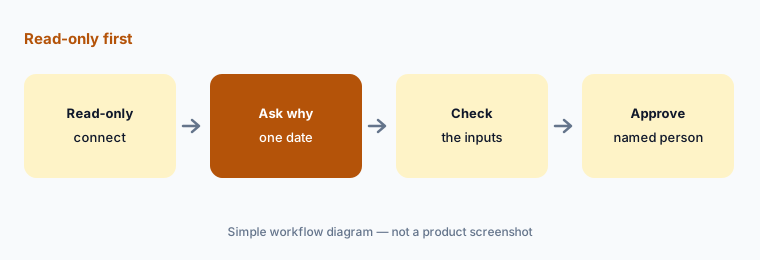
Ask why, read-only:
Connect one tool’s AI assistant read-only and ask why one upcoming date’s rate changed. Check every input it cites before you accept any suggestion.
6. Who approves rate rules, on either tool
What it is: Both tools change what guests pay. Whichever you pick, the owner signs off the floor, ceiling, minimum stay, and orphan-night rule; a revenue manager reviews changes daily for the first two weeks on one listing; and anyone using Wheelhouse’s managed Revenue Services or an AI assistant with write access still reports to that owner. Local permit, tax, and occupancy limits are checked by a person.
Keep one approval sheet with three columns — rate limits, stay rules, and strategy changes — and a named person in each. The same sheet works for either tool.
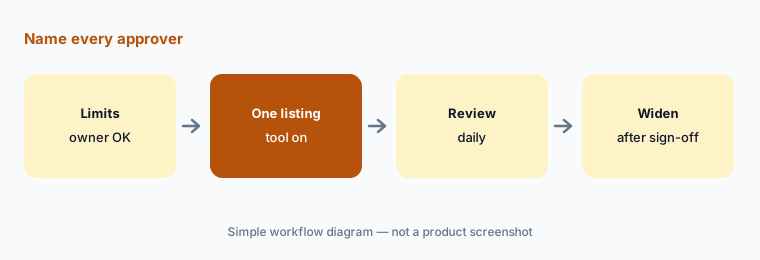
One approval sheet:
Make one approval sheet for rate limits, stay rules, and strategy changes. Name the approver for each before either tool syncs a rate.
Pricing context (October 2026)
PriceLabs’ plans page (FAQ read 13 Oct 2026): Dynamic Pricing with a 30-day free trial when you first add listings; $19.99 USD per listing per month in the USA, UK, Canada, Europe, Australia, New Zealand, and Israel; 47.50 BRL in Brazil; $9.99 USD per listing per month in the rest of the world (all plus taxes); a sliding scale discounted from the second listing; and a percentage plan of 1% of total revenue on request. Market Dashboards are separate, from $9.99 per dashboard per month after one free credit.
Wheelhouse’s pricing page (read 13 Oct 2026): Free tier for every listing (no card); Pro Flex 1% of revenue with a $2.99 minimum monthly fee, excluding taxes and fees, billed at reservation, cancellations refunded; Pro Flat $19.99 per listing per month, $16.99 for 10–49 listings, 50+ listings contact sales; Enterprise custom; Dynamic Sets $12.99 per set per month. Managed Revenue Services are not priced publicly. See our PriceLabs AI and Wheelhouse AI reviews for feature detail.
Uncertainty: PriceLabs’ sliding-scale discount amounts are not listed — get the total in writing. Athena and both MCP connectors are labelled beta or new; features and costs can change. Neither vendor’s revenue-lift claims are repeated here. Prices may exclude local taxes. This page is not a ranking.
When it’s useful (honest take)
PriceLabs is useful when you want a lower per-listing price outside its listed regions, market dashboards with comp sets, orphan-day and dynamic minimum-stay controls, and an AI analyst whose suggestions wait for your yes.
Wheelhouse is useful when you want a Free tier to start, a choice of flat or 1%-of-revenue billing with a published minimum, data-driven or rule-based strategies, map-built Dynamic Sets, and an MCP connection for Claude.
Less useful when (either one) nobody owns the floor and minimum stay, your PMS pricing tool already covers you (Guesty vs Hostaway), or you manage long-term leases where rent-setting software faces legal scrutiny (RealPage AI).
Still choosing between PriceLabs and Wheelhouse? The $19 AI toolkit audit gives you a written plan for which tools to keep using and which to drop across your whole AI stack, including this pair.
Prefer to do it yourself? Spreadsheet — $9
Related options (educational)
| Need | Better home | Why |
|---|---|---|
| PriceLabs on its own | PriceLabs AI | From $19.99 / $9.99 per listing |
| Wheelhouse on its own | Wheelhouse AI | Free tier; Pro Flat $19.99 |
| Pricing inside your PMS | Guesty vs Hostaway | PriceOptimizer / Dynamic Pricing |
| Turnovers and inspections | Breezeway AI | Ops, not pricing |
| Hosts with a few listings | Hospitable AI | Messaging and direct booking |
FAQ
Should I choose PriceLabs or Wheelhouse?
This page is not a ranking. Write down the minimum price, minimum stay, and orphan-night rule you want for one listing, check how each tool sets them, clean the comp set, and compare the published prices for your listing count.
How much do PriceLabs and Wheelhouse cost in October 2026?
PriceLabs lists $19.99 per listing per month in the USA, UK, Canada, Europe, Australia, New Zealand, and Israel and $9.99 elsewhere, with a 30-day trial. Wheelhouse lists Pro Flat at $19.99 per listing per month ($16.99 for 10–49), Pro Flex at 1% of revenue with a $2.99 minimum, and a Free tier. All as checked 13 October 2026.
Do both offer a percentage-of-revenue plan?
Yes. Wheelhouse publishes Pro Flex at 1% of revenue with a $2.99 monthly minimum; PriceLabs offers 1% of total revenue on request through support.
Does AI set my prices in either tool?
PriceLabs says its pricing engine sets prices and its Athena assistant only suggests changes that wait for you to accept. Wheelhouse’s MCP connection includes write tools, so keep write access behind a named person’s approval.
Who should approve minimum prices and stays?
The owner. A revenue manager can review daily changes, but the floor, ceiling, minimum stay, and orphan-night rules are the owner’s call on either tool.
Optional next step (if seats overlap)
If you pay for a PMS pricing add-on, a separate pricing tool, a comp-set subscription, and chat seats that all touch the same rates, that overlap is worth mapping. Map the overlap with the $19 AI toolkit audit or the $9 AI toolkit spreadsheet. Email Audit $19 or Toolkit spreadsheet $9.
Checkout is live via Stripe. After you pay, we email delivery (spreadsheet) or intake next steps (audit).