How-to · People ops · Rippling AI · Oct 10, 2026
Draft a Rippling onboarding FAQ with counsel-review flags
“Counsel-review flags” here means marking FAQ answers that need HR, an admin, or your lawyer to look before anyone publishes them. AI helps word the routine answers. It is not a source of legal, tax, or payroll advice.
Who this is for
People ops and IT leads whose HR and IT system of record (the HR information system everyone actually uses) is already Rippling and who want AI help wording onboarding FAQ answers, with clear gates for an admin and for counsel. If BambooHR is the HR home, see BambooHR AI. If Gusto runs payroll and HR for a smaller team, see Gusto AI. This page is not legal, tax, immigration, or payroll advice. If you are about to buy a second HR AI for the same FAQ job, read Three checks before you add another AI seat first.
How to do it
This page is a how-to. It is not a ranking of HR software AI. The Rippling AI review covers the features and packaging; this page is the narrower routine: twelve real questions, three buckets, drafts written only from your own help text, and a publish step that needs a reviewer’s initials. Confirm which AI features your Rippling plan actually shows before you pilot.

1. Step 1 — List FAQ questions from real onboarding
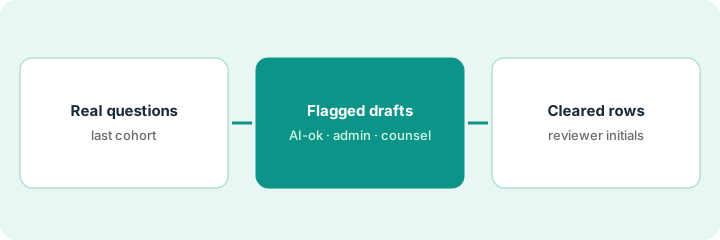
What it is: Collect eight to twelve questions that new hires (or IT) already ask, from tickets, chat, or the last group of hires. Do not invent “nice to have” topics.
- Pull questions from the last onboarding group or the IT queue.
- Sort them into three buckets: Process (how to do something), Policy (the rules), and Legal or pay-sensitive (always a person).
- Name the person who publishes (people ops) and the admin and counsel reviewers.
- Ban invented benefit percentages or visa steps in this list.
Real questions keep the FAQ short. If you only have three, that is the FAQ for now.
Process: “When do I get my laptop?”, “How do I set up two-step sign-in?” Policy: “Where do I request time off in Rippling?” Legal or pay-sensitive: “How is overtime calculated in my state?”, “What happens to my equity if I leave?” The last two are always flagged for counsel or an admin.
Paste twelve real questions into a sheet with three columns: Question | Bucket | OK for AI to word? (Y/N). Mark every pay, equity, immigration, and accommodation question N. If you have fewer than five real questions, wait for the next group of hires. Do not invent questions.
2. Step 2 — Draft answers with admin and counsel flags
What it is: For the Process rows (and carefully scoped Policy rows), draft short answers grounded only in your existing Rippling help text or a pasted procedure. Flag the rest.
- Prompt pattern: answer only from the pasted text; if it is missing, write Unknown; never state a legal rule.
- Tag every row: AI-ok · Needs admin · Needs counsel.
- Benefits, pay, leave law, equity, and immigration stay Needs counsel (or Needs admin), however confident the answer sounds.
- Keep the answers in a doc reviewers can comment on, not on the live help page yet.
If your help text lives in a wiki instead of Rippling, Turn one Confluence runbook into an FAQ without new steps and Answer the same how-to from a Guru card — or say Unknown show the same “answer from the source or say Unknown” rule.
“Laptop timing,” written from the IT procedure, is AI-ok after the IT admin skims it. “Where to request time off in Rippling” is Needs admin. “Overtime in my state” is Needs counsel, and the AI-written answer just says Unknown.
Write five Process answers only. Paste the procedure under each prompt. Reject any answer that adds a number, deadline, or legal claim not in the procedure. Label the legal and pay rows Unknown + Needs counsel.
3. Step 3 — Publish only the rows a reviewer cleared
What it is: Publish to your onboarding help page only after named reviewers have cleared each row. AI never goes live on its own.
- The admin clears Process and Policy rows, with sources cited.
- Counsel (or the HR lead your policy names) clears or rewrites the sensitive rows, or leaves them unpublished.
- Date-stamp the FAQ and set a review rhythm (for example, after each group of hires).
- Do not buy BambooHR or Gusto AI just to draft the same FAQ while Rippling stays the system of record.
Once the FAQ is live, Fill one stack-map row set for a single function this afternoon is a quick way to check whether two HR tools are now doing the same job.
Eight Process and Policy rows go into the onboarding wiki marked “Reviewed: people ops + IT admin · Oct 10, 2026.” Four sensitive rows stay unpublished and Unknown until counsel replies. No parallel BambooHR FAQ pilot starts for the same company.
Use a publish checklist: Reviewer initials | Date | Source link | Live URL. Anything without initials stays unpublished. Put a review date on the calendar for after the next group of hires.
Pricing context (October 2026)
This how-to is not a price sheet. Plan detail for Rippling AI, BambooHR AI and Gusto AI lives on those reviews. Recheck each vendor’s site before you budget. Dated October 2026.
Checked Oct 10, 2026 on the vendor’s own pricing page: rippling.com/pricing shows no public list price. It asks for your number of employees and contractors and sends a custom quote. Its FAQ says most products are billed per employee per month, bought on top of the required core Rippling Platform, and some include a monthly base fee. This page quotes no Rippling dollar figure. BambooHR and Gusto were not rechecked.
Uncertainty: Which modules and AI features your Rippling bundle includes changes by company and region. If an invoice and a review disagree, trust the invoice. Do not paste a marketing list price you did not pay. The only prices this site sells here are the optional $9 AI toolkit spreadsheet and $19 AI toolkit audit.
When this helps (honest take)
Useful when Rippling is already the people and IT home, you have real onboarding questions, and the admin and counsel reviewers are named.
Not useful when you want AI to give employment-law answers, there is no reviewer, or BambooHR or Gusto is already the system of record. This page does not replace counsel, an accountant, or your handbook.
Related options (educational)
| Need | Where to look | Why |
|---|---|---|
| Rippling people and IT AI | Rippling AI | When Rippling is the system of record |
| BambooHR onboarding FAQ | BambooHR AI | When BambooHR is the system of record |
| Gusto payroll FAQ flags | Gusto AI | When Gusto is the system of record |
| People ops inventory | Stack map — people ops · Fill one stack-map row set for a single function this afternoon | Job, tool, owner table |
| Before another seat | Three checks before you add another AI seat · See which AI tools you pay for and never open | Live how-tos |
Related reviews: Rippling AI · BambooHR AI · Gusto AI. Related how-tos: Turn one Confluence runbook into an FAQ without new steps · Answer the same how-to from a Guru card — or say Unknown · Fill one stack-map row set for a single function this afternoon. Free: seat-waste calculator if several HR AI seats draft the same FAQ.
FAQ
Is this legal or payroll advice?
No. It is an ops drafting routine. Sensitive answers need counsel or an admin. AI output is not advice.
Can AI publish straight into the employee handbook?
No. People publish cleared rows only. Handbook and policy changes follow your normal approval path.
Which Rippling plan do I need for the AI features?
Ask your Rippling contact or check your admin settings. On Oct 10, 2026, Rippling’s pricing page showed no public price and sold products per employee per month on top of the core platform, so the answer depends on your quote. The routine itself works with any chat assistant and your pasted help text.
Where do dated prices live?
On the Rippling AI review (and the BambooHR and Gusto reviews if relevant) plus rippling.com/pricing, which showed no public price on Oct 10, 2026. This October 2026 how-to only repeats prices we checked on the vendor’s own pricing page on Oct 10, 2026.
Optional next step
Free reviews stay free. Neither offer is required to use this page. If Rippling AI and another HR AI seat already draft the same onboarding FAQ, optional help: $9 AI toolkit spreadsheet (seats, spend, owner, cancel-by, overlap) or $19 AI toolkit audit when you want a written memo.