Ops or finance partners who see Fireflies and Otter (or Fathom and a Zoom Companion bot on the same Zoom calls) on the statement. If you only pay for one notetaker and someone opens it weekly, you do not need this page.
How to do it
This how-to walks a cancel decision in plain language. It only points at reviews already on this site and at the $9 / $19 offers that already exist.
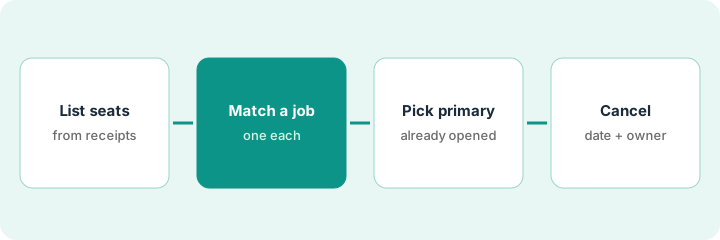
Simple mark for this how-to. The diagram below is the four-step cancel path, not a billing screenshot.Simple workflow: list seats from receipts, match one job each, pick a primary, then cancel with a date.
1. Step 1 — List every notetaker on a card or receipt
What it is: Include bots, Companion seats, and “free” tools that still hit a card when you upgraded. Last 30 days of receipts is enough.
Columns that matter: tool, monthly spend (from the invoice, not a guessed list price), seats, who owns it, whether anyone opened it last week, cancel-by date if you can see one.
Concrete example (finance partner)
Last month’s card shows Fireflies and Otter on the same week. Zoom Companion is a line on the Zoom invoice, not a separate vendor. All three go on the sheet. Prices stay blank until the invoice is open.
Try this
Paste last month’s card lines that say Fireflies, Otter, Fathom, Granola, tl;dv, or Zoom into a sheet. Leave price blank if you cannot see it yet — do not invent a number.
2. Step 2 — Match each tool to one job
What it is: Use the same job list we use elsewhere on this site:
Fireflies and Otter both say “owners and dates after standup.” That row pair is overlap. Granola on founder calls that cannot have a bot is a different job, so it is not marked overlap just because it is also “AI.”
Try this
For each row, write one job phrase. If two rows share a phrase, mark “overlap” in a notes column. Do not mark overlap just because both say “AI.”
3. Step 3 — Pick one primary per job
What it is: For each overlapped job, pick the tool someone already opens. The other becomes the cancel candidate. “Keep both for redundancy” is not a decision if nobody opens the backup.
Gong and Chorus are a different job (sales coaching / forecast). Loom is a different job (you record a clip on purpose). Do not cancel a notetaker because you have Loom.
Concrete example (one sentence)
The person who pays the card gets one sentence before anyone clicks cancel: “Primary for owners-and-dates is Fireflies. Cancel candidate is Otter.”
Try this
Write one sentence: “Primary for owners-and-dates is ___. Cancel candidate is ___.” Share it with the person who pays the card before you click cancel.
4. Step 4 — Cancel with a date and an owner
What it is: Export anything you still need (a month of transcripts is usually enough). Turn the cancel candidate off on the recurring meetings first; confirm the primary still captures. Then cancel the seat. Put the cancel-by date and the person who clicked cancel in your sheet.
Concrete example (order of operations)
Export a month of transcripts. Remove the second bot from the recurring invite. Hold a 15-minute check that the primary still records. Only then submit the cancel.
Try this
Schedule a 15-minute calendar block titled “Confirm primary notetaker still records.” Only after that meeting, submit the cancel.
Pricing context (October 2026)
This how-to is not a price sheet. Public list prices for Fireflies, Otter, Fathom, Granola, tl;dv, and Zoom AI Companion live on those reviews. Recheck each vendor’s site before you budget. Dated October 2026.
Uncertainty: Free tiers, seat minimums, bot add-ons, and CRM connectors change. If an invoice and a review disagree, trust the invoice. Do not paste a marketing list price you did not pay. The only prices this site sells here are the optional $9 AI toolkit spreadsheet and $19 AI toolkit audit.
When this helps (honest take)
Useful when two paid notetakers share a job, or the second one was never opened last week.
Not useful when the tools own different jobs on purpose (for example Granola for no-bot founder calls and Fireflies for all-hands), and both get opened.
When two paid notetakers share one job, or the second one was never opened last week.
Do two AI tools automatically overlap?
No. Overlap is the same job phrase on two rows. Different jobs can both stay.
Should we cancel Otter because we also have Loom?
No. Loom is a clip you record on purpose. Cancel a notetaker only when it shares the notes job.
What do we record when we cancel?
The cancel-by date and the person who clicked cancel, after you confirm the primary still captures.
Optional next step
Optional: $9 AI toolkit spreadsheet (seats, spend, owner, cancel-by, overlap, decision) · $19 AI toolkit audit when several seats overlap and you want a written memo in about 48 business hours.
Email hello@aiproduct.reviews with subject Toolkit spreadsheet $9 or Audit $19 if you want payment next steps. Free reviews stay free.
Affiliate disclosure: Some outbound product links may be affiliate links.
We may earn a commission if you subscribe. Prices and features change — always verify on the vendor site.
Full policy: disclosure.