How-to · Automation · Bardeen · Oct 7, 2026
Capture one browser playbook before you rebuild it in Zapier
“Browser playbook” here does not mean automating everything you click. It means one repetitive job that only exists inside a logged-in web page — no clean API (a documented way for software to pull the data), no webhook (an automatic notice when something changes) — captured once, checked by a person, and owned when the page changes.
Who this is for
Ops and revenue-ops people who spend an hour a week copying rows out of a vendor portal, an admin table, or a search results page into a Sheet — and who have already tried (or are about to try) a Zapier or Make scenario that cannot see the page. If the data already moves through an API or a connector you trust, stop here and use Zapier, Make, or n8n instead.
How to do it
This page is a how-to. It is not a ranking of automation tools. Product detail and dated pricing live on the Bardeen review.

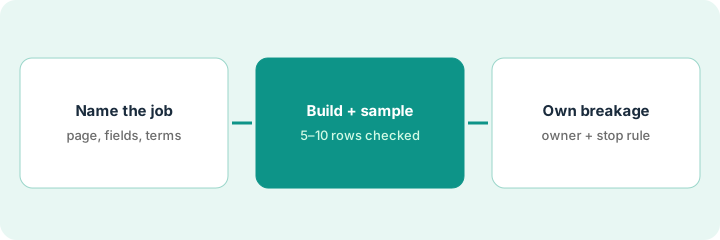
1. Step 1 — Name the UI job
What it is: Write down the one job, in a sentence, and prove it is UI-shaped (it only exists in the web page’s screens) before you open any automation tool.
- Source: which page, behind which login?
- Fields: exactly which columns you copy today.
- Destination: the Sheet or table it lands in.
- API check: is there a documented API, export, or connector you already use? If yes, this is a Zapier or Make job, not a browser job.
- Terms check: confirm the site’s terms allow automated access for your use. If unsure, ask the vendor or your admin first.
Every Monday, an ops coordinator logs into a freight vendor’s portal and copies last week’s invoice table — invoice number, date, amount, status — into a Google Sheet. The portal has no webhook, and a Make HTTP module only returned an empty page shell. That is a UI-shaped job.
Fill in one line: Source page — login needed (Y/N) — fields copied — destination — documented API or export (Y/N). If the last column is Y, write the Zap or Make outline instead and close this page.
2. Step 2 — Build the playbook with a checked sample
What it is: Build (or record) the playbook in Bardeen — open the page, extract the named fields, map them to columns, append rows — and check a sample by hand before trusting it. See the Bardeen review for playbooks, scrapers, agents, and how credit-based usage works.
- Map only the fields from Step 1. Extra columns are extra things to break.
- Run on a small sample first (five to ten rows) into a test tab, not the live Sheet.
- Compare every sampled row to the page. Values come from the page, never from the model filling a gap.
- Empty field on the page → empty cell in the Sheet, not a guess.
The first run writes ten invoice rows to a test tab. Nine match the portal. One has the amount in the date column because the portal shows a “credit” row with a different layout. The coordinator fixes the mapping, re-runs, and only then points the playbook at the live Sheet.
Before you use credits on a full run, write the playbook on paper: open page → filter last 7 days → extract [fields] → append to test tab. Run it once on 5–10 rows. Check every cell against the page. Move to the live Sheet only after a clean sample.
3. Step 3 — Own breakage
What it is: Browser playbooks break when pages change. Name one person who owns fixes, and write a “stop writing” rule before the first live run.
- Owner: one named person re-maps fields and pauses bad runs. Not “ops.”
- Stop rule: if a spot check fails (wrong column, blank amounts, duplicate rows), the playbook stops writing until fixed.
- Weekly check: spot-check three rows against the page after each run for the first month.
- Exit rule: if the vendor ships an API or export, move the job to Zapier or Make and retire the playbook.
Five weeks in, the portal redesigns its table and the playbook writes blank amounts. The owner sees it on the Monday spot check, pauses the playbook, re-maps two fields in twenty minutes, and re-runs. Finance never pulls from a broken week because the stop rule caught it first.
At the top of your destination Sheet, add one row: Playbook owner — stop rule — weekly spot-check day — exit trigger (API/export available). If you cannot fill the owner cell with a name, do not turn the playbook on.
Pricing context (October 2026)
This how-to is not a price sheet. Plan detail for Bardeen, Zapier, and Make lives on those reviews. Recheck each vendor’s site before you budget. Dated October 2026.
Checked Oct 7, 2026 on the vendor’s own pricing page: bardeen.ai/pricing says you always get 100 credits free and that unused credits expire at the end of each billing period. Each row an action creates costs 1 credit (scraper, web search, AI tools), enrichment rows cost 3, and utilities and imports are free. Paid plans are priced on a credit slider: Basic starts at $10 per month billed monthly (100 extra credits a month at the lowest setting), and Premium starts at $50 per month billed monthly (1,000 credits a month) or $480 per year billed annually (12,000 credits a year); Enterprise is custom. Prices rise as you add credits. Zapier and Make were not rechecked for this page — see their reviews and vendor sites.
Uncertainty: Credit rates, plan limits, and what counts as a run change. If an invoice and a review disagree, trust the invoice. Do not paste a marketing list price you did not pay. The only prices this site sells here are the optional $9 AI toolkit spreadsheet and $19 AI toolkit audit.
When this helps (honest take)
Useful when the job lives only in a rendered web page, repeats weekly, is allowed by the site’s terms, and someone will own breakage.
Not useful when a connector or API already exists (use Zapier, Make, or n8n), the job runs once a quarter (just copy it), or nobody will check the output. A playbook nobody owns becomes a Sheet nobody can trust.
Related options (educational)
| Need | Where to look | Why |
|---|---|---|
| Browser playbooks, scrapers, credits | Bardeen | When the data only lives in a web page |
| API-shaped handoffs | Zapier · Make | First-class connectors and triggers |
| Self-hosted or code-friendly flows | n8n · n8n vs Make | When you want more control over runs |
| AI driving a desktop or browser | Claude computer use | Different trade-offs; still needs an owner |
Related reviews: Bardeen · Zapier · Make · n8n. Related how-to: Automate one handoff in Zapier before you buy another AI seat. Free: automation glue calculator to size the hours before you build, and seat-waste calculator if two automation tools already cover the same job.
FAQ
Should I use Bardeen instead of Zapier?
Only for UI-shaped jobs. If an API or connector exists, Zapier or Make is usually the steadier home.
What if the playbook writes a wrong value?
The stop rule pauses it, the owner fixes the mapping, and you re-run on a sample before going live again.
Can the AI fill in fields the page does not show?
Not on this pattern. Empty on the page means empty in the Sheet.
Where do dated prices live?
On the Bardeen, Zapier, and Make reviews and the vendor sites. This October 2026 how-to only repeats prices we checked on the vendor’s own pricing page on Oct 7, 2026.
Optional next step
Free reviews stay free. Neither offer is required to use this page. If two automation tools already cover the same handoff, optional help: $9 AI toolkit spreadsheet (seats, spend, owner, cancel-by, overlap) or $19 AI toolkit audit when you want a written memo.