Feature how-to · Claude
Claude computer use how-to (Oct 2026): realistic ops jobs — and limits
Feature how-to linked from the Claude deep-dive: what desktop-agent style flows can and cannot do for ops, safety boundaries, and when to prefer Projects or an API instead.
Who this page helps
Ops leads evaluating desktop/browser-agent style automation for UI-only portals — and who need a clear split between tasks that are safe to automate and tasks that must stay human (payments, access grants, customer deletes). For broader Claude product context, start with the Claude deep-dive. For chat+files workflows without UI control, see Claude Projects.
What computer use is
Computer use (desktop-agent style) lets a model look at a screen and take UI actions — click, type, scroll, open apps — to finish a multi-step job. For ops, that matters when a vendor portal has no API and the job is “export → save → QA.” It is slower and more brittle than a typed API, and it should never be handed payments or irreversible deletes without a human gate.

Major features (with how someone uses them)
Examples at a glance: each feature has a concrete ops example plus a Try this mini-workflow.
1. Realistic ops jobs (UI glue)
What it is: The useful pattern is a short, supervised playbook: open a portal, export last week’s CSV, save to a known folder, pause for human QA. Think “assistant with a mouse,” not “unattended night shift.” Screenshots and readonly checks fit; silent send does not.
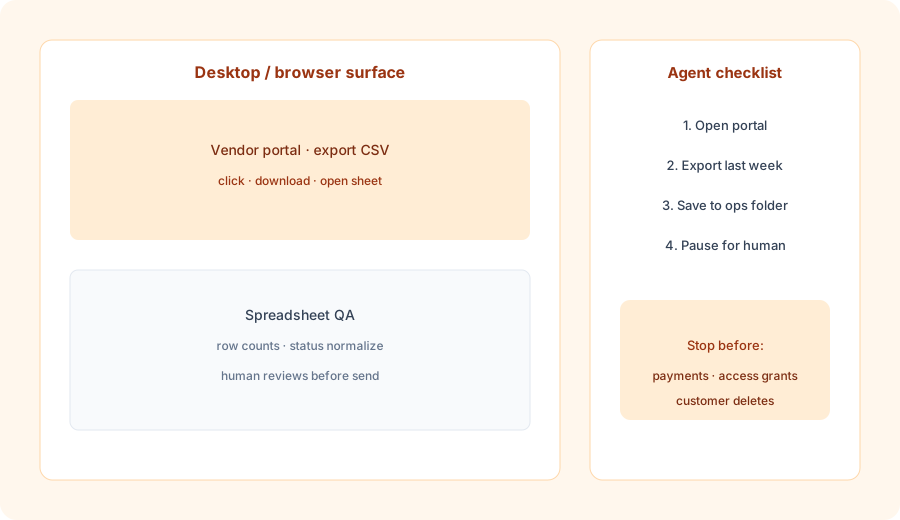
Before enabling any unattended run:
Write a 5-step computer-use playbook for “export last week’s vendor CSV to the ops folder.” End with an explicit STOP before any upload, email, or payment. Name the human who reviews the file.
2. Safe automate vs stay human (primary split)
What it is: The highest-value planning step is listing what the agent may do alone versus what requires a human. Payments, access grants, and customer deletes stay human — every time. Exports, screenshots, draft form fills, and readonly status checks can be agent-assisted with a pause.
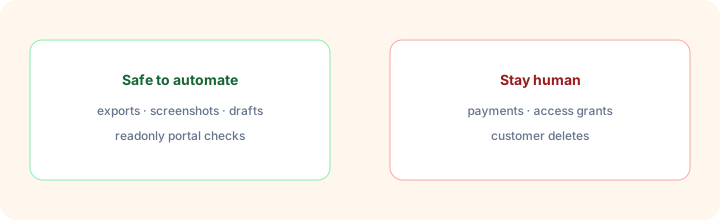
Primary Marketing prompt:
List 5 ops tasks safe to automate with computer-use-style agents and 5 that should stay human (payments, access grants, customer deletes). One-line reason each.
3. Safety boundaries
What it is: Treat computer-use sessions like a shared laptop: least privilege accounts, no stored payment credentials in the agent path, confirm dialogs for irreversible actions, and a kill switch (human watching the first N runs). Log every click path you care about for audit.
Before the first supervised run:
Draft a one-page safety brief: account used (read-only?), actions allowed, actions forbidden, who watches the first 3 runs, and how to abort. Keep it under 150 words.
4. Prefer Projects / API when better
What it is: Computer use is a fallback for UI-only systems. If you already have CSV exports, a Project with files, or an API, prefer those — faster, cheaper to operate, easier to test. Use Claude Projects for recurring file+prompt loops and the Artifacts how-to when the deliverable is a memo/table beside chat.
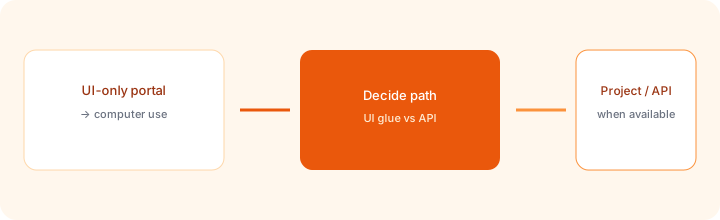
For one recurring ops job:
Name the job. Say whether it has an API, a scheduled export, or UI-only access. Recommend computer-use, Claude Project, or API/script — one sentence why. If computer-use wins, list the human pause step.
Pricing context (October 2026)
Computer-use style capabilities ship with Claude product surfaces and API tooling; availability and rate limits vary by plan. Public Anthropic pricing lists Pro about $20/month monthly (~$17 annual), Max from about $100/month, Team from about $25/member/month monthly. Confirm on claude.com/pricing and current computer-use docs. This how-to does not replace the dated pricing section on the Claude review.
Uncertainty: Which plans unlock computer use, session limits, and API pricing for tool use change — verify live before promising unattended coverage.
When computer use is useful (honest take)
It helps when a UI-only portal blocks a weekly export and a supervised agent can click the path a human already knows. It tends not to help when an API or scheduled export exists, when the UI changes weekly, or when the job includes payments, access grants, or deletes. Unattended overnight runs on irreversible actions are a bad default.
Paying for Claude computer use and a few other AI tools? The $9 AI toolkit spreadsheet lists every AI subscription you have, what each one costs, and how fast it pays for itself, so you can see which ones are worth the money.
Want someone to do it for you? AI toolkit audit — $19
Alternatives compared: computer use vs Projects vs browser automation
| Axis | Computer use | Claude Projects | Browser playbooks (e.g. Bardeen-style) | API / script |
|---|---|---|---|---|
| Best when… | UI-only portal; supervised export/QA. | Files + recurring prompts already exist. | Repeatable DOM steps with a named owner. | Stable API or scheduled export. |
| Cost shape (Sep 2026) | Claude plan / API (confirm live). | Claude plan (confirm live). | Playbook tool seat (confirm live). | Engineering time + infra. |
| Less useful when… | API exists; irreversible actions. | You need mouse control on a UI. | UI changes constantly; no owner. | No API and no export path. |
Also see Claude deep-dive, Claude Projects, Claude Artifacts, Claude for ops, and the ops & automation hub.
FAQ
What is Claude computer use?
A desktop/browser-agent style capability where Claude can look at a screen and take UI actions to complete a task. Useful for UI-only portals — risky for payments, access grants, and deletes.
Which ops tasks should stay human?
Payments, access grants, customer deletes, irreversible account changes, and anything that sends externally without review.
When should I prefer Projects or an API instead?
When you already have structured files, exports, or an API. Computer use is a fallback for UI-only systems.
How does this relate to the Claude deep-dive?
This is a feature how-to. The full product review is at /reviews/claude.html.
Optional next step (if seats overlap)
If Claude computer use is one of several AI seats and you want a written pass across the whole list, the optional $19 AI toolkit audit produces a short memo. Prefer an editable grid? The $9 AI toolkit spreadsheet is a one-time CSV. Soft offer only — this how-to stands alone.
Checkout is live via Stripe. After you pay, we email delivery (spreadsheet) or intake next steps (audit).