Ops · Browser automation · Glue
Bardeen review (Sep 2026): browser automation for ops glue without a full Zapier rebuild
When a browser playbook beats another Zap/Make scenario for web UI tasks — with ownership and breakage honesty, concrete Try this prompts, and dated Sep 2026 pricing notes.
Who this page helps
Ops and revops folks who keep hitting web UIs without clean API connectors — LinkedIn profiles, vendor portals, niche admin pages — and who are tempted to add another Zap/Make scenario that cannot see the page. If your data already moves through solid APIs, evaluate Zapier, Make, or n8n first. This page is for browser playbooks as ops glue, not a claim that Bardeen replaces your whole automation stack.
What Bardeen is
Bardeen is a browser automation / AI agents product aimed at scraping, enrichment, and playbooks that run against pages you can open, then export to Sheets and similar destinations. Public packaging emphasizes Agents, scrapers, web search, enrichment, and credit-based usage. This review focuses on ops glue via browser playbooks — when that beats rebuilding another Zap/Make path — plus honest ownership when selectors break.

Major features (with how someone uses them)
Examples at a glance: each feature has a concrete ops example plus a Try this mini-workflow.
1. Playbook design: profile → Sheet
What it is: A typical Bardeen-style playbook opens a profile page (or list), extracts fields (name, title, company, URL), maps them to columns, and appends a Sheet row. Ops value shows up when the same hand-copy job repeats weekly and the site has no reliable API you already trust.
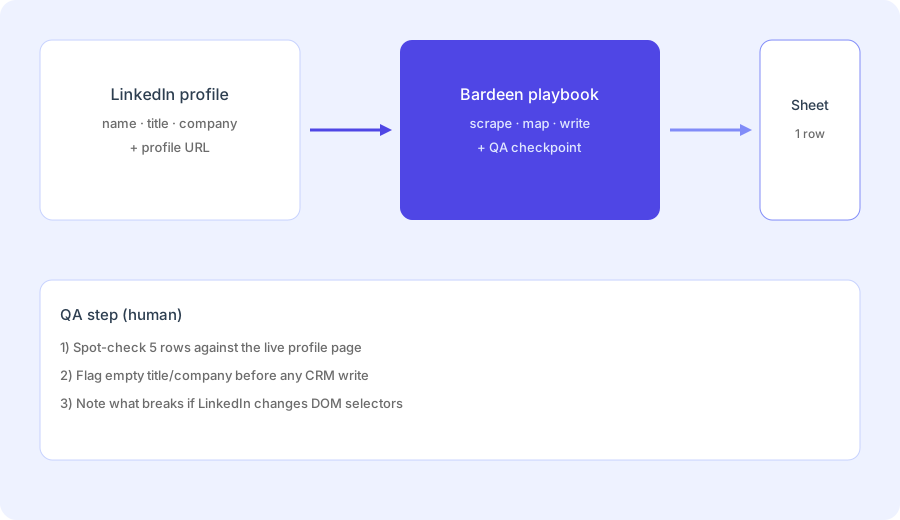
Design the playbook on paper before you spend credits:
Design a Bardeen-style playbook: LinkedIn profile → Sheet row (name, title, company, profile URL). Include a QA step and what breaks if LinkedIn changes DOM.
2. When a browser playbook beats another Zap/Make scenario
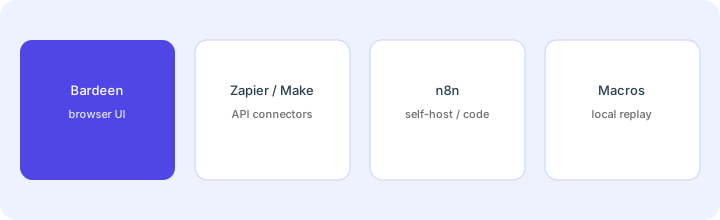
What it is: Zapier and Make shine when connectors and triggers are first-class. Bardeen (and similar browser tools) help when the truth lives only in a rendered page — search results, profile cards, admin tables — and building a brittle HTML parse inside Zapier would be worse. Prefer browser playbooks for UI-shaped jobs; prefer Zap/Make for API-shaped jobs.
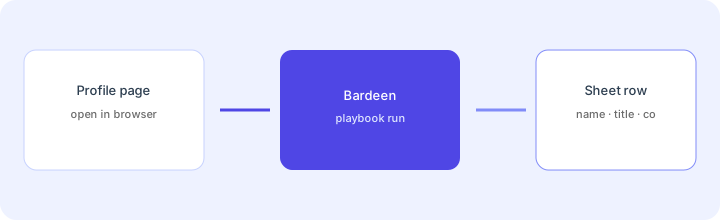
Before adding another Zap:
List the job’s data source. If it requires a logged-in browser view and has no documented API you already use, sketch a 5-step browser playbook. If it is an API event you already trust, write the Zap/Make outline instead — do not force Bardeen.
3. Ownership & breakage honesty
What it is: DOM selectors, layout shifts, and anti-bot walls break scrapers. Someone must own re-mapping fields, pausing bad runs, and explaining empty columns. Bardeen does not remove that ownership — it concentrates it. Plan a named owner and a “stop writing” rule when QA fails.
Write the ownership card before go-live:
Name one owner. List three breakage signs (blank fields, wrong company, row count mismatch). Define the pause rule: “If QA sample fails 2 of 5 rows, stop Sheet writes until selectors are fixed.”
4. Credits, QA, and run hygiene
What it is: Public pricing is credit-based: scraper/search/AI actions typically cost 1 credit per output row; enrichment often costs 3. Free allowance is small; paid packs scale. Test Mode / small samples matter — burning credits on a broken selector is an ops own-goal. Always QA before CRM or customer-facing writes.
Budget before a bulk run:
Estimate credits for 50 profiles (scrape + optional enrichment). Run 5 first. If any required field is blank or wrong, fix the playbook before the remaining 45.
Public pricing (September 2026)
From bardeen.ai/pricing (Sep 2026; interactive credit packs on the page):
- Free credits: public page states you always get 100 credits for free; unused credits expire at the end of each billing period.
- Basic: about $10 / month starting point for +100 credits / month (dropdown scales to higher monthly credit packs at higher dollar amounts).
- Premium: about $50 / month starting point for +1,000 credits / month; annual toggle shows about $480 / year for +12,000 credits / year (roughly ~$40/mo equivalent at that pack — confirm the live toggle).
- Enterprise: custom bulk credits; contact sales. Public cards mention scraped maintenance / premium support style add-ons for larger deals.
- Credit math (public): scraper / web search / AI tools ≈ 1 credit per row; enrichment ≈ 3 credits per row; utilities free; import/export often free or 1 credit depending on action.
Uncertainty flags: Pack dropdowns change the dollar amount and credit count together. Annual vs monthly numbers differ. Third-party roundups sometimes disagree on Basic credit counts — treat the live pricing calculator as source of truth. Never budget from a blog alone — open bardeen.ai/pricing for your pack size.
When Bardeen is useful (honest take)
Bardeen tends to help when an ops person already works in the browser, the job is UI-shaped (profiles, tables, portals), and a named owner will maintain selectors after site changes. It tends not to help when a clean API connector already exists in Zapier/Make/n8n, when nobody will own breakage, or when you need unattended bulk scraping against sites that aggressively block automation. Buying Premium credits before a five-row QA sample passes is usually premature.
Paying for Bardeen and a few other AI tools? The $9 AI toolkit spreadsheet lists every AI subscription you have, what each one costs, and how fast it pays for itself, so you can see which ones are worth the money.
Want someone to do it for you? AI toolkit audit — $19
Alternatives compared: Bardeen vs Zapier / Make / n8n / macros
| Axis | Bardeen | Zapier / Make | n8n | Browser macros |
|---|---|---|---|---|
| Best when… | Web UI jobs; scrape → Sheet. | API connectors & polished scenarios. | Self-host / code ownership. | Tiny personal replay only. |
| Cost shape (Sep 2026) | Credits; Free 100 → Basic ~$10+ → Premium ~$50/~$480 yr. | Task/ops credits by plan (confirm live). | Self-host time or cloud seats. | Near $0 tooling; fragile. |
| Less useful when… | Clean API already exists. | Page has no usable API. | You only need light UI glue. | Shared ops / multi-user runs. |
Also see Zapier, Make, n8n, Zapier Central, Claude computer use, and the ops & automation hub.
Compare hand-copy hours to automation cost on the automation glue calculator.
FAQ
What is Bardeen?
A browser automation and AI agents product for playbooks against web UIs — scrape, enrich, and write to Sheets and similar destinations when APIs are missing or weak.
How much does Bardeen cost in September 2026?
Public cards: 100 free credits always; Basic from ~$10/mo (+100 credits starting pack); Premium from ~$50/mo (+1,000 credits) or ~$480/yr (+12,000 credits/year); Enterprise custom. Confirm on bardeen.ai/pricing.
Bardeen vs Zapier?
Bardeen when the job is browser UI. Zapier when connectors and triggers are the job. Many stacks use both — do not force one tool into the other’s shape.
What if LinkedIn changes its DOM?
Selectors break. Keep a QA sample, a named owner, and a pause rule before CRM or customer writes.
Optional next step (if seats overlap)
If Bardeen is one of several AI/automation seats and you want a written pass across the whole list, the optional $19 AI toolkit audit produces a short memo. Prefer an editable grid? The $9 AI toolkit spreadsheet is a one-time CSV. Soft offer only — this deep-dive stands alone.
Checkout is live via Stripe. After you pay, we email delivery (spreadsheet) or intake next steps (audit).