Ops · Feature how-to · Automation
Zapier Central how-to (Oct 2026): when an ops bot beats another Zap
Feature how-to for ops leads: Central-style agent/bot patterns versus piling another linear Zap. Design a Slack + Sheet “Where is invoice #?” bot with allowed actions, denied actions, and a human escalation path. For the full Zapier deep-dive, see Zapier.
Who this page helps
Ops leads who already use Zapier and keep getting the same Slack question — “Where is invoice #?” — and are tempted to add yet another linear Zap. This how-to shows when a Central-style ops bot (tools + guardrails + escalation) is the cleaner pattern, and when a plain Zap still wins. It is not a full Zapier product review — that lives on /reviews/zapier.
What “Central-style” means in 2026
Zapier Central was Zapier’s earlier ops-bot surface: teach a teammate/bot with behaviors and connected apps so people could ask questions instead of wiring every path as a Zap. Through 2025–2026 Zapier has consolidated much of that into Zapier Agents and AI by Zapier steps inside Zaps (with approvals and tool calls). This page keeps the useful design pattern under the Marketing title people search: ad-hoc ask → allowed tools → deny list → escalate to a human. Always confirm the live product name in your Zapier account.

Major patterns (with how someone uses them)
Examples at a glance: each pattern has a concrete ops example plus a Try this mini-workflow.
1. When a bot beats another Zap
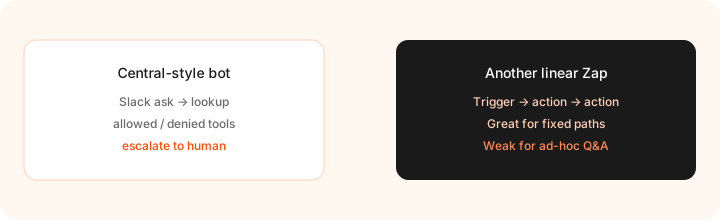
What it is: A linear Zap shines when the trigger and fields are known (new Typeform row → create HubSpot deal). A Central-style bot shines when the question is the trigger: someone asks in Slack, the bot chooses a tool (Sheet lookup), answers, or escalates. Piling another Zap for every phrasing of “where’s my invoice” creates brittle keyword filters and duplicate ownership.
Before building:
Write one sentence: Is this job a fixed path (Zap) or an ad-hoc ask (bot)? If both, pick the primary owner pattern and delete the other from the plan.
2. Invoice lookup bot (Slack + Sheet)
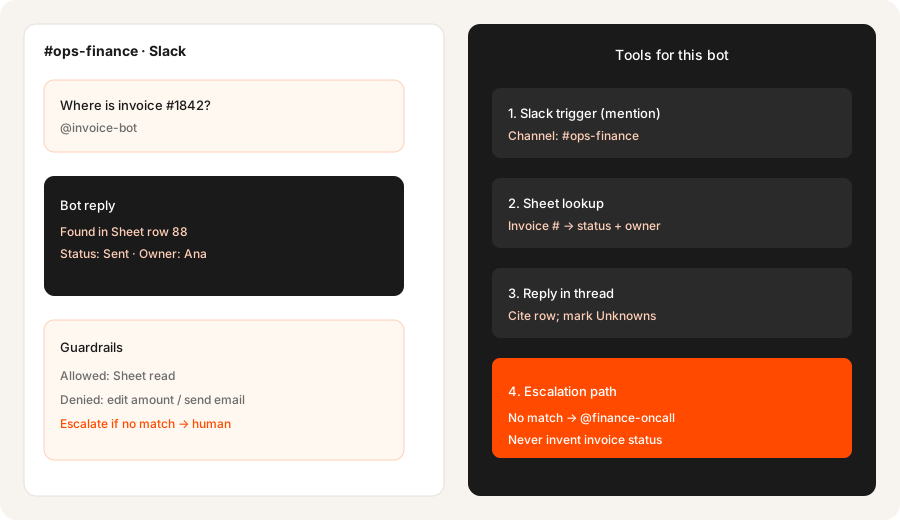
What it is: The canonical small-team Central-style job: mention a bot in Slack with an invoice number; bot looks up a Google Sheet (or Zapier Table); replies with status and owner; never invents a row. This is the pattern Marketing locked for this URL.
Design before you connect apps:
Design a Central-style bot for ‘Where is invoice #?’ using Slack + Sheet lookup. List allowed actions, denied actions, and the escalation path to a human.
3. Allowed actions, denied actions, escalate
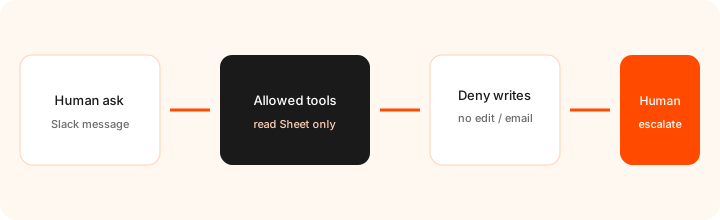
What it is: The difference between a helpful ops bot and a dangerous one is the deny list. Allowed: read Sheet columns Invoice #, Status, Owner, Updated. Denied: edit amounts, mark paid, send email to vendors, invent missing invoices. Escalate: no match, ambiguous #, or any write request → human channel.
Fill this table for your bot:
Allowed: [list read-only tools]. Denied: [list write tools]. Escalate when: [no match / ambiguous / write request]. Owner on-call: [name]. Never invent: [fields].
4. Build path on today’s Zapier
What it is: Depending on your account, you may build this as a Zapier Agent with Slack + Sheets tools, or as a Zap with an AI by Zapier step that can call tools under approval settings. Public Zapier help in 2026 describes migrating Agents into AI-by-Zapier patterns with per-tool approvals and task multipliers by model tier. Start with read-only tools and human approval on anything that writes.
After a pilot week:
From run history, list: successful lookups, escalations, and any time the bot almost wrote data. If any near-write happened, tighten denied tools before expanding channels.
Public pricing (October 2026)
Central-style bots bill through Zapier’s current plan and add-on structure — not a separate forever “Central SKU.” From zapier.com/pricing as of 31 October 2026 (cross-checked 31 Oct 2026; confirm live):
- Zapier Free: 100 tasks/mo; two-step Zaps; basic access to AI products noted on public cards.
- Professional: often from about $19.99/mo billed annually at the 750 tasks tier (monthly list higher — public table shows ~$29.99/mo at that tier). Multi-step Zaps, premium apps, AI by Zapier on paid plans.
- Team: shared workspace; public table often starts near $69/mo annual at 2,000 tasks — confirm live.
- Zapier Agents add-on: separate activities allowance (Free tier plus paid tiers; the public Agents tab lists Free at 400 activities/mo and Agents Pro at $33.33/mo billed annually ($400/yr) for 1,500 activities/mo, checked 31 Oct 2026).
- AI by Zapier: model-tier task multipliers (public help cites Standard / Advanced / Premium style multipliers such as 1× / 3× / 5× — confirm on Zapier’s rates page).
Uncertainty flags: Product naming (Central vs Agents vs AI by Zapier) and whether a given account still shows Central UI varies. Task multipliers and Agents activity prices change. Always open your Zapier Billing + Agents tabs before budgeting.
When a Central-style bot is useful (honest take)
A Central-style bot tends to help when ops gets the same question in many phrasings, the answer lives in a sheet/table the bot can read, and you can write a hard deny list plus a named human escalation. It tends not to help when the path is already a clean trigger→action Zap, when no one owns escalation, or when the bot would need write access on day one. For connector economics and Make/n8n compares, use the Zapier deep-dive.
Paying for Zapier Central and a few other AI tools? The $9 AI toolkit spreadsheet lists every AI subscription you have, what each one costs, and how fast it pays for itself, so you can see which ones are worth the money.
Want someone to do it for you? AI toolkit audit — $19
Alternatives compared: bot vs Zap vs other builders
| Axis | Central-style bot | Linear Zap | Make scenario | n8n |
|---|---|---|---|---|
| Best when… | Ad-hoc Slack Q&A + tools + escalate. | Fixed trigger and fields every time. | Visual multi-path glue; credit economics. | Self-host / code-friendly ownership. |
| Cost shape (Sep 2026) | Zapier tasks and/or Agents activities. | Zapier tasks per successful action. | Make credits. See Make. | Host + ops time. See n8n. |
| Less useful when… | Path is already deterministic. | Users ask freeform questions. | You only need a Slack Q&A bot. | Nobody will own the server. |
Also see Zapier, Make, n8n, and the ops & automation hub.
Compare hand-copy hours to automation cost on the automation glue calculator.
FAQ
What is Zapier Central?
Zapier’s earlier ops-bot workspace. In 2026 the same pattern usually maps to Zapier Agents and/or AI by Zapier with tools — confirm what your account shows.
When does a bot beat another Zap?
When the job is ad-hoc Q&A with tool use and escalation — not a fixed high-volume path.
How much does this cost in October 2026?
Budget Zapier plan tasks plus any Agents activities / AI multipliers. Free starts at 100 tasks/mo; Pro often ~$19.99/mo annual at 750 tasks. Confirm zapier.com/pricing.
Can the bot edit the Sheet?
It can if you allow write tools — for invoice lookup, start read-only and escalate writes to a human.
Optional next step (if seats overlap)
If Zapier Agents / AI steps sit beside other AI seats and you want a written pass across the whole list, the optional $19 AI toolkit audit produces a short memo. Prefer an editable grid? The $9 AI toolkit spreadsheet is a one-time CSV. Soft offer only — this how-to stands alone.
Checkout is live via Stripe. After you pay, we email delivery (spreadsheet) or intake next steps (audit).