How-to · Automation · Zapier · Oct 22, 2026
Build a Central-style Zapier bot that answers invoice questions in Slack from a Sheet, with guardrails
Ops teams get the same Slack question in many phrasings: where is invoice number such-and-such? A Central-style bot answers it by looking up a Sheet, replying with status and owner, and escalating anything it cannot answer, instead of another linear Zap with brittle keyword filters. This page shows how to build that bot with read-only access and a hard deny list.
Who this is for
Ops leads who already use Zapier and keep answering the same invoice question in Slack. The job here is one read-only lookup bot with guardrails. For automating one handoff in Zapier before you buy another AI seat — a different job (general Zap-first advice) — see Automate one handoff in Zapier before another seat. For giving a Lindy agent one inbox chore — a different job (working an inbox, not answering lookups) — see Lindy inbox agent with a supervision gate.
How to do it
This is a how-to, not a ranking of automation tools. Per the Zapier Central review, Zapier Central was Zapier’s earlier ops-bot surface, and through 2025–2026 Zapier has moved much of it into Zapier Agents and AI by Zapier steps inside Zaps, with approvals and tool calls; confirm the live product name in your account. A linear Zap shines when the trigger and fields are known; a Central-style bot shines when the question is the trigger. The review’s guardrails: allowed actions read Invoice number, Status, Owner, and Updated; denied actions include editing amounts, marking paid, emailing vendors, and inventing missing invoices; no match, ambiguous numbers, and any write request escalate to a person. The ground rule: start read-only, and never let the bot invent a row.
1. Decide whether it is a bot job or a Zap job
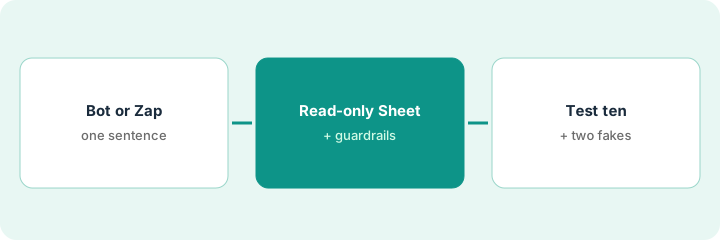
What it is: Write one sentence about the job. If the trigger and fields are always the same, build a Zap. If people ask the same thing in many ways and the answer lives in a Sheet, build the bot.
- List ten ways people have asked about invoices in Slack this month.
- Check whether the answer to all ten is in one Sheet or Zapier Table.
- Write one sentence: fixed path (Zap) or ad-hoc ask (bot)?
- Pick one pattern and drop the other from the plan.
The lead finds 23 invoice questions in Slack last month, phrased a dozen ways, and every answer lives in the receivables tracker Sheet. She writes “ad-hoc ask, bot” and drops the plan for a keyword-filter Zap.
List ten real invoice questions from Slack, check that every answer lives in one Sheet, and write one sentence deciding bot or Zap.
2. Connect the Sheet read-only and write the guardrails
What it is: Give the bot read access to four columns and nothing else. Write the allow list, deny list, and escalation path before turning it on.
- Allow: read Invoice number, Status, Owner, Updated.
- Deny: edit amounts, mark paid, email vendors, invent a missing invoice.
- Escalate to a named person on no match, an ambiguous number, or any write request.
- Set human approval on any tool that writes, in case someone adds one later.
The ops manager connects the invoice Sheet read-only and writes the deny list into the bot’s instructions. Escalations go to the billing channel, where the bookkeeper is on call Monday to Friday.
Connect your invoice Sheet read-only to the bot, write the allow and deny lists and escalation path, and require approval on any tool that writes.
3. Test ten real questions before opening it to the team
What it is: Ask the ten real questions from step 1, plus two with numbers that do not exist. The bot should answer from the Sheet or escalate; it should never guess.
- Ask the ten real questions in a test channel.
- Ask two questions with invoice numbers that are not in the Sheet.
- Check every answer against the Sheet row.
- Review run history after a pilot week for any near-write; tighten the deny list if you find one.
The bot answers nine of ten correctly and escalates the tenth, where two invoices share a number with different suffixes. Both fake numbers escalate. After a pilot week, run history shows one attempt to update a status, so the controller removes a write tool someone had added.
Ask the bot ten real invoice questions and two with fake numbers, check every answer against the Sheet, and review run history for near-writes after a pilot week.
Pricing context (October 2026)
This how-to isn’t a price sheet. Per the Zapier Central review, Central-style bots bill through Zapier’s current plans and add-ons, not a separate Central product; Zapier Agents have their own activities allowance and AI by Zapier steps use task multipliers by model tier. We rechecked the review’s September 2026 plan prices on Zapier’s pricing page on Oct 22, 2026 (below). Dated October 2026.
Checked Oct 22, 2026 on the vendor’s own site: Zapier’s pricing page lists a Free plan with 100 tasks per month, Professional starting from $19.99/month, and Team starting from $69/month (September 2026, per our review; checked Oct 22). Zapier Agents are priced separately on the same page.
Uncertainty: The only prices this site sells here are the optional $9 AI toolkit spreadsheet and $19 AI toolkit audit.
When this helps (honest take)
Useful when the same question arrives in many phrasings, the answer lives in one Sheet, and you can name a person for escalations.
Not useful when the path is already a clean trigger and action, nobody owns escalations, or the bot would need write access on day one.
Related options (educational)
| Need | Where to look | Why |
|---|---|---|
| Central-style lookup bot with guardrails | Zapier Central | Primary path |
| General Zap-first advice before another seat | Automate one handoff in Zapier before another seat | A different job |
| Inbox chores with an approval gate | Lindy inbox agent with a supervision gate | A different job |
| A Monday renewals check-in on a schedule | ChatGPT Monday renewals check-in | A different job |
| Other automation builders | n8n vs Make | Compare platforms |
FAQ
Is Zapier Central still a product?
Per our review, much of Central moved into Zapier Agents and AI by Zapier steps. The bot pattern on this page works on either; confirm what your account shows.
When does a bot beat another Zap?
When the job is an ad-hoc question answered with a lookup and escalation, not a fixed high-volume path.
Can the bot edit the Sheet?
It can if you allow write tools. For invoice lookups, start read-only and send write requests to a person.
What does Zapier cost?
On Oct 22, 2026 Zapier’s pricing page listed a Free plan with 100 tasks a month, Professional starting from $19.99 a month, and Team starting from $69 a month (September 2026, per our review; checked Oct 22). Agents and AI steps have their own allowances.
Optional next step
If you want a one-page toolkit map for the tools you already pay for, use the optional $9 AI toolkit spreadsheet. If you want a short review of seat waste and unused tools, use the optional $19 AI toolkit audit. Neither is required to follow this how-to.