How-to · AI agents · Lindy · Oct 22, 2026
Give a Lindy agent one inbox chore, and put a supervision gate before anything it sends
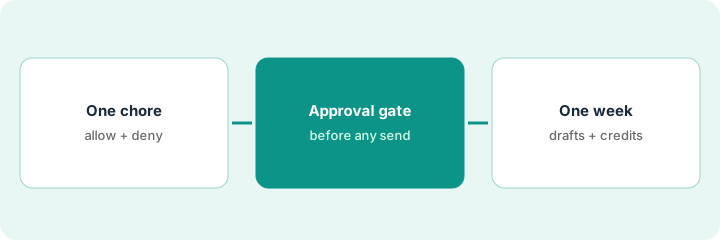
Lindy runs agent-style jobs on inbox, calendar, and recurring chores: extract fields, draft replies, update a sheet, nudge owners. Credits meter the work, and actions with outside impact are meant to wait for approval. This page shows how to give one agent one inbox chore, gate everything it sends, and judge it on a week of real drafts.
Who this is for
Ops leads and founder-operators who want an AI teammate for one recurring inbox chore, with a clear human gate. The job here is one chore, one gate, one week. For a Zapier bot that answers invoice questions in Slack from a Sheet — a different job (answering lookups, not working an inbox) — see Zapier invoice lookup bot. For a ChatGPT scheduled task that drafts a Monday renewals check-in — a different job (a calendar cadence, not an inbox) — see ChatGPT Monday renewals check-in.
How to do it
This is a how-to, not a ranking of automation tools. Per the Lindy review, Lindy offers inbox management, drafts in your voice, up to five connected inboxes, meeting scheduling and follow-up, and daily briefs, and its public packaging says actions with outside impact (sending email, updating a ticket, posting elsewhere) wait for approval while read-only lookups may not. Credits meter the work; bigger jobs spend more. The review advises writing an explicit allow and deny list, especially for payments, vendor records, and customer-facing legal language. The ground rule: the agent drafts, a person sends.

1. Pick one recurring inbox chore and write its allow and deny lists
What it is: Choose one high-volume, repetitive chore, such as acknowledging invoice emails, and write what the agent may and may not do before connecting a real inbox.
- Pick one chore that arrives many times a week with the same shape.
- Allow: read the email, extract vendor, amount, and due date, draft an acknowledgment, log to a sheet.
- Deny: send anything, change payment details, promise a payment date, reply to new senders.
- Name who handles escalations and what evidence they need.
The office manager picks invoice acknowledgments, about 60 a week. The allow list covers extracting fields and drafting a three-sentence acknowledgment; the deny list bans payment dates and any change to bank details. Escalations go to the bookkeeper.
Pick one recurring inbox chore, write an allow list and a deny list for the agent, and name who handles escalations before you connect a real inbox.
2. Add the approval gate before anything it sends
What it is: Every outgoing message waits for a person. Add a rule that low-confidence items and new senders escalate rather than draft.
- Set every send to require approval.
- Add a rule: new sender or low confidence goes to a person, never to a draft queue.
- Have the approver read the extracted fields against the original email.
- Redact bank details before testing on sample threads.
The coordinator approves drafts twice a day. On day two the agent drafts a reply to a vendor whose email changed the bank account; the deny rule escalates it to the coordinator instead, who confirms the change by phone first.
Set every Lindy send to require approval, escalate new senders and low-confidence items to a person, and have the approver check extracted fields against the original email.
3. Watch a week of drafts and credit use, then compare
What it is: After one week, count drafts approved as written, edited, and rejected, and check credit use. Then decide whether this chore needs an agent or a deterministic trigger in Zapier, Make, or n8n.
- Log every draft: approved as written, edited, or rejected.
- Check credits used for the week against your plan.
- Mark the chore Agent (judgment and drafting) or Trigger (fixed fields, fixed path).
- If it is a Trigger chore, compare with Zapier, Make, or n8n before keeping the agent.
In one week the agent drafts 48 acknowledgments; 41 go out as written, 6 are edited, 1 is rejected. Credit use is within plan. The chore needs judgment on odd invoices, so the ops lead keeps the agent and the gate.
Log one week of Lindy drafts as approved, edited, or rejected, check credit use, and decide whether the chore needs an agent or a plain trigger in Zapier, Make, or n8n.
Pricing context (October 2026)
This how-to quotes no Lindy dollar figure. Lindy’s pricing page on Oct 22, 2026 showed different plans and prices from the September 2026 figures in our review, so see the Lindy review and Lindy’s own pricing page before you budget. The review notes credits meter the work and bigger jobs spend more. Dated October 2026.
Checked Oct 22, 2026 on the vendor’s own site: Lindy’s pricing page on Oct 22, 2026 showed different plans and credit prices from the September 2026 figures in our review, so this page quotes no plan prices. This page quotes no Lindy dollar figure; see our review for what is known and Lindy’s own site before you budget.
Uncertainty: The only prices this site sells here are the optional $9 AI toolkit spreadsheet and $19 AI toolkit audit.
When this helps (honest take)
Useful when one inbox chore burns hours every week, you will write allow and deny lists, and someone will approve drafts daily.
Not useful when you need a fixed multi-step integration, browser scraping is the job, or nobody will read the drafts before they go out.
Related options (educational)
| Need | Where to look | Why |
|---|---|---|
| Agent-style inbox and calendar chores with approvals | Lindy | Primary path |
| Invoice lookups answered in Slack | Zapier invoice lookup bot | A different job |
| A Monday renewals check-in on a schedule | ChatGPT Monday renewals check-in | A different job |
| Deterministic triggers across apps | n8n vs Make | Fixed paths |
FAQ
Should a Lindy agent send email without approval?
Not for ops-critical sends. Per our review, design allowed and denied actions and escalate unknowns to a person before anything goes out.
What counts as an outside-impact action?
Per Lindy’s public packaging, as our review describes it: sending email, updating a ticket, or posting elsewhere. Read-only lookups may not wait for approval.
When is Zapier, Make, or n8n the better choice?
When the chore has fixed fields and a fixed path. Agents suit chores that need judgment and drafting.
Why does this page show no Lindy prices?
Lindy’s pricing page on Oct 22, 2026 differed from the figures in our September review, so we left prices off this page. Check Lindy’s pricing page. Our Oct 22, 2026 check of the vendor’s own site is summarized in the pricing section above.
Optional next step
If you want a one-page toolkit map for the tools you already pay for, use the optional $9 AI toolkit spreadsheet. If you want a short review of seat waste and unused tools, use the optional $19 AI toolkit audit. Neither is required to follow this how-to.