Ops · AI agents · Recurring tasks
Lindy review (Sep 2026): AI agents for recurring ops tasks
Agent-style workflows for inbox, calendar, and ops chores — realistic jobs and supervision. This page maps what Lindy is good at for recurring work, how to design allowed vs denied actions, plan honesty on credits, and fair alternatives when Bardeen, Zapier, Make, n8n, or a Claude Project is enough.
Who this page helps
Ops leads and founder-operators who want an AI teammate for recurring chores — invoice email triage, meeting scheduling, daily digests — with clear human gates. If you need browser scrapers and playbooks, see Bardeen. If you need durable triggers across SaaS APIs, see Zapier, Make, or n8n. For Project-based ops playbooks without an agent product, see Claude for ops.
What Lindy is
Lindy positions itself as an AI teammate: Slack-native help, scheduled routines, inbox management, meeting notes/scheduling, computer use, and integrations — with approvals before actions that have outside impact (per public packaging). This review focuses on the ops job — recurring agent-style tasks with supervision — not a generic “AI assistant” shopping list.

Major features (with how someone uses them)
Examples at a glance: each feature has a concrete ops example plus a Try this mini-workflow.
1. Agent-style recurring jobs
What it is: Define a job Lindy should run on a schedule or when mail/calendar events arrive — extract fields, draft replies, update a sheet, nudge owners. Credits meter the work; bigger jobs spend more. Treat the agent as a supervised teammate, not an unsupervised autopilot for money or vendor changes.
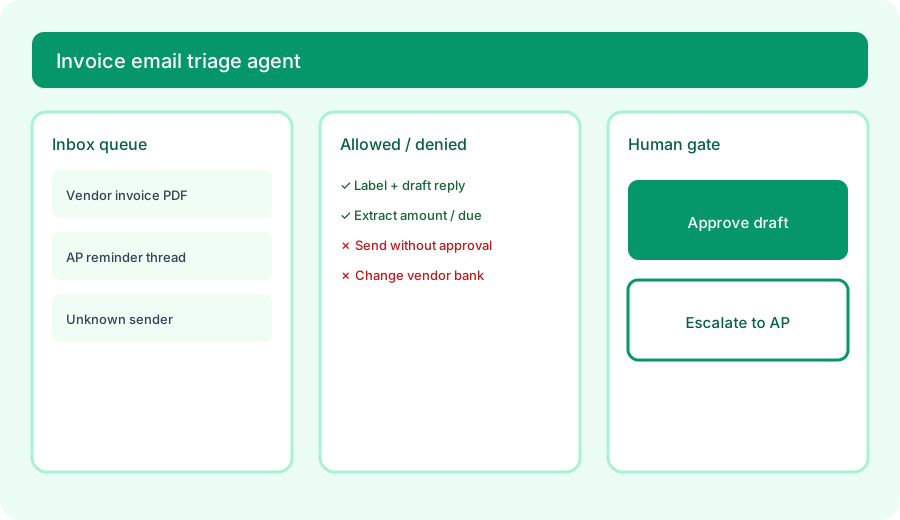
Design the agent before you connect a real inbox:
Design a Lindy-style agent for invoice-email triage: allowed actions, denied actions, escalation to human.
2. Inbox & calendar chores
What it is: Public packaging highlights inbox management, drafts in your voice, up to five connected inboxes, meeting scheduling/prep/follow-up, and daily briefs. Useful when the chore is high-volume and repetitive; less useful when every thread needs novel judgment or legal/finance authority.
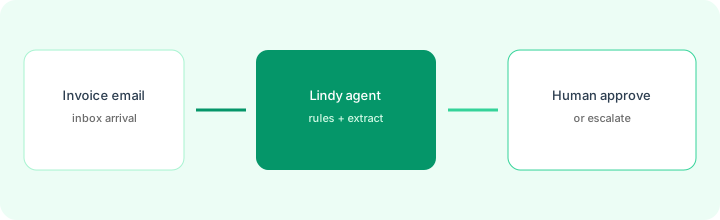
On a sample invoice thread (redact bank details first):
Extract vendor, amount, due date, and attachment type. Draft a 3-sentence AP acknowledgment. List fields that must stay blank if missing. Do not invent a payment date or bank account.
3. Supervision & approvals
What it is: Public FAQ-style packaging says outside-impact actions (send email, update a ticket, post elsewhere) wait for approval; read-only lookups may not. Ops should still write an explicit allow/deny list — especially for payments, vendor master data, and customer-facing legal language.
Before enabling send on any agent:
Write an allow list and a deny list for your top recurring agent. For each denied action, name who escalates and what evidence they need. Add a rule: if confidence is low or sender is new, escalate — never auto-send.
4. Vs Bardeen / Zapier / Make / n8n
What it is: Lindy competes with agent/teammate products more than classic iPaaS. Bardeen shines for browser playbooks. Zapier, Make, and n8n shine when you need deterministic triggers and long-lived integrations. Claude for ops wins when you want Project knowledge and human-in-the-loop prompts without a always-on agent seat.
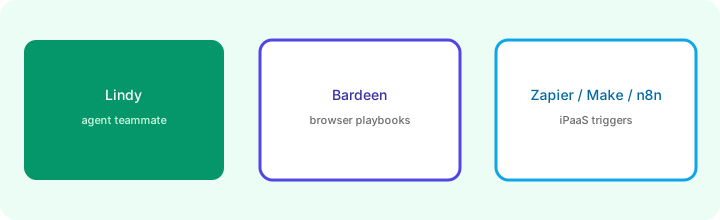
Before buying a second automation seat:
List three recurring chores. Mark each Agent (judgment + draft) / Playbook (browser steps) / iPaaS (API trigger). Only buy Lindy for Agent chores you will supervise weekly.
Public pricing (October 2026)
From lindy.ai/pricing, rechecked October 23, 2026 (USD; confirm live). Lindy replaced its earlier Plus / Pro / Max cards with one credit-based Team plan:
- Free trial: $50 in credits, no card required, lasts 7 days.
- Team: from $49.99/mo per active user for 5,000 credits; you pick a bigger monthly credit tier as needed (for example 15,000 credits for $99.99 or 35,000 credits for $199.99). Top-ups are $10 per 1,000 credits.
- Enterprise: Custom — HIPAA/BAA packaging, SSO/audit logs, shared usage + bonus credits, dedicated support (confirm with sales).
Uncertainty flags: Credits pool across the workspace and refresh each cycle (unused credits generally do not roll over per public docs). Top-ups are $10 per 1,000 credits, and if the pool runs low Lindy pauses credit-using actions instead of billing overage. Phone/voice add-ons, if used, may bill separately. The free tier is a one-time 7-day credit trial, not a permanent plan. On Oct 23 Lindy's page metadata still showed an older $29.99 / 3,000-credit figure, so check the plan picker itself. Never budget from this page alone.
When Lindy is useful (honest take)
Lindy tends to help when recurring inbox/calendar chores burn hours, you will write allow/deny lists, and someone will review drafts daily. It tends not to help when you need a durable multi-step integration (use Zapier/Make/n8n), when browser scraping is the job (Bardeen), or when you buy Max credits without a supervised agent design. Paying for an agent seat while still pasting the same chores into a chat Project without approvals is stack sprawl — pick the job, then the tool.
Paying for Lindy and a few other AI tools? The $9 AI toolkit spreadsheet lists every AI subscription you have, what each one costs, and how fast it pays for itself, so you can see which ones are worth the money.
Want someone to do it for you? AI toolkit audit — $19
Alternatives compared: Lindy vs Bardeen / iPaaS / Claude
| Axis | Lindy | Bardeen | Zapier / Make / n8n |
|---|---|---|---|
| Best when… | Agent teammate for inbox/calendar chores with approvals. | Browser playbooks and scrapers. | Deterministic API triggers and long-lived flows. |
| Cost shape (Oct 2026) | From ~$50 per user/mo for 5k credits; bigger credit tiers cost more. | See Bardeen public pricing. | Task/ops-based plans; self-host option on n8n. |
| Less useful when… | Nobody will supervise sends. | Work lives only in APIs, not the browser. | Job needs open-ended judgment drafts. |
Also see Bardeen, Zapier, Make, n8n, Claude for ops, and the ops & automation hub.
Compare hand-copy hours to automation cost on the automation glue calculator.
FAQ
What is Lindy?
An AI teammate product for recurring work such as inbox triage, calendar scheduling, meeting follow-ups, and tool updates — with approvals before actions that have outside impact.
How much does Lindy cost in October 2026?
$50 in free credits for 7 days, then Team from $49.99 per user per month for 5,000 credits, with larger credit tiers and $10-per-1,000 top-ups; Enterprise is custom (lindy.ai/pricing, Oct 23, 2026).
When should ops use Lindy instead of Bardeen, Zapier, Make, or n8n?
When you want an agent-style teammate for judgment-heavy chores with human gates. Use Bardeen for browser playbooks; use iPaaS for deterministic integrations.
Should a Lindy agent send email without approval?
No for ops-critical sends. Design allowed vs denied actions and escalate unknowns to a human before send.
Optional next step (if seats overlap)
If Lindy is one of several AI seats (agent + chat + iPaaS) and you want a written pass across the whole list, the optional $19 AI toolkit audit produces a short memo. Prefer an editable grid? The $9 AI toolkit spreadsheet is a one-time CSV. Soft offer only — this deep-dive stands alone. Or email hello@aiproduct.reviews with subject Audit $19 / Toolkit spreadsheet $9.
Checkout is live via Stripe. After you pay, we email delivery (spreadsheet) or intake next steps (audit).