What’s new · Asana · Sep 2026 (checked Oct 2026)
What’s new in Asana (Sep 2026): changes ops should notice
Dated changelog-style guide — Asana / Asana Intelligence changes that affect ops teams already living in Asana. Not a rehash of the Asana AI or Asana Intelligence deep-dives — those remain the how-tos; this page is what moved in September 2026 per public Asana notes (re-checked October 2026).
Who this changelog is for
Ops leads on Asana who already use Asana AI / Asana Intelligence and need a dated “what actually moved” note — not another full product review. Deep how-tos stay on those pages; board- or hierarchy-first teams should also see monday.com AI and ClickUp Brain.
Sep 2026 snapshot (picture)
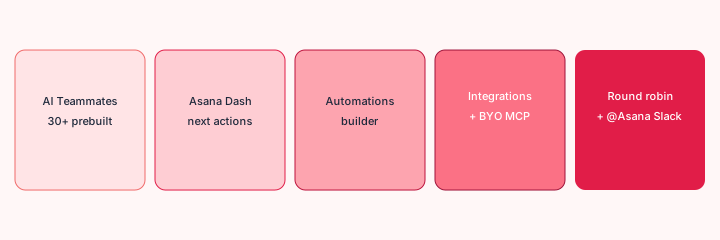
Try this (SoT primary): From Asana public Sep 2026 notes, list 5 ops-relevant changes — cite sources. (We walk those five below with citations.)
Changes that matter for ops teams
1. 30+ prebuilt AI Teammates (ops / marketing / IT)
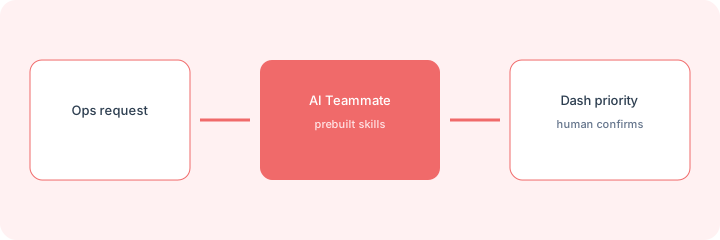
What it is: Asana’s Q3 2026 / Agentic Work Management push ships 30+ prebuilt AI Teammates tailored by role and industry, with skills and context meant to work inside real workflows from day one. Public what’s-new and Quarterly Release posts position these as ready-to-deploy agents for capacity, launches, compliance, and ops-style work — not a blank chat box. Sources: asana.com/whats-new · Q3 Quarterly Release (Sep 30, 2026) · Agentic Work Management launch.
2. Asana Dash (AI Chief of Staff)
What it is: Asana Dash surfaces what needs attention, recommends next best actions, and can bring in the right AI Teammate. Sep Release Notes also note Dash / AI Teammates can create and save simple active rules, or open Rule Builder with prefilled guidance for complex rules (Starter-gated in the notes). Sources: what’s-new · Q3 Release · Sep 2026 Release Notes.
3. Rules are now Automations (new builder)
What it is: Community announcement (Sep 21, 2026): Rules renamed Automations with a redesigned vertical builder. One automation can act across tasks, projects, and portfolios (e.g. task field change → project update; project change → portfolio; bulk-update filtered tasks). AI Studio steps can also act on projects/portfolios — not only tasks. Existing automations keep running; sequential multi-step and approval / human-in-the-loop workflows are called out as coming later. Source: Rules are now Automations.
4. AI Teammate integrations + BYO MCP
What it is: Q3 notes list new AI Teammate integrations for GDrive, OneDrive, Gmail, Google Calendar, Outlook Mail/Calendar, Slack, MS Teams, Canva, and HubSpot so teammates can act where work already happens. Sep Release Notes (Starter) add AI Teammate custom MCP integrations (BYO MCP) — connect to self-hosted or vendor-hosted MCP servers with each user’s own authorization — plus AI Studio self-serve activation and an access-to-work widget. Sources: Q3 Release · Sep Release Notes · what’s-new.
5. Round robin assignment + @Asana in Slack
What it is: Native round robin assignment for high-volume requests (also noted under Community Requested / Starter Rules set-assignee). Separately, @Asana in Slack (Personal in Release Notes) lets people mention Asana in Slack to create tasks from conversation context or privately retrieve work info. Pages and redesigned navigation appear in the Q3 kit as context/UX helpers — useful, but we keep the fifth ops item on routing + Slack capture. Sources: Q3 Release · Sep Release Notes · what’s-new.
What did not change for ops
Human review before customer-facing sends still matters. Asana AI / Teammates still do not replace your helpdesk or HRIS SoR. Plan gates (Personal / Starter / Advanced / add-ons) and rollout timing still decide what you actually see — Asana’s own posts note availability may vary. We do not invent features or packaging for your workspace. Sep Release Notes also include Markdown paste, threaded comments, recoverable custom fields, and multi-product licensing — useful, but less central to the five ops items above.
Vs monday / ClickUp / peers
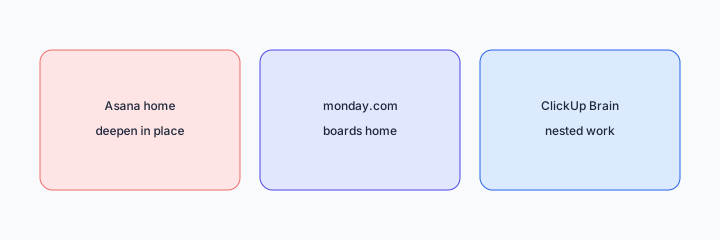
If work already lives in Asana, treat Sep 2026 as a deepen-in-place checklist (Teammates, Dash, Automations, integrations/MCP, routing). If monday boards are the SoR, see monday.com AI. If nested ClickUp work is home, see ClickUp Brain and the compare ClickUp Brain vs Asana Intelligence. Product how-tos remain Asana AI and Asana Intelligence. Related dated changelog: What’s new in Slack (Sep 2026).
Pricing & access (checked Oct 2026)
Asana publishes plans on asana.com/pricing. AI Teammates, Dash, AI Studio, MCP, and Automations packaging change — this page is dated with sources checked October 2026 and is not a price sheet. Release Notes mark many AI items as Starter (and some Personal). We do not invent exact seat prices. Confirm with your admin which Sep 2026 items are enabled.
Uncertainty: Rollout timelines, plan gates, and AI add-ons vary. Prefer asana.com/whats-new + official Release Notes over third-party summaries when budgeting.
When this update helps (honest take)
Useful when ops already lives in Asana and needs a dated checklist of verifiable Sep 2026 changes (Teammates, Dash, Automations, integrations/MCP, round robin / Slack capture). Less useful when you hoped this page would be a full Asana AI tutorial (use the deep-dives), when monday or ClickUp is the real work home, or when you need exact seat pricing (verify on Asana’s pricing pages).
Paying for Asana and a few other AI tools? The $9 AI toolkit spreadsheet lists every AI subscription you have, what each one costs, and how fast it pays for itself, so you can see which ones are worth the money.
Want someone to do it for you? AI toolkit audit — $19
FAQ
What changed in Asana in September 2026 that ops should notice?
30+ prebuilt AI Teammates, Asana Dash, Automations builder, integrations + BYO MCP, round robin + @Asana in Slack — per public Asana notes linked above.
Do Asana AI / Intelligence reviews still matter?
Yes. asana-ai.html and asana-intelligence.html are the how-tos; this page is the dated Sep 2026 changelog only.
Asana vs monday / ClickUp?
Stay where work already lives. See monday-ai.html and clickup-brain.html if those are home.
Where are deeper Asana guides?
See Asana AI and Asana Intelligence. This page is changelog-only.
Optional next step (if seats overlap)
If Asana AI, monday AI, ClickUp Brain, and a second chat seat already answer the same ops questions, optional help mapping overlap: $19 AI toolkit audit or $9 AI toolkit spreadsheet. Email Audit $19 or Toolkit spreadsheet $9.
Checkout is live via Stripe. After you pay, we email delivery (spreadsheet) or intake next steps (audit).