What’s new · Slack · Sep 2026 (checked Oct 2026)
What’s new in Slack (Sep 2026): changes ops should notice
Dated changelog-style guide — Slack / Slack AI changes that affect ops teams already living in Slack. Not a rehash of the Slack AI deep-dive — that remains the how-to; this page is what moved in September 2026 per public Slack notes (re-checked October 2026).
Who this changelog is for
Ops leads on a Slack workspace who already use Slack AI (and maybe Slackbot / Salesforce-in-Slack patterns) and need a dated “what actually moved” note — not another full product review. Deep how-tos stay on the Slack AI page; Microsoft-home teams should also see Microsoft Teams Copilot.
Sep 2026 snapshot (picture)
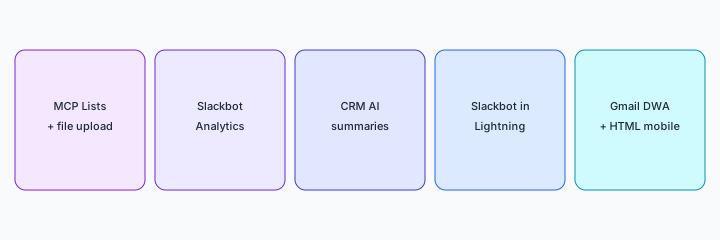
Try this (SoT primary): From Slack public Sep 2026 notes, list 5 ops-relevant changes — cite sources. (We walk those five below with citations.)
Changes that matter for ops teams
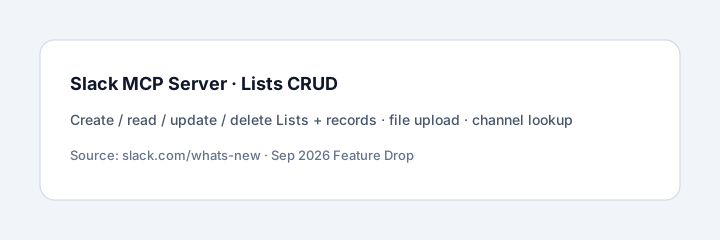
1. Slack Lists in the Slack MCP Server (+ file upload / channel lookup)
What it is: AI assistants connected through Slack’s MCP Server can create, read, update, and delete Slack Lists and records — alongside existing search, messaging, and Canvas tools. Sep notes also add file upload and list user channels tools so agents can post proof-of-work files and resolve a user’s channels. Sources: slack.com/whats-new (SEP 2026) · Sep 2026 Feature Drop.
2. Slackbot Analytics + Skills Admin Dashboard
What it is: Admins can ask Slackbot for org-wide usage data in plain language (Member Analytics; more datasets noted as on the way). The Skills Admin Dashboard rolls out more broadly so admins can audit skill/tool usage and promote top-performing skills. Source: Sep 2026 Feature Drop · whats-new.
3. CRM AI: meeting insights → Salesforce tasks
What it is: For Slack CRM teams, upcoming external meetings surface on the CRM Agenda / activity timeline; Slack auto-generates an AI call summary with action items after the call; those items can convert into Salesforce tasks. Public notes say it currently works with Google Calendar. Availability and Salesforce licensing still matter — verify with your admin. Sources: whats-new SEP 2026 · Feature Drop.
4. Slackbot in Salesforce Lightning
What it is: Slackbot chat panel inside Salesforce Lightning so sales/service can flag quiet deals or pull shipping status without leaving the record. Public notes say included in Business+ and Enterprise+; others via Flex Credits — confirm on your plan. Source: whats-new · Feature Drop.
5. Gmail Domain-Wide Auth, HTML on mobile (setup / access)
What it is: Admins can connect Gmail org-wide with a single Domain-Wide Auth (DWA) configuration for Enterprise Search, AI Answers, Slackbot, and Workflows — no per-user connect. Separately, HTML files render as live interactive pages on iOS/Android (prototypes, dashboards, agent output). Sources: whats-new · Feature Drop. (We bundle these as one “setup/access” ops item; they are separate SEP 2026 entries on Slack’s page.)
What did not change for ops
Human review before customer-facing sends still matters. Slack AI / Slackbot still do not replace your helpdesk SoR. Plan gates (Business+ / Enterprise+ / Flex Credits) still decide what you actually see — Slack’s own Feature Drop notes that some features may not be immediately available depending on rollout, licensing, or admin settings. We do not invent availability for your workspace.
Vs Teams Copilot / peers
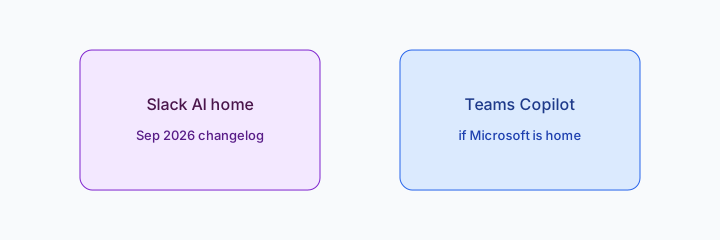
If collaboration already lives in Slack, treat Sep 2026 as a deepen-in-place checklist (MCP Lists, analytics, CRM summaries). If Microsoft 365 is the collaboration SoR, see Microsoft Teams Copilot rather than migrating for this changelog alone. Product how-to remains Slack AI.
Pricing & access (checked Oct 2026)
Slack publishes plans on slack.com/pricing. AI, CRM, Slackbot-in-Lightning, and Flex Credits packaging change — this page is dated with sources checked October 2026 and is not a price sheet. We do not invent exact seat prices. Confirm with your admin which Sep 2026 items are enabled for your workspace.
Uncertainty: Rollout timelines and plan gates vary. Prefer Slack’s what’s-new + Feature Drop over third-party summaries when budgeting.
When this update helps (honest take)
Useful when ops already lives in Slack and needs a dated checklist of verifiable Sep 2026 changes (MCP Lists, analytics, CRM summaries, Lightning Slackbot, Gmail DWA / mobile HTML). Less useful when you hoped this page would be a full Slack AI tutorial (use slack-ai.html), when Microsoft is the real collaboration home, or when you need exact seat pricing (verify on Slack’s pricing pages).
Paying for Slack and a few other AI tools? The $9 AI toolkit spreadsheet lists every AI subscription you have, what each one costs, and how fast it pays for itself, so you can see which ones are worth the money.
Want someone to do it for you? AI toolkit audit — $19
FAQ
What changed in Slack in September 2026 that ops should notice?
MCP Lists CRUD (+ file upload / channel lookup), Slackbot Analytics / Skills Admin, CRM AI meeting summaries → Salesforce tasks, Slackbot in Lightning, Gmail DWA + HTML on mobile — per public Slack notes linked above.
Does the Slack AI review still matter?
Yes. slack-ai.html is the how-to; this page is the dated Sep 2026 changelog only.
Slack vs Microsoft Teams Copilot?
Stay where collaboration already lives. See microsoft-teams-copilot.html if Microsoft is home.
Where are deeper Slack guides?
See Slack AI. This page is changelog-only.
Optional next step (if seats overlap)
If Slack AI, Teams Copilot, and a second chat seat already answer the same ops questions, optional help mapping overlap: $19 AI toolkit audit or $9 AI toolkit spreadsheet. Email Audit $19 or Toolkit spreadsheet $9.
Checkout is live via Stripe. After you pay, we email delivery (spreadsheet) or intake next steps (audit).