Feature · Ops & automation · Microsoft Teams · Oct 2026
Microsoft Teams Copilot review (Oct 2026): meeting and channel assists for ops
Teams Copilot for meeting recaps and channel digests when Teams is already the collab SoR — with human edit before post. Complements Slack AI and Zoom AI Companion.
What Teams Copilot covers here
This page is for ops teams already collaborating in Microsoft Teams who want Copilot help for meeting recaps and channel digests — without inventing owners or decisions. We focus on sanitized outlines, Unknown markers, and when Slack AI or Zoom AI Companion is the better home. Feature names and packaging change — verify live on Microsoft docs.
Major features (with how someone uses them)
Examples at a glance: each feature has a concrete ops example plus a short Try this.
1. Meeting recap + action list (primary)
What it is: From a sanitized meeting outline (or transcript excerpt your policy allows), draft a recap and action list. Mark Unknown when owners are missing. A human edits before the recap hits a channel.
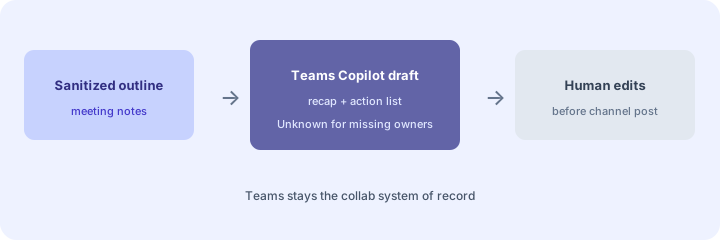
Primary SoT workflow:
From a sanitized meeting outline: draft recap + action list; mark Unknown for missing owners.
2. Channel digests for ops hubs
What it is: Propose a short digest of an ops channel: themes, open asks, and items that need a human decision. Prefer evidence from visible threads. Never invent a decision that was not stated.
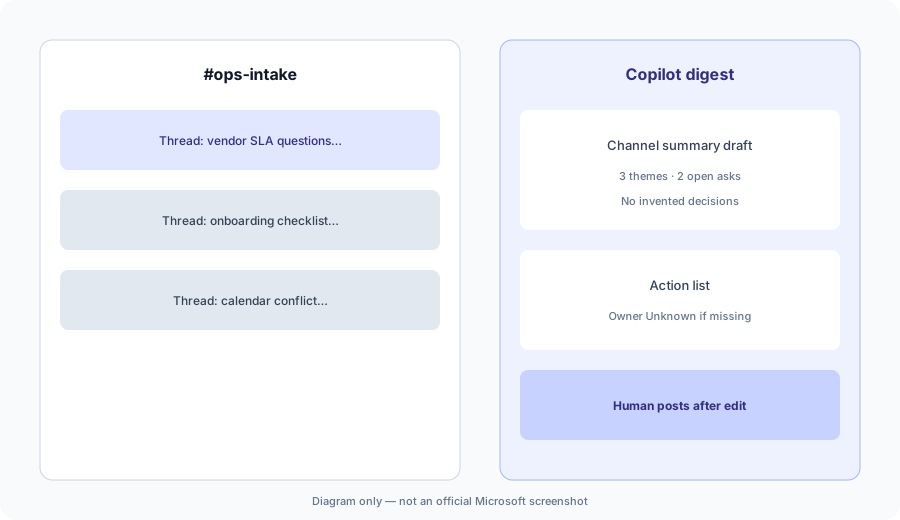
Digest honesty:
Paste 8 sanitized channel snippets. Draft a 5-bullet digest and list which bullets need a human decision vs are just FYI.
3. Unknown owners and missing context
What it is: Teach the habit: if the outline does not name an owner, deadline, or decision, output Unknown instead of guessing. Ops leads fill gaps before posting.
Unknown drill:
From 6 action lines (half missing owners or dates): rewrite as Action | Owner | Due — use Unknown, never invent people or dates.
4. Vs Slack AI / Zoom Companion
What it is: Stay in the collab home you already pay for. Teams Copilot when Teams is the SoR; Slack AI when Slack owns channels; Zoom AI Companion when Zoom is the meeting platform and decisions do not live in Teams. Soft $19/$9 below only if Copilot and other seats overlap on the same recap/digest jobs.
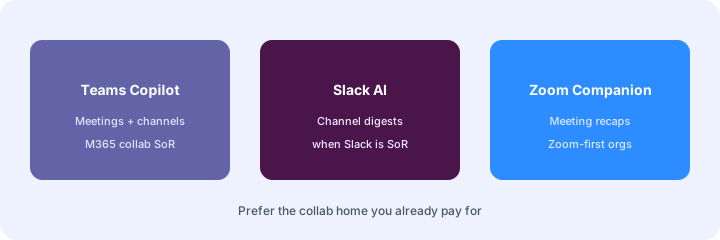
Home-for-the-job:
List 6 recurring meeting/channel jobs this quarter. Assign each to Teams Copilot, Slack AI, or Zoom AI Companion — one sentence why. Do not invent a tool you do not use.
Pricing context (October 2026)
Microsoft publishes Microsoft 365 Copilot and Teams packaging on its public site (start from microsoft.com Microsoft 365 Copilot and Teams admin docs). This page is dated October 2026 and is not a price sheet — we do not invent exact per-seat or add-on prices.
Uncertainty: Which SKUs include which Copilot surfaces in Teams, seat minimums, and regional availability change. Always verify on live Microsoft pages and your tenant admin before budgeting.
When Teams Copilot is useful (honest take)
Useful when Teams is already the collab SoR, humans edit recaps before post, and Unknown is used for missing owners. Less useful when Slack or Zoom already own those jobs, or when you hoped Copilot alone would invent decisions and assignees from empty outlines.
Paying for Microsoft Teams Copilot and a few other AI tools? The $9 AI toolkit spreadsheet lists every AI subscription you have, what each one costs, and how fast it pays for itself, so you can see which ones are worth the money.
Want someone to do it for you? AI toolkit audit — $19
Related options (educational)
| Need | Better home | Why |
|---|---|---|
| Teams meetings + channels | Teams Copilot (this page) | Recaps + digests in the M365 collab SoR |
| Slack channel digests | Slack AI | When Slack is the channel home |
| Zoom-first meeting recaps | Zoom AI Companion | When Zoom owns meetings |
FAQ
What is Microsoft Teams Copilot?
Copilot assists inside Teams for meeting and channel drafts a human should review. Verify live feature names on Microsoft docs.
How much does it cost?
Confirm on Microsoft's public Copilot / M365 pricing — this Oct 2026 page does not invent exact prices.
Should Copilot invent action owners?
No. Mark Unknown when the outline does not name an owner. Human assigns before post.
Teams vs Slack AI / Zoom Companion?
Stay in the collab home you already pay for. See related reviews linked above.
Optional next step (if seats overlap)
If several AI seats would cover the same scheduling, collab, and people-ops jobs, optional help mapping overlap: $19 AI toolkit audit or $9 AI toolkit spreadsheet. Email Audit $19 or Toolkit spreadsheet $9.
Checkout is live via Stripe. After you pay, we email delivery (spreadsheet) or intake next steps (audit).