What’s new · Notion · Sep 2026 (checked Oct 2026)
What’s new in Notion (Sep 2026): changes ops should notice
Dated changelog-style guide — Notion / Notion AI changes that affect ops teams already living in Notion. Not a rehash of the Notion AI deep-dive or Notion AI for ops role guide — those remain the how-tos; this page is what moved in September 2026 per public Notion release notes (re-checked October 2026).
Who this changelog is for
Ops leads on a Notion workspace who already use Notion AI (and maybe Notion AI for ops patterns) and need a dated “what actually moved” note — not another full product review. Deep how-tos stay on those pages and the Notion AI vs Coda AI compare.
Sep 2026 snapshot (picture)
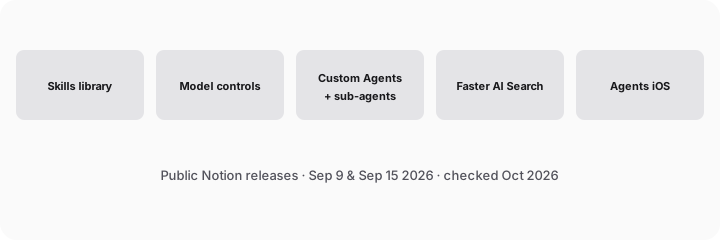
Try this (SoT primary): From Notion public Sep 2026 notes, list 5 ops-relevant changes — cite sources. (We walk those five below with citations.)
Changes that matter for ops teams
1. Agent skills library (Notion 3.7 — Sep 15, 2026)
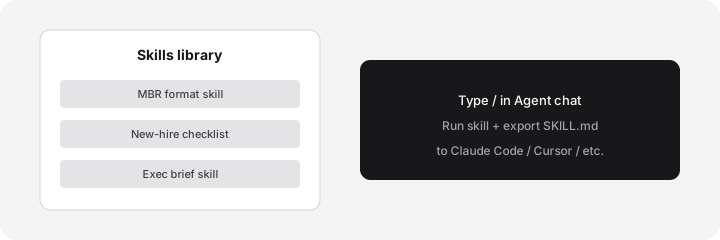
What it is: Shared, reusable AI instructions (“skills”) in a workspace library — e.g. monthly business review format, new-hire checklist, exec brief. Invoke with / in Notion Agent chat; export as SKILL.md for Claude Code, Cursor, and other agents. Source: notion.com/releases/2026-09-15.
2. Model controls (Sep 9, 2026)
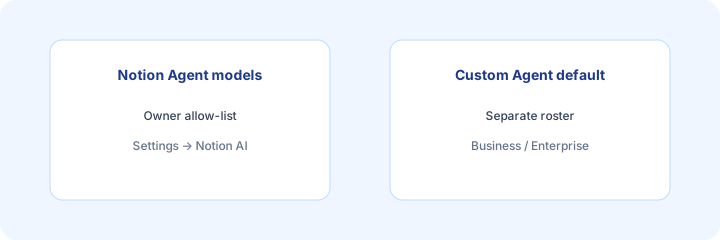
What it is: Workspace owners choose which AI models are available for Notion Agent and Custom Agents separately, and set a default for Custom Agents. Aimed at cost and compliance. Business and Enterprise per Notion’s note. Source: notion.com/releases/2026-09-09. Path cited by Notion: Settings → Notion AI → General → Model controls.
3. Custom Agents: sub-agents + post-meeting work (Sep 15, 2026)
What it is: Custom Agents can call other Custom Agents as sub-agents, and can pick up post-meeting work (recap, action items) when a meeting summary is ready. Notion also notes MCP connections (e.g. GitHub, Amplitude) with confirmations before changes. Business/Enterprise and beta labels apply — verify on your workspace. Source: Sep 15 release.
4. AI Search ~50% faster (Sep 15, 2026)
What it is: Notion states AI Search is 50% faster for answers and agent outputs that use workspace context — Business and Enterprise. Useful when ops asks “where is the latest SOP?” inside Notion rather than Slack archaeology. Source: Sep 15 “And a few more…”.
5. Notion Agents iOS app (Sep 15, 2026)
What it is: Notion’s Sep 15 note introduces a Notion Agents iOS app for capturing ideas, voice, photos, and spinning up docs on the go. Ops value is thin unless field/on-call leads already work from phones — still worth listing as a Sep change. Source: Sep 15 release.
What did not change for ops
Wiki-as-system-of-record habits, permission design, and “AI drafts / human publishes” still matter more than any single Sep feature. The Notion AI and Notion AI for ops guides remain the how-tos. Skills do not replace a clean SOP page tree.
Vs Coda / peers
If Notion is already where docs live, Sep skills + Custom Agents deepen that home. If packs live in Coda, see Coda AI and Notion AI vs Coda AI rather than migrating for a changelog alone.
Pricing & access (checked Oct 2026)
Notion AI / Agent packaging and Business vs Enterprise gates change. Confirm seats, AI add-ons, and agent credit limits on notion.com/pricing and your workspace admin. Sep 2026 release notes flag Business/Enterprise for several agent features — we do not invent exact prices. Dated: Sep 2026 changes, checked October 2026.
When this update helps (and when it doesn’t)
Useful when: Notion is already the ops wiki, you want shared skills instead of private prompts, and owners need model controls. Less useful when: Docs live elsewhere, or you only needed a one-off AI rewrite. Educational — not a scorecard.
Paying for Notion and a few other AI tools? The $9 AI toolkit spreadsheet lists every AI subscription you have, what each one costs, and how fast it pays for itself, so you can see which ones are worth the money.
Want someone to do it for you? AI toolkit audit — $19
FAQ
What changed in Notion in September 2026 for ops?
Public notes highlight Agent skills, model controls, Custom Agents (sub-agents / post-meeting), faster AI Search, and Agents iOS. Cite Sep 15 and Sep 9.
Do the Notion AI deep-dives still matter?
Yes — this page is the dated changelog only. How-tos stay on Notion AI and Notion AI for ops.
How does this compare to Coda AI?
Stay in Notion if it’s already the wiki; see Notion AI vs Coda AI if packs live in Coda.
What does Notion AI cost (Oct 2026)?
Confirm on notion.com/pricing. Packaging and plan gates change — we do not invent exact prices.
Optional next step (if seats overlap)
If Notion AI sits beside other wiki/AI seats, optional help mapping overlap: $19 AI toolkit audit or $9 AI toolkit spreadsheet. Email Audit $19 or Toolkit spreadsheet $9.
Checkout is live via Stripe. After you pay, we email delivery (spreadsheet) or intake next steps (audit).