Automation · Ops handoffs · AI
Relay.app review (Sep 2026): AI-assisted workflows for ops handoffs
Educational look at the Relay-style AI workflow pattern for multi-step ops handoffs — human checkpoints, failure notifications, and when Make or Zapier is the better live home for the same job. Status note (Sep 2026): Relay.app publicly shut down; this page teaches the pattern, not a signup path.
Who this page helps
Ops leads designing multi-step handoffs — form intake → enrich → Slack approve → Sheet log — who need AI for messy fields and a human gate before money, access, or customer data moves. If you only need a linear “new row → Slack ping,” start with Zapier or Make and skip the AI step until a human actually reviews enrichment quality.
What Relay.app was
Relay.app was an AI-assisted workflow builder aimed at ops handoffs: triggers from forms and apps, AI steps for extraction/summarization/enrichment, human approval steps (often Slack), and writebacks to sheets/CRMs. Public notices on relay.app state the product shut down in September 2026 and that accounts, workflows, and run history were deleted. This review keeps the educational pattern — not a recommendation to hunt for a dead signup URL.

Major features (with how someone uses the pattern)
Examples at a glance: each block has a concrete ops example plus a Try this mini-workflow you can redesign in Make or Zapier today.
1. AI-assisted steps (enrich without inventing policy)
What it is: Relay-style workflows insert an AI step between a trigger and a writeback — extract fields from a form blob, summarize risk, label priority — while keeping the next step explicit. Useful when the form is messy; dangerous when the AI invents amounts, owners, or approvals nobody typed.
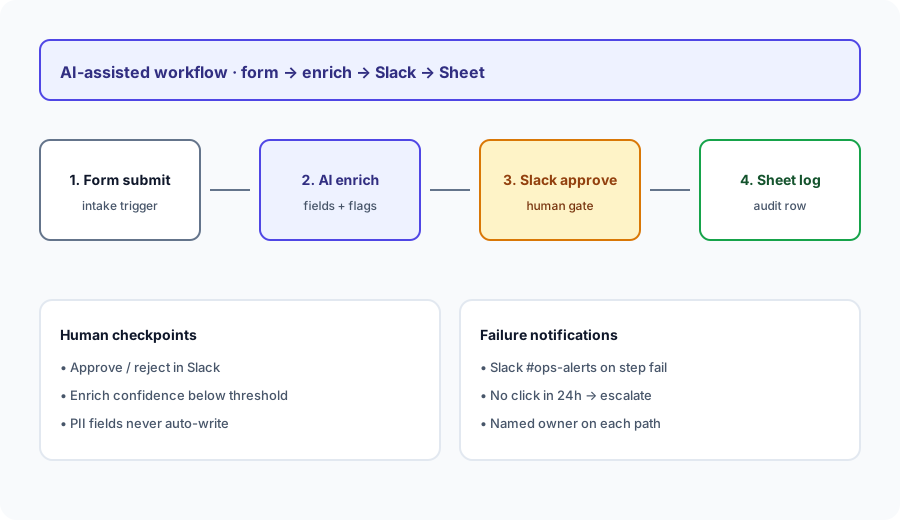
Design the workflow on paper (or in Make/Zapier) before connecting production apps:
Design a workflow: form submit → enrich → Slack approve → Sheet log. List human checkpoints and failure notifications.
2. Human checkpoints (the actual product)
What it is: The durable idea from Relay-style tools is not “AI runs everything” — it is named human gates before irreversible steps. Approvals in Slack, confidence thresholds that force review, and PII fields that never auto-write are the difference between helpful glue and silent bad data.
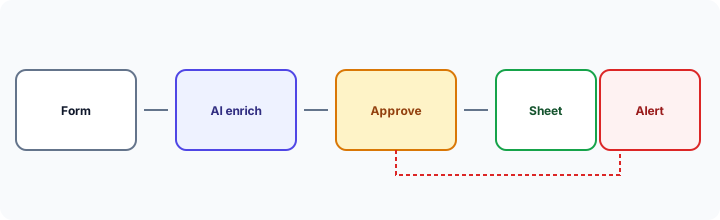
Before enabling auto-write:
List every field the AI may fill. Mark each: auto-ok / human-required / never-AI. If any money, access, or customer PII is auto-ok, stop and redesign the checkpoint.
3. Failure notifications & ownership
What it is: Multi-step handoffs fail in boring ways — Slack button ignored, enrich timeout, Sheet API 429. Relay-style ops design names a channel, a 24h escalate path, and a human who owns broken runs. Without that, AI automation just relocates the copy-paste mess into a queue nobody watches.
Add the failure path to the same design doc:
For the form→enrich→Slack→Sheet workflow, write: (1) alert channel, (2) 24h no-click escalate, (3) named owner. Refuse any design with “AI will retry until it works.”
4. Rebuild after shutdown (Make / Zapier)
What it is: With Relay shut down, the practical move is to rebuild the same four beats in a live tool. Make often fits branching + credit control; Zapier often fits simple linear paths and Interfaces/Tables where you already live. See also Make scenarios for an approvals+Slack pattern, and Zapier Central if you are evaluating Zapier’s AI layer.
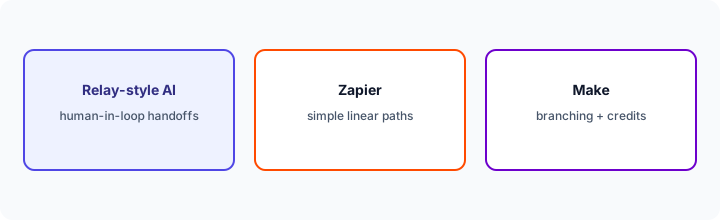
Pick one live home this week:
Rewrite the form→enrich→Slack→Sheet design as either a Make scenario outline or a Zap outline. Name modules, the approve step, and the error path. Do not invent connectors your stack does not have.
Public pricing (September 2026)
Relay.app: no longer sold. The public homepage states shutdown in September 2026. Historical archived pricing pages commonly listed approximately:
- Free: limited automated steps and AI credits (often cited ~200 steps / ~500 AI credits per month).
- Professional: often cited around $19/month billed annually (solo), with higher step/credit allotments.
- Team: often cited around $69/month billed annually (shared seats, higher steps).
- Enterprise: custom. Extra AI-credit bundles were sold separately; docs and marketing pages sometimes disagreed on included paid-plan credits — another reason not to budget from secondary writeups.
Live alternatives to price instead: check make.com/pricing and zapier.com/pricing for current credit/task meters. Our Make and Zapier deep-dives walk the cost shapes educationally.
Uncertainty flags: Historical Relay figures above are from archived public pages and secondary summaries — treat as approximate context only. Do not attempt to purchase Relay. Budget any rebuild from live Make/Zapier configurators.
When a Relay-style AI workflow is useful (honest take)
The pattern tends to help when a human must approve before writeback, enrichment quality is good enough to save typing but not good enough to trust blindly, and someone owns failures. It tends not to help when the path is a simple linear ping, when nobody will watch the approve queue, or when you hoped AI would invent policy your team never wrote down. After Relay’s shutdown, usefulness is about rebuilding the pattern — not nostalgia for a logo.
Moving off Relay.app and paying for a few other AI tools? The $9 AI toolkit spreadsheet lists every AI subscription you have, what each one costs, and how fast it pays for itself, so you can see which ones are worth the money.
Want someone to do it for you? AI toolkit audit — $19
Alternatives compared: pattern vs live tools
| Axis | Relay-style AI handoffs | Make | Zapier | Native sync / Sheets + LLM |
|---|---|---|---|---|
| Best when… | AI enrich + human approve + owned failures. | Branching routers + credit control. | Simple linear paths / broad connectors. | One-off hygiene; no multi-app glue yet. |
| Availability (Sep 2026) | Relay product shut down — pattern only. | Live — see Make. | Live — see Zapier. | Live; human time is the meter. |
| Less useful when… | You only need a Slack ping on new rows. | You refuse to own broken scenarios. | You need heavy branching on a tight credit budget. | You need multi-user approval queues. |
Also see Make scenarios, Zapier Central, Bardeen, and the ops & automation hub.
Compare hand-copy hours to automation cost on the automation glue calculator.
FAQ
What was Relay.app?
An AI-assisted workflow tool for ops handoffs — enrich steps, human approvals, writebacks — now shut down per its public homepage (Sep 2026).
Can I still sign up for Relay.app?
No. Rebuild the pattern in Make or Zapier (or a native integration) if you still need the handoff.
When should we use AI in a workflow at all?
When enrichment saves real typing and a human gate sits before irreversible writes. Otherwise keep the path dumb and observable.
Make or Zapier for the rebuild?
Zapier for simple linear paths; Make when you need routers/branching and tighter credit control. Compare on connectors you actually use and who owns failures — not brand preference.
Optional next step (if seats overlap)
If automation seats are one of several AI costs and you want a written pass across the whole list, the optional $19 AI toolkit audit produces a short memo. Prefer an editable grid? The $9 AI toolkit spreadsheet is a one-time CSV. Soft offer only — this deep-dive stands alone.
Checkout is live via Stripe. After you pay, we email delivery (spreadsheet) or intake next steps (audit).