Tool · Sales & marketing · Pipedrive · Sep 2026
Pipedrive AI review (Sep 2026): pipeline assists for small sales ops
AI assists for teams already on Pipedrive — hygiene and next steps. This page maps pipeline paste workflows, Nova meeting help with human approval, coaching questions for reps, and when HubSpot or Salesforce AI is the better home.
What Pipedrive AI covers here
This page is for small sales ops already standardized on Pipedrive who want AI for pipeline hygiene and next-step coaching — not a migration pitch. We focus on paste-based hygiene lists, missing next steps, three coaching questions per rep, and Nova-style meeting briefs/CRM suggestions that a human must approve. If your CRM is HubSpot or Salesforce, start with those reviews instead of buying Pipedrive for AI alone.
Major features (with how someone uses them)
Examples at a glance: each feature has a concrete sales-ops example plus a short Try this.
1. Pipeline hygiene from a paste
What it is: Paste a sanitized deal export (name, stage, owner, value if present, last activity, next step). Ask AI to list stale deals and blanks — without inventing owners, amounts, or close dates the export never had.
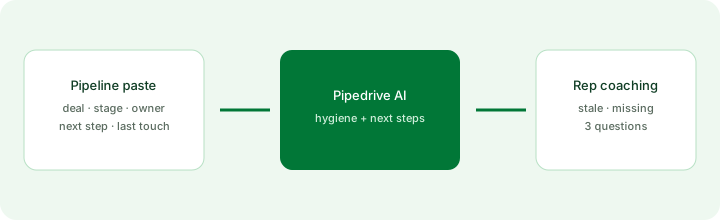
Primary SoT workflow:
From pipeline paste: list stale deals, missing next steps, and 3 coaching questions for reps.
2. Missing next steps (no invented dates)
What it is: Propose next-step drafts only when stage + recent notes support them. If the deal is silent, output “Next step: Unknown — rep must set.” Never invent a meeting that did not happen.
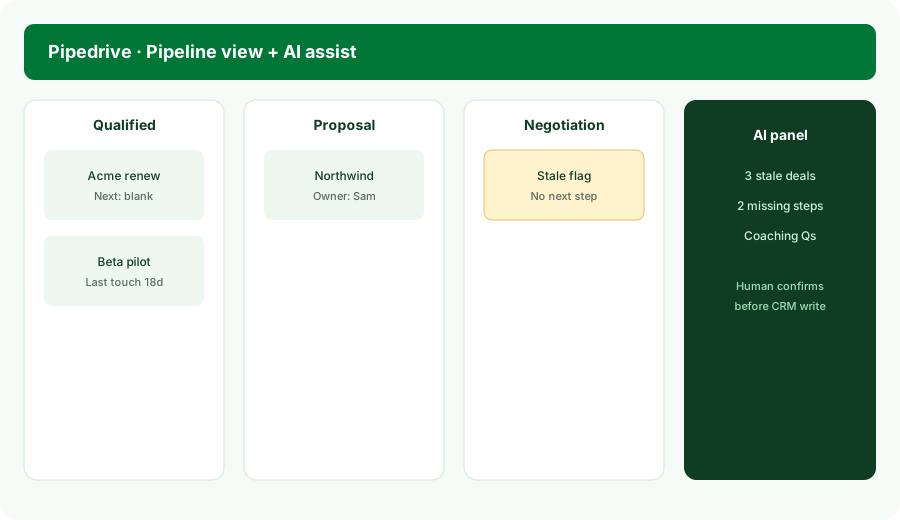
Next-step honesty:
Using only this deal paste (stage, notes, last activity): draft a next step or mark Unknown. Do not invent meetings, amounts, or close dates. List what a human must confirm before saving to Pipedrive.
3. Coaching questions for reps
What it is: Turn hygiene gaps into three manager questions per rep — not a rating table. Questions should point at deal facts (stale, blank next step, stage stuck) so the 1:1 stays grounded.
1:1 prep:
From this rep’s open deals only: write 3 coaching questions about stale deals and missing next steps. No invented win rates. Flag any deal where owner or stage is blank as Unknown.
4. Nova meeting assists (human approves)
What it is: Pipedrive’s Nova-style meeting help (briefs from CRM context, transcription where enabled, suggested CRM updates). Public packaging (Sep 2026) emphasizes human review before write-back. Treat suggestions as drafts — consent and recording rules still apply.
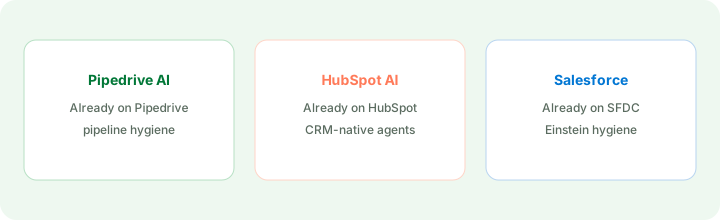
Meeting write-back guardrail:
After a call summary paste: list suggested CRM field updates. For each field: keep, edit, or discard. Never auto-apply amounts or close dates the summary did not state.
Pricing context (September 2026)
Public Pipedrive pages (as of September 2026) list paid tiers such as Lite, Growth, Premium, and Ultimate (often cited around US$14 / $39 / $59 / $79 per seat/month billed annually — confirm live). AI features are commonly bundled by plan (report/email assists and Nova where available) rather than a separate “AI SKU” on every page. Confirm seats, which AI surfaces sit on which tier, and add-ons on pipedrive.com/pricing. This page is dated September 2026 and is not a price sheet.
Uncertainty: Plan names, AI inclusion by tier, Nova availability/languages, and add-on prices move. Always verify on live vendor pages and your admin console before budgeting.
When Pipedrive AI is useful (honest take)
Useful when Pipedrive is already the CRM of record, deals have owners and stages filled often enough to trust a hygiene list, and managers want coaching questions grounded in those blanks. Less useful when the pipeline is empty of next steps by culture, when enrichment lives only in Clay/Apollo and never syncs back, or when you hoped AI would replace weekly pipeline review. If HubSpot or Salesforce is SoR, use those native AI pages instead.
Paying for Pipedrive AI and a few other AI tools? The $9 AI toolkit spreadsheet lists every AI subscription you have, what each one costs, and how fast it pays for itself, so you can see which ones are worth the money.
Want someone to do it for you? AI toolkit audit — $19
Related options (educational)
| Need | Better home | Why |
|---|---|---|
| Already on Pipedrive — hygiene + next steps | Pipedrive AI (this page) | Stay in the CRM you already pay for |
| Already on HubSpot | HubSpot AI | Breeze / Agent Hub on HubSpot fields |
| Already on Salesforce | Salesforce Einstein | Stale-deal hygiene in Salesforce |
| Enrichment tables outside CRM | Clay · Apollo.io | Research/enrichment jobs, then QA into CRM |
Inventory seats by job on the stack map for sales ops.
FAQ
What is Pipedrive AI?
Native AI inside Pipedrive for teams already on the CRM — hygiene, next steps, and Nova-style meeting suggestions with human approval. Not a migration pitch.
Should Pipedrive AI invent missing next steps or owners?
No. Mark Unknown and have a human set the field before enabling any write-back.
When is Pipedrive AI useful vs HubSpot AI or Salesforce Einstein?
Use the AI inside the CRM you already pay for. Enrichment tables may still live in Clay or Apollo with QA before CRM sync.
What does Pipedrive AI cost in September 2026?
Confirm on pipedrive.com/pricing. Seats and which AI features sit on which tier change — this review is dated September 2026.
Optional next step (if seats overlap)
If Pipedrive AI would sit beside HubSpot AI, Clay, Apollo, and chat seats, optional help mapping overlap: $19 AI toolkit audit or $9 AI toolkit spreadsheet. Email Audit $19 or Toolkit spreadsheet $9.
Checkout is live via Stripe. After you pay, we email delivery (spreadsheet) or intake next steps (audit).