How-to · Sales ops · Pipedrive · Oct 12, 2026
Sweep stale deals in Pipedrive with AI suggestions and a human close-lost call
A pipeline full of deals nobody has touched in a month makes the forecast look better than it is. This page shows a small sales team on Pipedrive how to run a weekly sweep: one stale rule, an AI flag list, and a rep who makes every call on whether a deal is still live.
Who this is for
Sales managers and founders running a small team on Pipedrive, where the pipeline has grown and nobody trusts it. If your CRM is Close or Attio, the same sweep works there; see the Close CRM AI and Attio AI reviews. If you're on HubSpot and wondering whether you need more tools for this, start with HubSpot native before Clay.
How to do it
This is a how-to, not a ranking of CRMs. Feature detail, including Pipedrive's AI assists and the Nova meeting features, lives on the Pipedrive AI review. The idea here: AI is good at finding stale deals. Only the rep knows whether the buyer is still there.

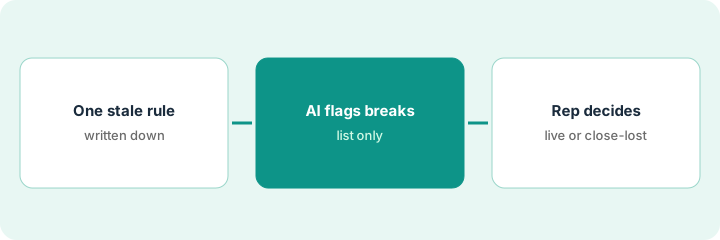
1. Step 1 — Write one stale rule
What it is: A single written definition of "stale" so the sweep catches the same deals every week.
- Pick a number of days with no activity that's clearly too long for your sales cycle. Many small teams use 14 or 21 days.
- Add the second signal: no next activity scheduled.
- A deal is stale if both are true.
- Write the rule in the team's sales notes so nobody argues about it during the sweep.
The team's deals usually close in about six weeks. The manager writes: "Stale = no activity in 14 days and no next activity scheduled." That catches deals drifting without flagging ones with a call already booked.
Write one line: "Stale = no activity in [days] and no next activity scheduled. Sweep every [day]."
2. Step 2 — Let AI flag the deals that break it
What it is: Pipedrive's filters find deals that match the rule. AI then adds a short note for each one, based only on what's in the deal.
- Build a saved filter in Pipedrive for the stale rule, or export open deals with name, stage, owner, last activity, and next activity.
- Ask AI, inside Pipedrive where your plan includes it or in a chat tool with a cleaned export, to list each stale deal with its last real activity and one question for the rep.
- Where there's no information, the AI writes "Unknown, rep must say." It doesn't guess why a deal went quiet.
- The AI doesn't change stages, close deals, or schedule activities. It writes a list.
Of 42 open deals, 7 match the stale rule. For one, the AI writes: "Last activity: quote sent Sept 18. No reply logged. Question for rep: did the buyer respond outside email?" For another with no notes at all, it writes "Last activity: Unknown. Rep must say."
Prompt: "Using only this deal export, list deals with no activity in 14 days and no next activity. For each, give the last activity and one question for the owner. Write Unknown where the export has nothing. Don't suggest stage changes."
3. Step 3 — The rep decides: still live or close-lost
What it is: Each rep goes through their own flagged deals and makes one of two calls. The manager doesn't decide for them, and neither does the AI.
- Still live: the rep schedules a real next activity in Pipedrive with a date, today. A deal can't be still live with nothing scheduled.
- Close-lost: the rep marks it lost with a reason from your lost-reason list. Lost deals can be reopened if the buyer comes back.
- Deals a rep can't decide on get one more week, with a next activity to ask the buyer directly.
- The manager reads the totals, not every deal: how many were swept, how many closed, how many came back to life.
Sam has three flagged deals. One buyer replied by phone last week, so Sam logs it and books a call for Thursday. One went with a competitor, so it's close-lost with that reason. One is unclear, so Sam sends a direct "is this still a priority?" email and sets a follow-up for next Monday.
Manager's weekly line: "Stale deals: [count]. Still live with next activity: [count]. Close-lost: [count]. Asked buyer, decide next week: [count]."
Pricing context (October 2026)
This how-to isn't a price sheet. When our Pipedrive AI review checked public pages in September 2026, paid tiers were Lite, Growth, Premium, and Ultimate, often cited around $14, $39, $59, and $79 per seat per month billed annually, with AI features bundled by plan rather than sold separately. Confirm current prices and which AI features sit on your plan on Pipedrive's pricing page. Dated October 2026.
Checked Oct 12, 2026 on the vendor’s own pricing page: Pipedrive’s pricing page (annual billing) lists Lite at US$168 per seat per year ($14 per seat per month), Growth at US$468 per year ($39 per month), Premium at US$708 per year ($59 per month) and Ultimate at US$948 per year ($79 per month), each with a 14-day trial. AI email assist features are called out on higher plans; confirm which AI features sit on your plan before you rely on them for the flag list.
Uncertainty: Plan names, AI features by tier, and Nova availability change. The only prices this site sells here are the optional $9 AI toolkit spreadsheet and $19 AI toolkit audit.
When this helps (honest take)
Useful when the pipeline has more open deals than anyone believes in, the forecast keeps missing, and reps rarely mark deals lost.
Not useful when you have ten open deals and talk about each one every week. You already know which are stale.
Related options (educational)
| Need | Where to look | Why |
|---|---|---|
| Pipedrive features | Pipedrive AI | Primary path on this page |
| Calling teams | Close CRM AI | Same sweep in a calling CRM |
| Lighter modern CRM | Attio AI | Small schema, next steps with human review |
| Hygiene from an export | ChatGPT for revenue operations | Shared GPT on a cleaned paste |
| Before another tool | HubSpot native before Clay · Three checks before an AI seat | Live how-tos |
Free: seat-waste calculator if a chat seat and your CRM's AI are both building the same stale list.
FAQ
Should the AI close stale deals automatically?
No. Only the rep knows whether the buyer is still there. An automatic close-lost hides deals that were alive, and nobody notices.
What if reps never mark anything lost?
Make "still live" require a scheduled next activity. When every live deal needs a real date, reps close the ones they can't schedule.
Where do current prices live?
On Pipedrive's pricing page. The Pipedrive AI review records what we saw in September 2026. This page doesn't invent prices. Our Oct 12, 2026 check of the vendor’s own pricing page is summarized in the pricing section above.
Can AI close-lost a deal on its own?
No. AI only flags. The rep decides still-live or close-lost and owns the reason code.
Optional next step
Free reviews stay free. If Pipedrive, a chat seat, and a second sales tool are all producing pipeline lists, the $9 AI toolkit spreadsheet helps you lay them out, or the $19 AI toolkit audit gets you a written memo.