How-to · Revenue ops · HubSpot AI · Clay · Oct 8, 2026
Try HubSpot-native AI on clean fields before adding Clay
“Native before Clay” here does not mean HubSpot’s AI replaces every enrichment table. It means you hold off on a second research tool until the CRM fields you already pay for are clean enough for a fair test — and you still know which jobs Clay’s multi-source tables do better.
Who this is for
Revenue-ops and sales-ops leads whose CRM of record is already HubSpot and who are tempted to add Clay (or another enrichment table) for research, list building, or company data. If HubSpot is not your CRM, this is the wrong question — start with the AI inside the system you actually use. If Clay already runs your research with a checked sample before anything syncs to HubSpot, keep that; this page is for the “should we add Clay yet?” moment.
How to do it
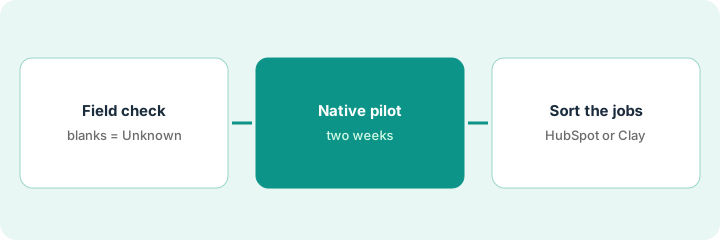
This page is a how-to, not a verdict. The HubSpot vs Clay compare explains which jobs fit each tool on a 50-account list; this page is the step before that — clean the fields, run a two-week native pilot, then sort your weekly jobs. Product detail and dated pricing live on HubSpot AI and Clay.
1. Step 1 — Run a field hygiene check
What it is: Before any AI feature or enrichment purchase, sample the records the pilot will touch. AI reflects the CRM it reads — blank and conflicting fields turn into confident nonsense.
- Pick one object and one view, for example 50 open deals or a target-account list.
- Check Owner, Stage, Amount, Close date, and the two company fields you care about most. Blank stays Unknown — do not fill it with a guess.
- Fix or flag conflicts a person must settle (two owners, close dates that already passed).
- Write the rule: nothing writes back an amount or close date the record never had.
A 50-deal view has twelve blank next steps and eight close dates from last month that nobody updated. The lead clears or marks those twenty rows Unknown before asking HubSpot’s AI for any draft notes. The pilot now runs on thirty honest rows instead of fifty half-true ones.
Filter or export 50 records. Count blank owners and blank or stale close dates. Write down a limit (for example, under five blanks) and do not start the pilot until you are under it — or until the blanks are clearly marked Unknown.
2. Step 2 — Pilot HubSpot’s own AI on clean records
What it is: Use HubSpot’s built-in AI (branded Breeze; which assistants and agents you get varies by edition) on jobs the CRM already owns: drafting from deal properties, cleanup suggestions, and light agents that read HubSpot data. See HubSpot AI.
- Scope one job for two weeks — for example deal-summary drafts or next-step emails built from deal properties — not “automate all enrichment.”
- Watch HubSpot Credits. Agents and AI features use credits when they take action, and each Sales Hub edition includes a different number.
- A person confirms Stage, Amount, and Close date before anything is written back.
- If a draft names a competitor or an amount that is not on the record, delete that line. The record wins.
HubSpot’s AI drafts next-step emails for seven clean deals. The account executive edits the tone; revenue ops removes two discount mentions that were never discussed. No Clay seat is bought during the pilot, and credit use is logged against this one job.
Pick ten clean records and ask for one fixed shape: Company — stage — next step from the CRM — Unknowns. Cap it at ten lines and check every line against the record before anyone sends anything.
3. Step 3 — Decide which jobs still need Clay
What it is: After the pilot, sort jobs into the ones HubSpot already owns and the ones that need multi-source research tables. Clay often fits waterfall enrichment (trying several data providers in turn) and building lists before records reach the CRM — with a checked sample before sync. See HubSpot vs Clay.
- Stay in HubSpot when the fields already live on the contact, company, or deal and the job is cleanup or drafting from the record.
- Consider Clay when you need research rows from several sources, waterfall enrichment, or a list of accounts that are not in HubSpot yet.
- Never auto-sync Clay columns into Amount or Close date without a person checking them.
- If both tools would do the same weekly job, that is seat overlap — pick one path for that job.
Check the plan before you count on a sync: on Oct 8, 2026, Clay’s pricing page listed CRM auto-sync on its Growth plan, not on Launch.
HubSpot’s AI helped on known deals. A new list of 50 target accounts still needs columns from several sources that HubSpot does not hold. Revenue ops runs Clay on that list only, checks 20 rows by hand, then syncs the approved fields. Deal amounts stay with people.
Draw two columns: HubSpot-native jobs and Clay-table jobs. Put each weekly task in exactly one column. If a task fits both, drop it from one before you buy or add seats.
Pricing context (October 2026)
This how-to is not a price sheet. Plan detail for HubSpot AI, Clay, and HubSpot vs Clay lives on those reviews. Recheck each vendor’s site before you budget. Dated October 2026.
Checked Oct 8, 2026 on the vendor’s own pricing page: hubspot.com/pricing/sales lists Sales Hub Free at $0 for up to 2 users; Starter from $7 per seat per month on the annual view ($20 on the monthly view) with 500 HubSpot Credits; Professional from $90 per seat per month ($100 on the other billing view) with 3,000 credits and a required one-time $1,500 onboarding; and Enterprise from $150 per seat per month with 5,000 credits and a $3,500 onboarding. clay.com/pricing lists a Free plan (100 data credits and 500 actions a month, up to 200 rows per table), usage-based Launch and Growth plans — the FAQ says Launch starts at $185 a month and Growth at $495, while the plan cards showed other starting figures for other credit levels — and Enterprise by quote. Price Clay at your own volume with its calculator.
Uncertainty: Credit allowances, agent metering, Clay plan bundles, and data-provider costs change. If an invoice and a review disagree, trust the invoice. Do not paste a marketing list price you did not pay. The only prices this site sells here are the optional $9 AI toolkit spreadsheet and $19 AI toolkit audit.
When this helps (honest take)
Useful when HubSpot is already the CRM, someone will clean fields before the pilot, and you can say whether each weekly job is CRM-grounded or multi-source research.
Not useful when HubSpot is not your system of record, most deals have blank owners, or you want AI to make up company data and close dates. That is a data-hygiene problem first — or a different CRM conversation.
Related options (educational)
| Need | Where to look | Why |
|---|---|---|
| Breeze assistants, agents, credits | HubSpot AI | Built-in AI when HubSpot is the CRM |
| Tables, waterfall enrichment, checked samples | Clay | Research tables before or beside the CRM |
| Side-by-side jobs on a 50-account list | HubSpot vs Clay | Educational compare, not a winner |
| Sales tools inventory | Stack map — sales ops | List job, tool, owner, and overlap |
Related reviews: HubSpot AI · Clay · HubSpot vs Clay. Related how-tos: Turn one Gong call into coaching bullets a manager edits · Three checks before you add another AI seat. Free: seat-waste calculator.
FAQ
Does this page say never buy Clay?
No. It says run a HubSpot-native pilot on clean fields first, then use Clay for jobs that need multi-source tables — with a checked sample before anything syncs.
Should an agent update Amount and Close date on its own?
Not on this page’s pattern. People confirm money and dates. Treat AI suggestions as drafts.
Which page do I open first?
Start with HubSpot AI for built-in features and credits. Use HubSpot vs Clay when you are deciding between enrichment tables and CRM-native jobs.
Where do dated prices live?
On the linked reviews and the vendors’ pricing pages. This October 2026 how-to only repeats prices we checked on the vendor’s own pricing page on Oct 8, 2026.
Optional next step
Free reviews stay free. Neither offer is required to use this page. If HubSpot AI and Clay (or another enrichment seat) already cover the same weekly job, optional help: $9 AI toolkit spreadsheet (seats, spend, owner, cancel-by, overlap) or $19 AI toolkit audit when you want a written memo.