How-to · Sales coaching · Gong · Oct 8, 2026
Turn one Gong call into coaching bullets a manager edits
“Coaching bullets” here does not mean Gong grades the rep or rewrites the CRM. It means one recorded call becomes a short list of coaching questions, suggested CRM updates, and deal risks — and a manager edits all of it before anything is said in a one-on-one or saved to a record.
Who this is for
Sales managers and revenue-ops leads who already record calls in Gong under your company’s recording and consent policy and want a repeatable one-on-one prep routine — not a new conversation intelligence seat. If you only need email sequence help, this is the wrong page. If your team’s habit is weekly theme reviews in a Chorus-style tool, start with Chorus and compare the job you actually run.
How to do it
This page is a how-to. It is not a ranking of conversation intelligence tools, and it is not legal advice on call recording. The Gong review explains the features; this page is the weekly prep routine — one call, one goal, three short lists, and a manager who edits before the one-on-one.

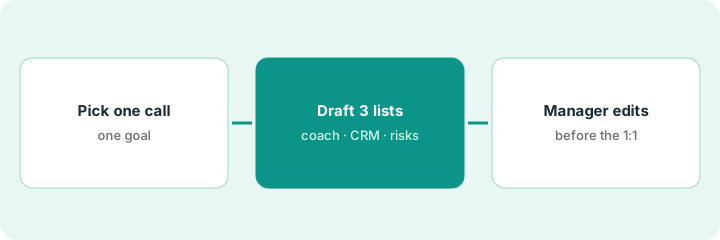
1. Step 1 — Pick one call you are allowed to use
What it is: Choose one call the manager will actually coach from this week — a deal that matters, recorded the way your policy requires.
- Confirm the recording notice and consent were handled under your company policy before you dig in.
- Work inside Gong’s call view or a summary your workspace already allows. Do not paste customer details into an unapproved outside chat tool.
- Note the deal name and stage exactly as they appear in the CRM. Do not add a close date to make the exercise tidier.
- Write one coaching goal: discovery depth, a clear next step, or champion strength — not “grade the rep.”
Tuesday’s one-on-one will cover one mid-pipeline call where the next step was vague. The recording notice was in the calendar invite, per policy. The CRM shows the deal in Evaluation; the close date is blank and stays blank until a person sets it.
Pick one call from the last five business days and write the coaching goal in one sentence. If you cannot name a goal, pick a different call — do not ask the tool for a general score.
2. Step 2 — Draft coaching bullets, CRM fields, and risks
What it is: From the call summary and assists described on Gong, produce three lists only — without adding amounts, buyers, or dates the call never mentioned.
- Coaching questions tied to what was said (pricing pushback, a weak champion, an unclear next step).
- CRM fields as suggestions marked keep, edit, or discard — never applied automatically.
- Deal risks backed by something on the call (no dated next step, no economic buyer named) — not a probability to treat as fact.
- Delete any competitor quote or dollar figure that does not appear in the call.
The summary returns eight coaching lines, five CRM suggestions, and three risks. The manager keeps four questions, accepts an edit to the next-step text, discards a dollar amount nobody said, and marks one risk Unknown until the account executive confirms it.
For one call, ask for this shape only: Coaching questions (max 5) — CRM fields (keep / edit / discard) — Risks (quote from the call, or Unknown). Keep the result to one page; everything else stays in Gong.
3. Step 3 — The manager owns the coaching
What it is: The one-on-one uses the edited list. Gong does not give the feedback — the manager does — and CRM changes stay approved by a person.
- Edit the list before the one-on-one. Tone and fairness are a person’s job.
- In the one-on-one, ask the questions. Do not read a grade or a report card aloud.
- Afterward, apply only the CRM updates you marked keep or edit. Unknowns stay Unknown.
- If your team prefers weekly theme reviews over per-call prep, compare the routine on Chorus.
Four questions turn into a twenty-minute coaching conversation. One next-step field gets updated in the CRM; the amount is untouched. The account executive leaves with one thing to practice on the next call — not a ranked report.
Before the one-on-one, delete any bullet that reads like a grade. Afterward, write back at most three CRM fields you confirmed yourself. If nobody edited the draft, do not use it with the rep.
Pricing context (October 2026)
This how-to is not a price sheet. Plan detail for Gong and Chorus lives on those reviews. Recheck each vendor’s site before you budget. Dated October 2026.
Checked Oct 8, 2026 on the vendor’s own pricing page: gong.io/pricing shows no list price. It says licenses are priced per user, there is a platform fee based on the number of users, existing-stack integrations are included at no extra charge, and Gong prepares a custom proposal. So this page gives no Gong dollar figure — budget from your quote. Chorus was not rechecked.
Uncertainty: Seat bundles, platform fees, and conversation intelligence add-ons are usually quoted and change. If an invoice and a review disagree, trust the invoice. Do not paste a marketing list price you did not pay. The only prices this site sells here are the optional $9 AI toolkit spreadsheet and $19 AI toolkit audit.
When this helps (honest take)
Useful when Gong already records calls under a clear policy, managers run regular one-on-ones, and someone edits the bullets before coaching and before any CRM update.
Not useful when recording consent is unclear, nobody coaches from calls, or you want AI to set amounts and close dates. That is a policy or management problem first. Paying for Gong and a second call-analysis tool for the identical weekly coaching job is usually overlap.
Related options (educational)
| Need | Where to look | Why |
|---|---|---|
| Call summary to coaching, CRM, risks | Gong | Per-call coaching pattern |
| Weekly agendas and theme libraries | Chorus | A different coaching routine, not a loser |
| Follow-up email after the call | Write the follow-up email from the call | Still sent by a person |
| CRM-native drafting first | HubSpot AI · Try HubSpot-native AI on clean fields before adding Clay | Only if HubSpot is the CRM and the job is not call analysis |
Related reviews: Gong · Chorus · HubSpot AI. Related how-to: Write the follow-up email from the call. Free: seat-waste calculator if two call-analysis seats cover the same coaching routine.
FAQ
Should Gong write CRM fields from a call on its own?
Not on this page’s pattern. Suggest, then keep, edit, or discard. Never apply amounts or close dates the call did not state.
Is this legal advice on call recording?
No. Follow your company policy and the law where you and the customer are. This how-to assumes consent is already handled.
Gong or Chorus for this job?
Pick by routine. Per-call coaching bullets and deal risks fit the Gong pattern; weekly agendas and theme libraries fit the Chorus pattern. See Gong and Chorus — this page is not a ranking.
Where do dated prices live?
On the linked reviews and the vendor sites. Gong did not publish a list price when we checked on Oct 8, 2026, so this page quotes none.
Optional next step
Free reviews stay free. Neither offer is required to use this page. If two conversation intelligence seats already cover the same coaching job, optional help: $9 AI toolkit spreadsheet (seats, spend, owner, cancel-by, overlap) or $19 AI toolkit audit when you want a written memo.