Ops · Trackers · Base AI
Airtable AI review (Sep 2026): bases for ops trackers — when AI inside the base helps
For teams already living in Airtable: AI for field fill, summaries, and interfaces — vs exporting every row to ChatGPT or Claude. Concrete Try this prompts, credit honesty, and dated Sep 2026 pricing notes.
Who this page helps
Ops leads whose system of record is already an Airtable base — vendor intake, launch trackers, blocker boards — and who are tempted to export CSVs into ChatGPT/Claude every Friday. If the work is doc-first, evaluate Notion AI or Coda AI. If the truth is a Sheet, evaluate Gemini in Sheets or a chat Project. This page is for AI inside the base, not a claim that Airtable replaces your whole stack.
What Airtable AI is
Airtable AI (public docs: Omni, Field Agents / AI fields, AI-assisted interfaces, credit metering) lets teams build and fill bases with natural language and per-record agents. Omni can create tables, fields, agents, and interface elements; Field Agents run research, classification, summarization, and generation at the cell level; credits meter the expensive asks. This review focuses on ops trackers — when AI inside Airtable beats another chat seat for the same weekly jobs.

Major features (with how someone uses them)
Examples at a glance: each feature has a concrete ops example plus a Try this mini-workflow.
1. Field Agents: normalize status + summarize blockers
What it is: Field Agents (Airtable’s AI-powered fields) can classify, extract, summarize, translate, or research per record — manually or when inputs change. Ops value shows up when messy free-text status needs a controlled vocabulary and blocker notes should roll up by owner without a Friday CSV export.
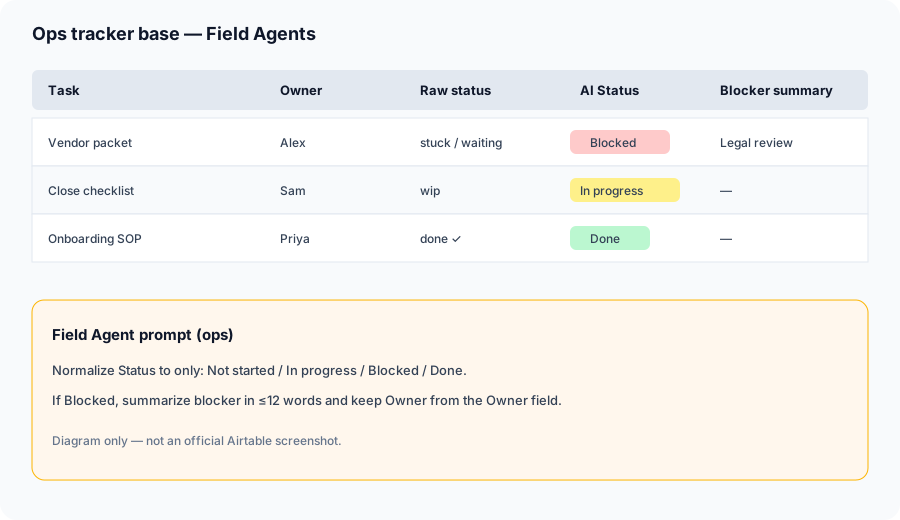
In a sample base (or describe fields on paper first):
Draft formulas/AI field prompts to normalize Status to only: Not started / In progress / Blocked / Done, and summarize blockers by owner.
2. Omni: build and ask in natural language
What it is: Omni is Airtable’s in-product assistant for building apps (tables, views, fields, agents, workflows) and asking questions over the base. Public help notes that building with Omni is broadly available; many analysis/generation actions consume AI credits. Workspace owners control whether AI is enabled.
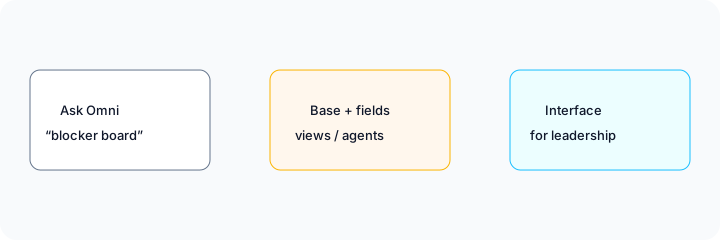
Paste your field list into Omni (or draft the ask offline first):
Create a Blocked view: Status = Blocked only, group by Owner, show Task, Owner, Blocker summary, Due date. Do not invent new tasks. Add a Field Agent prompt that maps free-text status into Not started / In progress / Blocked / Done.
3. Interfaces for leadership views (without another chat seat)
What it is: Interface Designer (and Omni-generated interface elements) lets ops ship a leadership-facing page over the same base — lists, summaries, filtered blocker boards — instead of screenshotting the grid into Slack. Omni can create many native layouts; some layouts (e.g. certain blank/Gantt cases per public help) still need manual Interface Designer work.
Design an Interface page titled “Friday blockers”: list Blocked records, group by Owner, fields Task + Blocker summary + Due date. Read-only for leadership. Note what still must stay a human Slack huddle.
4. Credits, models, and run hygiene
What it is: Airtable meters AI with monthly credits that typically expire unused. Field Agents and Omni analysis consume credits; model choice (OpenAI / Anthropic options subject to plan/admin) affects cost vs quality. Auto-run on every field change can burn a month of credits on a messy base — sample first.
Write the credit hygiene card before go-live:
List three Field Agent jobs. For each: manual Generate vs auto-run, estimated rows/week, and a pause rule (“If >10% of sample rows need human edit, stop auto-run”). Prefer Low-cost models for classification; reserve stronger models for blocker summaries.
Pricing (September 2026)
Seat prices from public airtable.com/pricing; AI credit bundles from Airtable Help (AI billing / plans overview) as of September 2026. Confirm live — packs and included credits change.
- Free: $0 — limited collaborators/records; public materials cite about 500 AI credits per editor+/month.
- Team: about $24/collaborator/month billed monthly, or about $20 annual — public materials cite about 15,000 AI credits per billable collaborator/month.
- Business: about $54/collaborator/month monthly, or about $45 annual — public materials cite about 20,000 AI credits per paid user/month; stronger admin/AI controls.
- Enterprise Scale: custom — public materials cite about 25,000 AI credits per paid user/month at list.
- Extra credits: sold as packs (public third-party summaries often cite examples like ~$20 for 10,000 / month) — confirm on Airtable’s billing UI.
Uncertainty: Which collaborators are billable (Commenter vs Editor rules differ by plan), whether AI is enabled in workspace settings, and exact credit burn by model all affect real cost. Unused credits typically expire monthly. Always verify on pricing and in-product meters before you scale auto-run Field Agents.
When it’s useful (honest take)
Airtable AI tends to help when the tracker already lives in Airtable, status/blocker text is messy, and leadership wants an Interface over the same base. Field Agents shine for repetitive normalize/classify/summarize jobs that should stay in cells. Omni helps builders who would otherwise click Interface Designer for an hour.
It tends not to help when nobody owns the base schema, when you only needed a one-off memo (export to ChatGPT / Claude instead), when credit burn on auto-run would exceed the value of cleaner status, or when the team’s system of record is Notion docs or Sheets. Buying Business solely for AI credits you will not use is usually wasted — soft next step below only if multiple AI seats overlap.
Paying for Airtable AI and a few other AI tools? The $9 AI toolkit spreadsheet lists every AI subscription you have, what each one costs, and how fast it pays for itself, so you can see which ones are worth the money.
Want someone to do it for you? AI toolkit audit — $19
Alternatives compared
- Notion AI — better when narrative docs + light databases are the home; weaker when you need strict multi-select status at scale.
- Coda AI — docs+tables runbooks; compare if SOPs mix prose and checklists more than a pure tracker.
- Gemini in Sheets / Sheets + ChatGPT / Claude — fair when the truth is already a spreadsheet and you only need occasional LLM cleanup.
- ClickUp Brain / monday.com AI — prefer if the PM tool is already the system of record instead of Airtable.
Same job, two products: Airtable AI vs Smartsheet AI.
FAQ
What is Airtable AI?
Omni + Field Agents + AI-assisted interfaces inside Airtable bases — for field fill, summaries, and leadership views without exporting every row.
How much does it cost in September 2026?
Seats (Team ~$20–$24, Business ~$45–$54 per collaborator depending on annual/monthly) plus monthly AI credits included by plan; extra packs available. Confirm on airtable.com/pricing.
Should I use Airtable AI or export to ChatGPT/Claude?
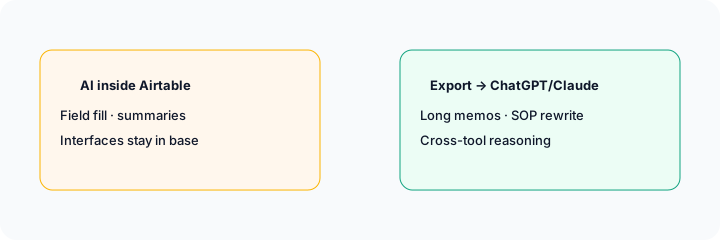
Keep Field Agents for repetitive cell work in the tracker. Export for long memos, SOP rewrites, and cross-tool Projects. See Custom GPTs and Claude Projects.
Airtable AI vs Notion AI?
Airtable when the base is already truth; Notion when docs are truth. See Notion AI.
Optional next step (if seats overlap)
If Airtable AI is one of several AI seats doing the same weekly tracker/memo loop, optional help: $19 AI toolkit audit or $9 AI toolkit spreadsheet — only if you are juggling overlapping seats.
Checkout is live via Stripe. After you pay, we email delivery (spreadsheet) or intake next steps (audit).