How-to · Product onboarding · Userpilot · Oct 13, 2026
Draft an onboarding flow with Userpilot AI and test it on a segment first
Userpilot's AI can draft a whole onboarding flow (steps, copy, and format) in the time it takes to describe the goal. That speed makes it tempting to publish to every new user the same afternoon. This page shows a growth or product lead how to keep the speed and still learn something: one goal, one AI draft cut down to what matters, and a test on a small segment with a measure agreed before launch.
Who this is for
Growth leads, product managers, and customer success leads at SaaS companies who own onboarding in Userpilot and have their key events tagged. You want a new flow for trial users without guessing whether it worked. If you're choosing a tool, Userpilot vs Appcues covers analytics depth, AI agents, and pricing transparency.
How to do it
This is a how-to, not a ranking of onboarding tools. Feature detail lives on the Userpilot AI review. Per that review, Lia is Userpilot's AI agent, flows are built in a Chrome extension on top of your product, and Userpilot's help center says Lia won't change live content on its own. Lia only sees what's tracked in Userpilot, so this routine assumes your activation event is tagged.

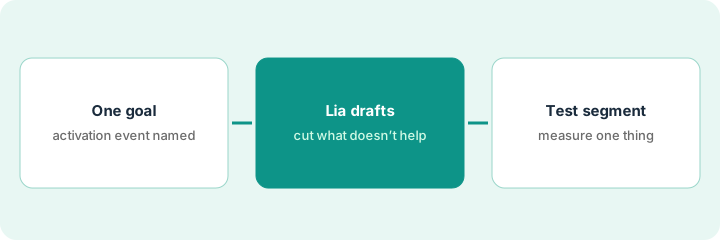
1. Step 1 — Write one onboarding goal and its activation event
What it is: One sentence for the goal ("new trial admins create their first dashboard in the first session") and the name of the activation event that proves it happened. Everything later gets checked against that event: each step of the draft, and the test result.
- Pick the activation event your team already uses: the one action that predicts a user sticks.
- Check its definition. Per the review, Lia's skills can show you the event it treats as activation; make sure that's your team's definition.
- Write down today's rate for that event among new trial users, with the date range. That's your baseline.
- Name the person who approves the flow before launch.
Goal: "new trial admins create their first dashboard in the first session." Activation event: "dashboard_created." She checks the event fires on the first dashboard, not only on saves, and records the current first-session rate for the last 30 days.
Write three lines above the flow before it exists: "Goal: ___. Activation event: ___ (definition checked on [date]). Baseline: ___ over [date range]. Approver: ___."
2. Step 2 — Let Lia draft the flow, then cut it
What it is: You describe the goal, and per the review Lia drafts the experience: the steps, the copy, and the format (tooltip, modal, slideout, checklist, or banner). Userpilot's own blog advises generating from evidence, such as an observed drop-off, rather than from nothing. An AI draft tends to be long and friendly, so check each step against the activation event and cut any step that doesn't move the user toward it.
- Give Lia the goal sentence plus the drop-off you've seen ("most trial admins never open the template gallery").
- Read each step and ask: does this get the user closer to the activation event? If not, cut it.
- Use the AI writing assistant (press space in a text box, per the review) to shorten copy, then swap in the button's real label.
- Check that every tooltip is anchored to the right element and the targeting matches the users you meant.
Lia's draft has a welcome modal, a tooltip on "Invite team," and a tooltip on "Connect data." She keeps the data step, replaces the invite step with a pointer to the dashboard template gallery, and cuts the welcome to one sentence. The finished flow has three steps, all aimed at "dashboard_created."
Have Userpilot's AI draft a three-step flow from your goal sentence. Next to each step, write "moves toward [activation event]: yes/no." Delete every "no" before anyone previews it.
3. Step 3 — Test on staging and a small segment, and measure one thing
What it is: The AI-drafted flow goes through the same path as a hand-built one. Per the review, Userpilot's help center describes Preview Mode, Test Mode (experience a live flow as an end user), and controlled publishing to staging or testing domains or by permalink. Its plan table lists A/B testing above the Starter plan. Agree the success measure (the activation event from Step 1) before launch.
- Preview in the builder, then publish to staging or by permalink only.
- Walk through it in Test Mode on two screen sizes. Fix anything that covers or misses its button.
- Target a small segment of new trial users. If your plan has A/B testing, compare users who saw the flow with users who didn't; if not, compare the segment with your Step 1 baseline over the same length of time.
- After the agreed period, compare activation rates before you widen the audience.
On staging, the third tooltip covers the template button on a small laptop screen; she re-anchors it. She publishes to 20% of new trial admins with an A/B test. After two weeks, the group that saw the flow creates a first dashboard in the first session more often than the control group, so the approver signs off on widening it to all new trial admins.
Publish your next AI-drafted flow to staging or by permalink only. Walk through it in Test Mode on two screen sizes, then target one small segment and write the date you'll compare its activation rate with the baseline.
Pricing context (October 2026)
This how-to isn't a price sheet. Per the Userpilot AI review, Userpilot's pricing page on 9 October 2026 listed Starter at $299/mo (up to 2,000 monthly active users, 3 seats) and Growth from $849/mo (15 seats), with Enterprise unpriced. All three list "MCP and AI Agent Lia." There's a 14-day free trial. Dated October 2026.
Checked Oct 13, 2026 on the vendor’s own pricing page: Userpilot’s pricing page lists Starter at $299/mo (up to 2,000 monthly active users) and Growth at $849/mo, priced on monthly active users, with Enterprise as a custom contract. A free trial is offered. The page doesn’t say on our read whether those figures assume annual billing.
Uncertainty: Our review couldn't tell whether those are monthly or annual-billing rates, and Growth is a "from" price that rises with monthly active users. A/B testing is listed above Starter, so check your plan before planning Step 3 around it. If your contract and our review disagree, trust your contract. The only prices this site sells here are the optional $9 AI toolkit spreadsheet and $19 AI toolkit audit.
When this helps (honest take)
Useful when a SaaS team owns onboarding, has its activation event tagged, and wants to ship flows faster without losing the ability to tell whether they worked. The AI draft saves build time; the segment test tells you whether it was worth it.
Not useful when events aren't tagged (Lia can only see what Userpilot tracks), nobody has agreed on an activation event, or new-user volume is so low that a segment test won't show a difference. A hand-built checklist may be enough for one simple onboarding path.
Related options (educational)
| Need | Where to look | Why |
|---|---|---|
| Userpilot AI features | Userpilot AI | Primary path on this page |
| Comparing onboarding tools | Userpilot vs Appcues | Lia vs Appcues AI; published vs quote-only pricing |
| A close peer with AI recommendations | Appcues AI | Prompt-built drafts and spike alerts |
| Running the test as a formal experiment | Statsig | Experiments and feature gates |
| Clean usage data before you measure | Pendo AI tagging cleanup | Same day's how-to |
| Onboarding and analytics tools in one view | Stack map for product ops | Spot overlapping seats |
FAQ
Will Lia publish a flow to users on its own?
Per our review, Userpilot's help center says Lia won't change live content on its own. A person still publishes; this routine adds a staging test and a small segment before full launch.
What if we don't have A/B testing on our plan?
Compare the test segment with your Step 1 baseline over the same length of time. It's weaker evidence than an A/B test, so say so when you share the result.
Where do current prices live?
On Userpilot's pricing page. Our review read Starter and Growth figures on 9 October 2026; Enterprise is by quote, and this page doesn't invent figures beyond those. Our Oct 13, 2026 check of the vendor’s own pricing page is summarized in the pricing section above.
How small should the test segment be?
Small enough that a broken step won’t reach most new users, and big enough to compare activation over your agreed period. Many teams start with a fifth of new trial users.
Optional next step
Free reviews stay free. If you pay for an onboarding tool, a separate product analytics seat, and a survey tool that all touch the same activation question, the $9 AI toolkit spreadsheet helps you lay them out, or the $19 AI toolkit audit gets you a written memo.