How-to · Product analytics / CS · Pendo · Oct 13, 2026
Clean up Pendo page tags with AI tagging before you trust a usage report
A usage report is only as good as the page tags under it. When three people have tagged the same settings page three different ways, the "adoption" number in the weekly note is really a tagging accident. This page shows a CS or ops lead how to fix the 20 pages that matter most, using Pendo's AI tagging suggestions as a first draft and a person's naming rule as the final word.
Who this is for
Customer success leads, CS operations, and ops managers who read Pendo adoption reports (or forward them to leadership) but didn't set up the tags. You already pay for Pendo and suspect the numbers are off because pages are tagged twice, named inconsistently, or not tagged at all. If you're still deciding where adoption questions should live, the Pendo AI review and the Userpilot AI review cover each tool's analytics side.
How to do it
This is a how-to, not a ranking of analytics tools. Feature detail lives on the Pendo AI review. Per that review, Pendo's help center describes AI tagging as an open beta that needs a paid subscription, and Pendo Free can only tag pages by hand. Names and beta status change, so check your own Subscription settings before you start.

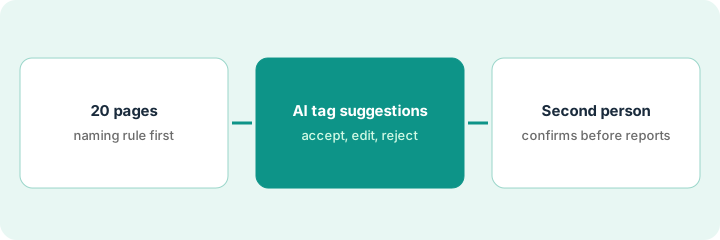
1. Step 1 — List the 20 pages your reports lean on
What it is: A short list of the pages behind the reports people actually read, plus one written naming rule, before any AI suggests anything. Without the rule, nobody can say whether a suggested name is right.
- Open the two or three reports your team forwards most (a weekly adoption note, a feature-usage chart) and list every page they count.
- Stop at 20. The goal is the pages that move numbers people quote, not the whole product.
- Write one naming rule in a sentence, such as "Product area, then page name, in title case: Billing – Invoices."
- Check Subscription settings to see whether AI tagging is switched on. If you're on Pendo Free, do this whole routine by hand; the rule and the review step still apply.
The weekly adoption note counts views of a new "Workspace settings" page. Her list turns up three tags for it: "Settings," "workspace-settings," and "WS Settings (old)." Two of the three rules overlap, so some visits count twice. Seventeen other pages on the list have similar drift.
Make a sheet with five columns: Page URL pattern | Current tag name(s) | Report that uses it | Proposed name (per rule) | Owner. Fill the first three before you open AI tagging.
2. Step 2 — Review the AI tagging suggestions against your naming rule
What it is: Per the Pendo review, AI tagging suggests a name, a rule, and a product area for a page. Treat each suggestion as a draft row in your sheet. The person doing the cleanup marks every suggestion "accept," "edit," or "reject" against the naming rule, and checks that the rule matches only the pages you meant.
- Compare the suggested name with your rule, not with what sounds reasonable.
- Read the suggested rule: does it catch the page you want and nothing else? A rule that's too broad is how double counting starts.
- Check the product area against the one your reports group by.
- Don't accept suggestions in bulk. The review's own example says nothing on a billing or admin screen is accepted in bulk without a second person.
The AI suggests "Settings – Workspace" in product area "Admin." The name fits her rule once she flips it to "Admin – Workspace settings." The suggested rule, though, also matches a "Workspace settings help" page, so she narrows it. She marks the row "edit" and notes both changes.
For each of the 20 pages, paste the AI suggestion into the Proposed name column and mark it accept / edit / reject with one line on why. Leave any page you can't decide on as "Unknown" rather than guessing.
3. Step 3 — A second person confirms names before anyone reports
What it is: A short review by someone who reads the reports (often the CS lead or a product manager) before the cleaned tags count. Then rerun the reports and compare before and after, so everyone knows which numbers moved because of tagging, not behavior.
- The reviewer reads the sheet, not the Pendo screen: proposed name, rule change, and reason.
- Only rows the reviewer signs off on get applied. Old duplicate tags get retired, not left beside the new one.
- Rerun the reports from Step 1 and write down every number that changed and by how much.
- Add one line to the next adoption note: "Page tags for these 20 pages were cleaned up on [date]. Numbers before that date aren't directly comparable."
Once tags are clean, Pendo's Leo assistant (included with Pendo plans, per the review) is more useful for plain-language questions, but its answers are still drafts. Check numbers in Pendo before forwarding them.
After cleanup, "Workspace settings" weekly views drop by about a third, because the double-counted visits are gone. The CS lead adds the "not directly comparable" line, and nobody reads the drop as customers losing interest.
Before you send the next usage report, list every number that changed after the tag cleanup and say why in one sentence each. If you can't explain a change, hold that number back.
Pricing context (October 2026)
This how-to isn't a price sheet. Per the Pendo AI review, Pendo's pricing page (checked 3 October 2026) described Pendo Free as free for up to 500 monthly active users, with paid Base, Core, and Ultimate plans priced by monthly active users and no single public list price. Leo is listed as included with plans; Predict and Agent Analytics are separate Pendo AI add-ons; AI tagging is a beta for paid subscriptions. Dated October 2026.
Checked Oct 13, 2026 on the vendor’s own pricing page: Pendo’s pricing page lists Pendo Free for up to 500 monthly active users (product analytics, in-app guides, Pendo-branded roadmaps and NPS surveys) and Base, Core, and Ultimate with “Request pricing” and custom monthly-active-user volume. No paid list price is published. Predict and Agent Analytics appear as add-ons with custom volumes.
Uncertainty: Which AI features are on in your subscription, and how long AI tagging stays in beta, depend on your contract. If your contract and our review disagree, trust your contract. The only prices this site sells here are the optional $9 AI toolkit spreadsheet and $19 AI toolkit audit.
When this helps (honest take)
Useful when Pendo is already installed, several people have tagged pages over time, and CS or ops forward usage numbers to customers or leadership. Twenty pages is usually enough to fix the numbers people actually quote.
Not useful when you're on Pendo Free (AI tagging needs a paid plan, so you'll tag by hand), or when the real problem is missing instrumentation rather than messy names. AI tagging can't tag a page nobody has set up to track.
Related options (educational)
| Need | Where to look | Why |
|---|---|---|
| Pendo AI features and packaging | Pendo AI | Primary path on this page |
| Onboarding flows plus analytics in one tool | Userpilot AI | Lia only sees what's tracked, so tagging still matters |
| Events already live in PostHog | PostHog AI | Ask there instead of a second analytics seat |
| Testing an onboarding flow on a segment | Userpilot flow test | Same day's how-to; needs clean events too |
| Product analytics and guidance tools in one view | Stack map for product ops | Job, tool, and owner in one place |
| A one-off count from an export | Sheet plus a careful reader | Fine once; don't invent metrics the export lacks |
FAQ
Can I accept all of Pendo's AI tagging suggestions at once?
You can try, but this routine doesn't. Each suggestion is checked against a written naming rule, and a second person confirms before the tags count in reports.
Does AI tagging work on Pendo Free?
Per our Pendo review, no. Pendo's help center describes AI tagging as an open beta that needs a paid subscription; Pendo Free tags by hand only.
Where do current prices live?
With Pendo. Paid plans are priced by monthly active users and Pendo publishes no single list price; this page doesn't invent one. Our Oct 13, 2026 check of the vendor’s own pricing page is summarized in the pricing section above.
Should we delete the old duplicate tags?
Retire them once the reviewer signs off on the new ones, so reports don’t keep counting the same page twice.
Optional next step
Free reviews stay free. If CS pays for a product analytics tool, an onboarding tool, and a chat assistant that all answer the same adoption questions, the $9 AI toolkit spreadsheet helps you lay them out, or the $19 AI toolkit audit gets you a written memo.