How-to · Tasks · Todoist AI · Oct 11, 2026
Build a daily focus trio in Todoist without auto-moving everything
A “daily focus trio” here means three tasks you will actually finish today, chosen from what is already on Today — not an AI reshuffle that silently slides risk work into tomorrow.
Who this is for
Ops leads whose task home is already Todoist and who want a short daily focus set without letting AI auto-reschedule compliance, customer, or payroll-sensitive work. If Sunsama is already your daily planner home, see Sunsama. If the bottleneck is calendar defense rather than task triage, see Reclaim.ai. If you are about to buy a second task AI for the same Today list, read three checks before an AI seat first.
How to do it
This page is a how-to. It is not a ranking of task AI products. Product detail and dated packaging notes live on Todoist AI. Confirm which AI assists exist on your Todoist plan before you pilot.

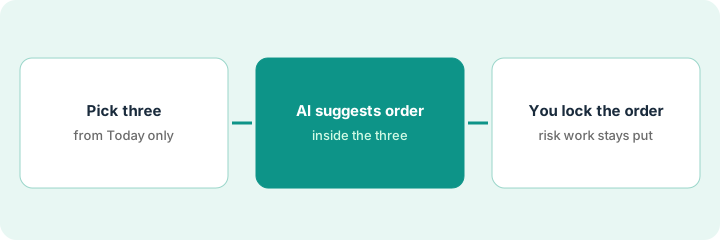
1. Step 1 — Pick three candidates from Today
What it is: Open Today. Shortlist only tasks that are already due or deliberately pulled into today — do not invent work to fill a trio.
- Cap at three. A fourth item waits until one is done.
- Tag any compliance, customer response-time, or payroll item as risk on a sticky or custom label before AI touches order.
- Drop fantasy “someday” tasks that landed on Today by accident.
- Name who owns the lock (you) — AI does not own the day plan.
Today has eight items. Shortlist: (1) close-checklist row for vendor X, (2) customer quarterly business review deck bullets, (3) inbox batch. Risk label on vendor X — it must not slide to tomorrow without a human.
Write three titles on a sticky from Today only. Mark risk with an R. Do not open AI yet. If Today is empty, fix capture hygiene before you ask for suggestions.
2. Step 2 — Ask AI to suggest only within that list
What it is: Use Todoist AI (or your plan’s assist) to propose order or wording inside the three — never to pull new tasks from other projects into the trio or to auto-defer risk items.
- Prompt pattern: “Given only these three titles, suggest a morning order and one risk note. Do not add tasks. Do not change due dates.”
- Reject any suggestion that invents a fourth task, a new project, or a reschedule of risk work.
- Keep AI output in a comment or scratch — not as a silent filter change.
- If your plan’s AI does not support scoped prompts, do the order yourself and skip this step.
AI proposes: quarterly business review bullets first (45 min), vendor close row second (pinned risk), inbox batch third. It tries to add “prep Friday standup” — you reject the add. Due dates unchanged.
Paste only the three titles into the assist. Delete any invented fourth item. Screenshot the suggestion for your own log. Do not enable any “auto-reschedule overdue” style rule for risk-labeled work in this pilot week.
3. Step 3 — Human locks order; risk work does not auto-move
What it is: You set P1/P2/order (or manual sort) and leave risk items pinned to today unless you consciously move them.
- Lock the trio order in Todoist (priority or manual).
- Confirm risk items have no auto-defer / auto-reschedule rule applied for this week.
- End of day: complete, consciously defer with a reason, or split — AI does not silently roll risk.
- Do not buy Motion or Reclaim solely to re-order the same three Todoist tasks if Todoist remains system of record for tasks.
P1 = vendor close (risk, stays today). P2 = quarterly business review bullets. P3 = inbox. Auto-reschedule left off for the risk label. End of day: vendor close done; inbox consciously moved to tomorrow with a one-line reason in the task comment.
Checklist: Trio locked | Risk label present | Auto-move off for risk | end of day note written. Anything that auto-deferred without your click gets restored and the rule reviewed.
Pricing context (October 2026)
This how-to is not a price sheet. Plan and AI packaging notes live on Todoist AI. Recheck todoist.com/pricing and your Todoist account before you budget. Related planner notes live on Sunsama and calendar-defense notes on Reclaim.ai. Dated October 2026.
Checked Oct 11, 2026 on the vendor’s own pricing page: Todoist’s pricing page (billed yearly view, US prices) lists Beginner at $0, Pro at $5 per user per month ($60 billed yearly), and Business at $8 per user per month ($96 billed yearly, plus local tax). Task Assist and unlimited Ramble (voice capture) are listed under Pro; Beginner lists Ramble with limits. We did not record monthly-billing figures, so we do not quote them.
Uncertainty: Which AI-labeled assists are included on your Todoist plan change by tier and rollout. If an invoice and a review disagree, trust the invoice. Do not paste a marketing list price you did not pay. The only prices this site sells here are the optional $9 AI toolkit spreadsheet and $19 AI toolkit audit.
When this helps (honest take)
Useful when Todoist is already the task home, Today is noisy, and you can name risk work that must not auto-move.
Not useful when you want AI to invent the day’s work, silently defer response-time target items, or stack Todoist AI with another daily planner “just in case.” Pick one daily focus home.
Related options (educational)
| Need | Where to look | Why |
|---|---|---|
| Todoist task AI / Assist | Todoist AI | Primary path on this page |
| Daily planner shutdown ritual | Sunsama | When Sunsama is the day home |
| Calendar focus defense | Reclaim.ai | When the bottleneck is calendar, not Today |
| Tasks auto-packed on calendar | Motion AI | Different product home — pinned vs flexible first |
| Before another seat | Three checks before an AI seat · Find unused AI seats | Live how-tos |
Related reviews: Todoist AI · Sunsama · Reclaim.ai. Free: seat-waste calculator if two task/planner AI seats own the same daily focus job.
FAQ
Can Todoist AI auto-move risk work if I am busy?
Not in this pattern. Risk items stay on Today until a human moves them with a reason.
Should I pull unfinished trio items into a fourth “overflow” every night?
No. Consciously defer or split. Overflow lists hide the same prioritization problem.
Where do dated prices live?
On the Todoist AI review plus Todoist’s pricing page. This October 2026 how-to does not invent list prices. Our Oct 11, 2026 check of the vendor’s own pricing page is summarized in the pricing section above.
Which Todoist plan lists Task Assist?
On Oct 11, 2026 Todoist’s pricing page listed Task Assist under the Pro plan. If your account does not show it, run Step 2 by hand and keep the same rule: suggest order only inside the three tasks.
Optional next step
Free reviews stay free. Neither offer is required to use this page. If Todoist AI and another planner seat already fight over the same daily focus job, optional help: $9 AI toolkit spreadsheet (seats, spend, owner, cancel-by, overlap) or $19 AI toolkit audit when you want a written memo.